Digital Donor Wall: Donor Recognition That’s Accessible Online
Build a digital donor wall that recognizes sponsors and donors with searchable tiers, stories, and media—designed for WCAG-minded accessibility and easy updates.
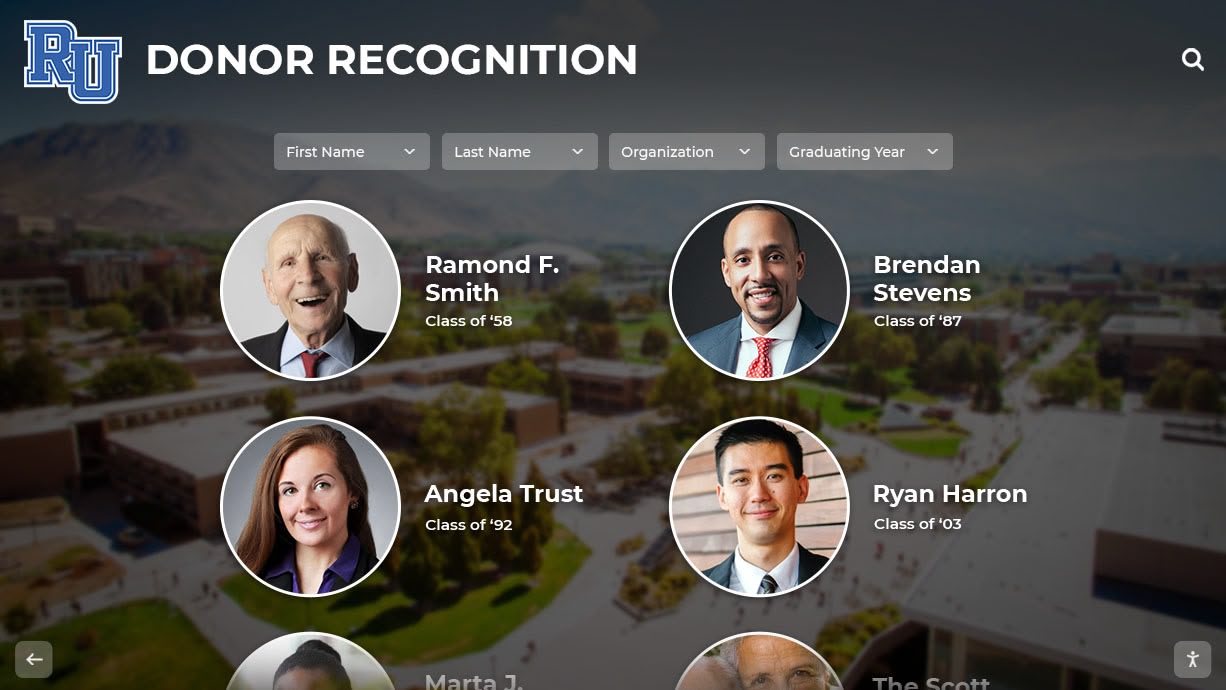
Intent: plan — Build a digital donor wall that works online and on-site, stays accurate, and is accessible to everyone.
Program Snapshot
- Audience: donors, families, students, alumni, visitors, advancement teams
- Primary outcomes: stewardship, donor satisfaction, campaign momentum, sponsor value
- Cadence: campaign updates + quarterly refresh cycles
- Featured honorees: donors, sponsors, foundations, memorial gifts
Golden rule: “findability” beats “wall of names”
A donor wall ranks and performs better when visitors can search, filter by tier, and tap into optional donor stories—especially online.
Content Architecture (tiers, entries, and sponsor placements)
Tier model
- Tier name (e.g., Founders, Leadership, Champions)
- Minimum thresholds (optional for internal governance)
- Display rules (alphabetical, by gift year, by campaign)
- Visual styling per tier (consistent and readable)
Donor entry template
- Display name + preferred formatting (e.g., “The Smith Family”)
- Gift designation (optional / campaign-based)
- Year(s) recognized
- Story blurb (optional) + photos/video (optional)
- Tags: campaign, department, facility, scholarship
Sponsor/donor “extras” that create momentum
- Rotating sponsor loop (event mode)
- QR share links (“View this donor online”)
- Featured donor stories (monthly spotlight)
- Matching gift announcements and progress counters (when appropriate)

Execution Timeline (Plan → Build → Launch → Refresh)
Plan (1–2 weeks)
- Define tier names, display rules, and approval workflow.
- Decide which fields are public vs internal.
- Set accessibility standards (contrast, focus, keyboard navigation).
Build (2–6 weeks)
- Import donor list and normalize names.
- Add tier navigation + search.
- Configure sponsor placements and event mode (if used).
Launch (campaign/event week)
- Publish top tiers + featured donors first (highest visibility).
- Add a “how recognition works” explainer to reduce confusion.
Refresh (monthly/quarterly)
- Bulk update tiers from your source-of-truth list.
- Rotate featured stories and sponsor placements.
Display Integration (touchscreen + online)
- Online: donor directory, shareable story pages, search indexing.
- On-site: kiosk mode for events; large type and strong contrast for readability.
- Remote management: scheduled publishing and easy bulk updates.
Measurement (stewardship + operations)
- Donor page views and searches (what people look for)
- Sponsor impressions/clicks (UTM/QR tracking)
- Time-to-publish new donors after gift confirmation
Copy/Paste Asset: Donor Recognition Display Rules (starter)
- Display name must match signed recognition form.
- Sort donors alphabetically within tier (default).
- Update cadence: monthly during campaigns; quarterly otherwise.
- Accessibility: minimum contrast ratio targets; no text-only images.
Next step
Request a tiered donor wall mock-up with your naming rules and a sample import: Request Your Free Custom Demo (?demo=demo).
FAQ
Frequently Asked Questions
Answers for teams building an online hall of fame or awards website.
What should a digital donor wall include?
A tier structure, searchable name list, donor stories (optional), sponsor placements, and clear rules for how names are displayed. Add QR/share links for online access.
How do we handle donor name accuracy and updates?
Use a controlled intake workflow, keep a source-of-truth spreadsheet/CRM export, and publish via bulk update. Log approvals for spelling, preferred names, and recognition level.
How do we keep a donor wall accessible?
Use strong contrast, readable type sizes, keyboard navigation, and avoid text baked into images. Provide clear focus states and alt text for meaningful visuals.






























