




Intent: Define — Touchscreen software powers the interactive recognition experiences that enable schools, universities, and organizations to celebrate unlimited achievements through engaging digital displays. While impressive hardware captures initial attention, the software platform determines whether recognition programs succeed or disappoint, affecting everything from ease of content management and user engagement to long-term program sustainability and administrative efficiency.
Organizations evaluating digital recognition solutions face critical software decisions: Should they choose purpose-built recognition platforms or adapt generic kiosk software? What features distinguish effective recognition software from standard digital signage systems? How do cloud-based and native applications compare for institutional recognition needs? Which software architecture best serves limited technical resources while delivering professional recognition experiences?
This comprehensive guide explores touchscreen software specifically for recognition applications, providing program directors and technology coordinators with frameworks for evaluating platforms, understanding essential features, and selecting solutions that transform recognition from administrative burden into sustainable programs celebrating excellence effectively.
The software powering touchscreen recognition displays determines whether programs deliver engaging exploration experiences or become underutilized technology investments gathering dust. Organizations implementing appropriate recognition-specific software create systems that honor achievements comprehensively, engage communities meaningfully, and remain manageable within real-world resource constraints throughout years of operation.

Professional touchscreen recognition systems depend on software platforms specifically designed for achievement celebration and interactive exploration
Program Snapshot: Touchscreen Software for Recognition
Understanding touchscreen software in the recognition context clarifies requirements distinct from generic kiosk or digital signage applications:
| Software Element | Recognition Requirements | Key Distinctions |
|---|---|---|
| Primary Function | Interactive exploration of achievement archives and individual accomplishments | Database-driven profiles versus slideshow announcements |
| Content Type | Individual honoree profiles with photos, biographies, statistics, videos, and multimedia | Structured persistent content versus temporary rotating messages |
| User Interaction | Search, filter, browse across thousands of profiles spanning decades | Deep exploratory engagement versus passive information consumption |
| Administrative Needs | Profile management, media libraries, relationship mapping across achievements | Recognition-specific workflows versus generic content scheduling |
| Access Model | Simultaneous touchscreen kiosk and web platform delivery to global audiences | Extended accessibility beyond physical display limitations |
| Update Frequency | Ongoing additions of new honorees plus occasional corrections and enhancements | Continuous accumulation versus frequent content replacement |
Content Architecture: Recognition Software Platform Components
Effective touchscreen recognition software organizes achievement celebration through specialized architectural elements:
Database and Profile Management Systems
Recognition platforms require sophisticated data organization:
Individual Honoree Profiles
Comprehensive recognition demands structured information:
- Personal identification including full names, biographical details, and photographs
- Achievement documentation with categories, dates, and significance descriptions
- Statistical data tracking quantitative accomplishments and records
- Career information showing progression and multi-year achievements
- Team and relationship connections linking individuals to groups, coaches, and contemporaries
- Multimedia integration embedding photos, videos, audio, and documents within profiles
- Categorization and tagging enabling discovery through multiple organizational schemes
Team and Group Recognition
Collective achievement celebration requires coordination:
- Team roster management connecting individual profiles to collective accomplishments
- Season documentation preserving records, statistics, and tournament progression
- Championship and milestone tracking across program history
- Coach and leadership information connecting teams to program continuity
- Group photography with individual identification enabling both collective and personal recognition
Historical Archive Organization
Comprehensive programs preserve complete institutional memory:
- Chronological organization enabling exploration by specific years, decades, or eras
- Category-based structure separating athletics, academics, arts, service, and other achievement types
- Program-specific sections organizing recognition within departments or activities
- Era and milestone markers providing context for historical achievements
- Anniversary and commemorative content highlighting significant institutional moments
Interactive Discovery and Navigation Features
Touch screen kiosk software for interactive displays enables multiple exploration pathways serving diverse user needs and discovery preferences.
Search Functionality
Robust search capabilities prove essential:
- Full-text search across names, achievements, biographical information, and keywords
- Auto-complete suggestions accelerating discovery while reducing spelling errors
- Fuzzy matching tolerating misspellings and variations in name formatting
- Multi-criteria search enabling simultaneous filtering by year, category, and achievement type
- Search analytics revealing what community members seek and which profiles attract interest
Filtering and Browsing Options
Structured navigation supports systematic exploration:
- Year-based filtering showing specific graduating classes, seasons, or recognition periods
- Achievement category organization enabling focused exploration of specific program types
- Sport or activity-specific views within broader recognition programs
- Alphabetical browsing when visitors know names but need assistance locating profiles
- Featured content showcasing notable achievements, interesting stories, and timely recognition
Engagement and Sharing Capabilities
Modern platforms extend recognition beyond physical displays:
- Social media sharing enabling honorees to celebrate achievements with extended networks
- QR code generation connecting physical spaces to specific digital profiles for mobile exploration
- Email sharing sending profile links to family members and community supporters
- Print capabilities creating physical keepsakes from digital recognition content
- Analytics tracking which content generates most community engagement and interest
Solutions like Rocket Alumni Solutions provide comprehensive platforms combining these architectural elements with intuitive interfaces specifically designed for recognition applications rather than generic information display purposes.
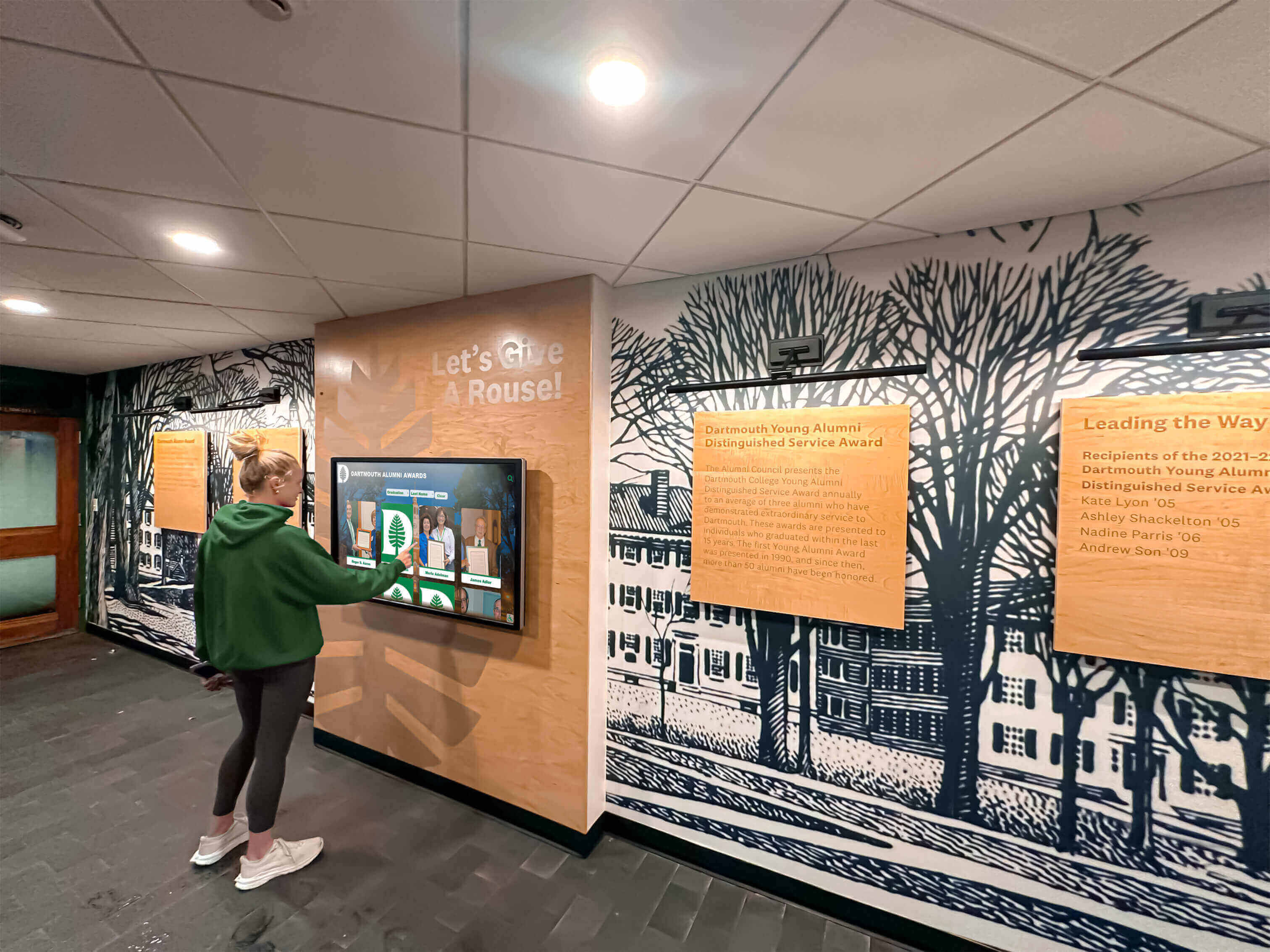
Intuitive software interfaces enable users of all ages and technical abilities to explore recognition independently without instruction
Execution Timeline: Software Selection and Implementation
Systematic evaluation and deployment ensures recognition software serves institutional needs effectively:
Phase 1: Requirements Definition and Software Research (Weeks 1-3)
Clarify Recognition Software Needs
Begin by documenting specific requirements:
- Identify which achievement categories require recognition software support
- Determine expected volume of honorees initially and projected growth over years
- Assess available staff technical capabilities and time for ongoing content management
- Establish whether web accessibility beyond physical displays proves essential
- Define budget parameters for initial licensing and ongoing subscription or maintenance costs
- Understand infrastructure constraints including internet reliability and device platforms
Distinguish Software Platform Types
According to digital signage market research, the global market is projected to reach USD 26.1 billion by 2028, driven by increasing demand for interactive experiences across industries. However, recognition applications require specialized capabilities beyond standard digital signage:
Recognition software falls into distinct categories:
- Purpose-built recognition platforms designed specifically for halls of fame and achievement celebration
- Interactive kiosk software with general-purpose functionality that can be adapted for recognition
- Digital signage systems with touchscreen support but limited interactive capabilities
- Custom-developed applications built specifically for unique organizational requirements
Understanding these distinctions prevents costly mistakes selecting platforms poorly matched to recognition needs.
Evaluate Web-Based versus Native Applications
Software architecture fundamentally affects long-term program sustainability:
Web-based applications provide substantial advantages for recognition:
- Cross-platform compatibility eliminating hardware vendor lock-in
- Instant updates deployed simultaneously across all display locations
- Cloud-based content management accessible from any internet-connected device
- Extended web accessibility making recognition available globally beyond physical displays
- Simplified maintenance without local software installation or version management
- Lower total cost of ownership through reduced technical support requirements
Native applications offer benefits for specific scenarios:
- Offline functionality for locations with unreliable internet connectivity
- Maximum performance for graphics-intensive interactive experiences
- Deep hardware integration when connecting specialized peripheral equipment
- Local data control when security policies prohibit cloud storage
Most recognition applications benefit substantially from web-based platforms’ simplified administration and extended accessibility unless specific offline or integration requirements necessitate native development approaches.
Phase 2: Platform Evaluation and Vendor Selection (Weeks 4-6)
Compare Recognition-Specific Software Features
Essential capabilities distinguishing effective recognition platforms include:
Profile and Content Management
- Template-based profile creation ensuring consistent professional presentation
- Bulk upload tools enabling efficient addition of entire teams, classes, or induction groups
- Media asset management organizing thousands of photos and videos with search and tagging
- Approval workflows supporting content quality review before publication
- Version history tracking changes with rollback capabilities when corrections needed
- Scheduled publishing coordinating recognition releases with ceremonies or events
User Experience and Interface Design
- Touch-optimized navigation with appropriately sized interactive elements for finger input
- Visual design customization reflecting institutional branding, colors, and identity
- Responsive performance with smooth scrolling, transitions, and multimedia playback
- Accessibility features supporting users with diverse abilities and technical comfort levels
- Attracting idle-state content drawing attention when displays inactive between user sessions
- Multi-language support serving diverse communities when applicable
Extended Platform Capabilities
- Simultaneous web and touchscreen delivery from unified content source
- Mobile-responsive design ensuring quality experience across devices
- Social media integration enabling profile sharing and community engagement
- Analytics and reporting showing usage patterns, popular content, and engagement trends
- API access for integration with existing institutional systems when needed
- Export capabilities for backup, archival, or supplementary printed materials
Request Comprehensive Platform Demonstrations
Effective evaluation requires hands-on experience:
- Schedule live demonstrations with actual recognition content rather than generic examples
- Ask vendors to demonstrate specific workflows relevant to your recognition programs
- Test administrative interfaces evaluating ease of profile creation and content management
- Explore user experience from visitor perspective assessing intuitive navigation and engagement
- Request temporary access to demo systems enabling extended evaluation by multiple stakeholders
- Observe system performance under realistic usage conditions
Speak with Current Customers
Direct feedback from existing users provides invaluable insights:
- Request references from schools or organizations with similar recognition needs
- Ask specific questions about implementation experience, ongoing support, and actual usage
- Inquire about hidden costs, unexpected challenges, and things they wish they’d known earlier
- Assess customer satisfaction with vendor responsiveness and support quality
- Understand real-world administrative time requirements for ongoing program management
- Learn whether platforms delivered promised capabilities and met expectations
Phase 3: Software Configuration and Content Development (Weeks 7-16)
Customize Platform Appearance and Functionality
Tailor software to institutional identity:
- Configure visual design elements including colors, logos, fonts, and branding
- Customize navigation structure organizing recognition categories appropriately
- Set up user roles and permissions controlling administrative access
- Configure search and filtering options matching organizational structure
- Establish content templates ensuring consistent professional presentation
- Test configuration across various devices and screen sizes
Develop Initial Recognition Content
Comprehensive launch content creates immediate value:
- Research historical archives identifying all qualifying honorees for initial launch
- Collect high-quality photography for all included individuals and teams
- Write engaging biographical narratives and achievement descriptions
- Compile statistics, records, and quantitative accomplishment documentation
- Gather video content, interviews, or multimedia elements when available
- Organize content following established templates and quality standards
Quality initial content proves critical—sparse incomplete recognition disappoints audiences regardless of software quality or hardware impressiveness.
Administrator Training and Capability Building
Sustainable programs require confident, capable management:
- Hands-on training creating actual profiles rather than just watching demonstrations
- Practice with all administrative functions including media management and publishing workflows
- Develop documented procedures ensuring continuity through staff transitions
- Train multiple administrators preventing single points of failure
- Establish ongoing support channels for questions and technical assistance
- Schedule follow-up training sessions addressing questions after initial practice

Cloud-based recognition software enables content management from any location with internet access without requiring physical display access
Phase 4: Launch and Community Engagement (Week 17+)
Deploy Software Across All Display Locations
Systematic rollout ensures consistent operation:
- Configure all physical displays with appropriate software settings
- Test connectivity and performance at each installation location
- Verify content appears correctly across different screen sizes and orientations
- Confirm search, filtering, and navigation functions operate as expected
- Validate web platform accessibility from various devices and browsers
- Document display locations, configurations, and troubleshooting procedures
Promote Recognition Platform and Encourage Exploration
Software effectiveness depends on community awareness:
- Announce launch through multiple communication channels reaching diverse audiences
- Create promotional content featuring interesting profiles and stories
- Incorporate displays into facility tours for prospective students and families
- Train student ambassadors to demonstrate features and encourage exploration
- Share recognition profiles through social media generating awareness and engagement
- Sustain communication maintaining visibility beyond initial launch excitement
Monitor Usage and Gather Feedback
Early assessment guides improvement:
- Review analytics understanding which content attracts interest and engagement
- Solicit feedback from users about navigation ease and content quality
- Monitor technical performance identifying any reliability or usability issues
- Assess whether software capabilities meet operational needs and expectations
- Identify enhancement opportunities based on actual usage patterns
- Document lessons learned informing ongoing program refinement
Display Integration: Software Connecting Recognition to Screens
Effective touchscreen software bridges content and hardware creating cohesive recognition experiences:
Touchscreen Display Compatibility
Recognition software must operate across diverse hardware:
Operating System Support
Platform compatibility affects hardware flexibility:
- Windows-based systems common in educational technology infrastructure
- Android displays popular for commercial digital signage applications
- Chrome OS devices used in schools with Chromebook investments
- iOS platforms when leveraging iPad hardware for smaller installations
- Linux systems for organizations preferring open-source technology stacks
Interactive touchscreen software supporting multiple operating systems provides hardware flexibility preventing vendor lock-in and enabling equipment changes without software replacement.
Screen Size and Resolution Adaptation
Software should accommodate various display configurations:
- Small format displays (32-43 inches) for intimate spaces and hallway alcoves
- Medium format installations (43-65 inches) most common for general recognition
- Large format screens (65-86 inches) for lobbies and high-visibility locations
- Ultra-high definition (4K) displays requiring optimized media and interface scaling
- Portrait orientation for vertical kiosk installations
- Landscape orientation for traditional horizontal display mounting
Responsive software design adapts interfaces automatically across these varied configurations ensuring quality experiences regardless of specific hardware choices.
Remote Management and Cloud-Based Administration
Modern recognition software enables efficient ongoing management:
Anytime, Anywhere Content Updates
Cloud-based platforms provide substantial operational advantages:
- Web-based control panels accessible from any internet-connected device
- Simultaneous multi-user access enabling collaborative content development
- Mobile-responsive admin interfaces supporting smartphone and tablet management
- No special software installation or licensing required for content administrators
- Secure authentication protecting institutional recognition content
- Automatic cloud backups preventing permanent content loss from hardware failures
Schools and organizations consistently report that cloud-based content management reduces administrative time by 60-80% compared to systems requiring physical display access or complex local software installation for updates.
Multi-Location Display Coordination
Organizations with multiple facilities benefit from centralized management:
- Single administrative platform updating all displays across campus or district simultaneously
- Location-specific content enabling customized recognition at different facility areas
- Coordinated scheduling ensuring consistent content across institutional displays
- Remote troubleshooting and configuration without campus visits or on-site technical support
- Performance monitoring identifying technical issues before impacting user experience
- Update verification confirming content changes appear correctly across all platforms
Integration with Existing Institutional Systems
Advanced recognition platforms connect with other school software:
- Student information system integration for automatic roster and biographical updates
- Athletic management software connections reducing duplicate data entry and statistics compilation
- Alumni database integration enriching recognition with current contact and career information
- Donor recognition platform coordination showing philanthropic support transparently
- Website content management systems displaying recognition on institutional web pages
- Social media publishing automating profile sharing across communication channels
These integrations reduce administrative burden while ensuring consistency across institutional systems.
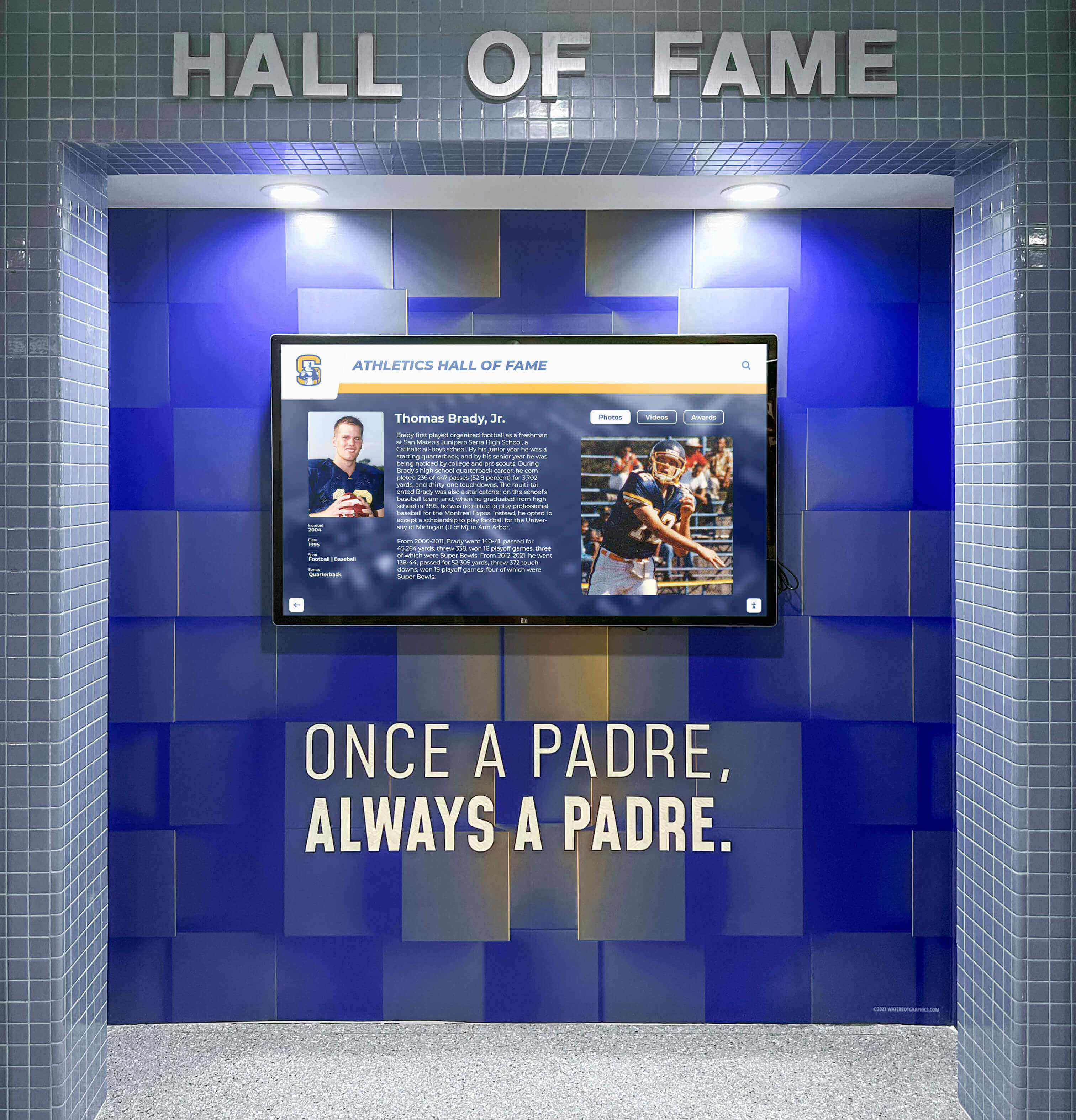
Purpose-built recognition software creates engaging interfaces specifically designed for achievement celebration and interactive exploration
Measurement Block: Evaluating Recognition Software Effectiveness
Systematic assessment demonstrates software value and guides improvement:
User Engagement Analytics
Recognition software should provide comprehensive usage data:
Quantitative Metrics
- Total interactions showing how frequently community members engage displays
- Average session duration indicating depth of exploration versus brief glances
- Web platform visits demonstrating global reach beyond physical display locations
- Search queries revealing what visitors seek and which honorees attract interest
- Popular content identification showing which profiles, teams, or categories engage most
- Geographic distribution understanding audience composition and recognition reach
- Year-over-year trends tracking whether engagement grows, stabilizes, or declines
Behavioral Insights
- Navigation patterns showing how users explore recognition content
- Search success rates measuring whether visitors find sought individuals
- Content depth analysis revealing whether users explore complete profiles or skim briefly
- Filter usage understanding which organization schemes users prefer
- Sharing frequency indicating social media engagement and viral potential
- Return visitor identification showing whether displays create sustained interest
- Time-of-day patterns informing optimal scheduling for featured content updates
Administrative Efficiency Indicators
Software effectiveness extends beyond user experience:
Content Management Productivity
- Time required for adding new honorees to recognition programs
- Efficiency of bulk operations when updating entire teams or classes
- Media management capabilities handling thousands of photos and videos
- Correction and update ease when fixing errors or enhancing existing content
- Approval workflow efficiency when multiple reviewers involved
- Publishing frequency achievable within available staff time constraints
Technical Support Requirements
- Frequency of technical issues requiring vendor assistance
- Time to resolution when problems occur
- Learning curve for new administrators added to programs
- Documentation quality enabling self-service problem solving
- Training needs for maintaining administrator competency
- Overall satisfaction with platform usability and reliability
Schools successfully implementing recognition programs report software usability and administrative efficiency proving more important than specific feature lists for long-term program sustainability.
Community Impact Assessment
Beyond metrics, recognition software delivers broader value:
Stakeholder Satisfaction
- Honoree feedback about recognition quality and personal meaning
- Current student surveys measuring motivational influence from visible achievement examples
- Alumni engagement changes showing strengthened institutional connections
- Family satisfaction with how loved ones receive appropriate celebration
- Administrator confidence in platform capabilities and ongoing support
- Community pride indicators through informal observation and feedback
Institutional Benefits
- Recruitment effectiveness from prospective family interest during facility tours
- Donor engagement potentially influenced by transparent recognition stewardship
- Media coverage generating institutional visibility and community awareness
- Competitive positioning versus peer institutions using traditional recognition approaches
- Return on investment analysis comparing costs to benefits across multi-year periods
Understanding complete software impact beyond simple feature checklists enables informed decisions aligning technology investments with institutional priorities and recognition philosophy.
Advanced Recognition Software Capabilities
Sophisticated platforms provide enhanced functionality beyond basic profile management:
Multimedia Integration and Rich Content
Modern recognition software supports diverse content types:
Video Content Management
Video transforms recognition from static to dynamic:
- Inductee interviews capturing personal reflections and achievement stories
- Highlight compilations showing athletic performances, artistic accomplishments, or presentations
- Historical footage preserving memorable moments and championship seasons
- Ceremony recordings of induction speeches and acceptance remarks
- Coach or mentor testimonials providing perspective on honoree character and achievements
- Documentary features telling comprehensive stories about particularly significant accomplishments
Audio Content Integration
Sound enriches specific recognition applications:
- Musical performances for band, chorus, or individual music achievement recognition
- Speeches demonstrating excellence in debate, student government, or leadership
- Podcast-style interviews creating longer-form achievement exploration
- Historical radio broadcasts capturing significant moments from recognition periods
- Oral history projects preserving memories from program pioneers and influential figures
Document and Archive Display
Recognition extends beyond photos and biographies:
- Certificates, awards, and formal recognition document digitization
- Historical newspaper clippings and publication archives
- Programs and rosters from significant events and seasons
- Correspondence and letters providing historical context
- Scoresheets and statistical documentation supporting records
- Organizational documents showing institutional evolution and governance
Best touchscreen software options provide comprehensive multimedia support enabling rich storytelling that honors achievements meaningfully while engaging audiences effectively.
Accessibility and Inclusive Design Features
Recognition software should serve all community members:
Screen Reader Compatibility
Visually impaired users require specialized support:
- Semantic HTML structure enabling screen reader navigation
- Alternative text descriptions for all images and visual content
- Keyboard navigation alternatives to touch-only interfaces
- ARIA labels providing context for interactive elements
- Logical tab order enabling efficient keyboard-only navigation
- Text-to-speech integration reading content aloud
Visual Accessibility Options
Software should accommodate various visual needs:
- Text size adjustment enabling comfortable reading across age ranges
- High-contrast modes for users with low vision
- Color blindness accommodations avoiding color-only information communication
- Zoom capabilities for examining photos and detailed content
- Clear typography using readable fonts at appropriate sizes
- Adequate spacing preventing accidental touches and improving readability
Physical Accessibility Considerations
Touchscreen interfaces should work for diverse users:
- Large touch targets appropriate for finger input precision limitations
- Timed interaction avoidance or extension for users with slower response times
- Alternative input methods beyond direct touch when feasible
- Lower screen region controls for wheelchair user comfort
- Audio feedback confirming selections for users with coordination challenges
According to accessibility research, organizations implementing comprehensive accessibility features report broader community engagement and enhanced satisfaction across all user groups—inclusive design benefits everyone, not just users with specific needs.
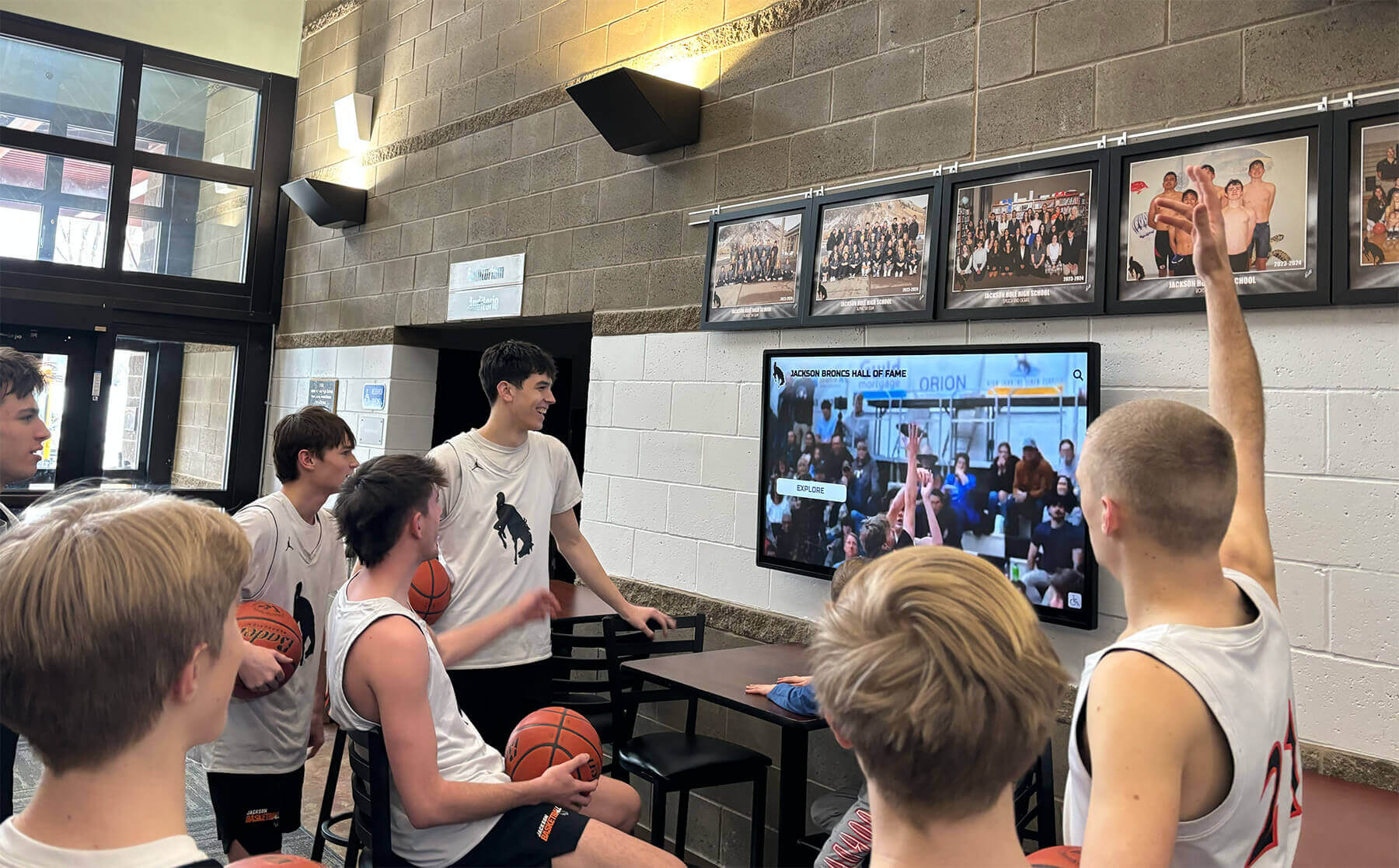
Multimedia-capable recognition software creates engaging social experiences where communities explore achievements together
Advanced Analytics and Data-Driven Optimization
Sophisticated software platforms provide strategic insights:
Engagement Pattern Analysis
Understanding usage enables optimization:
- Time-series analysis showing engagement trends across months and years
- Cohort analysis comparing different graduating classes or achievement periods
- Content performance comparison identifying which profile types engage most effectively
- Seasonal variation detection informing optimal timing for feature updates and promotions
- Geographic analysis understanding audience composition and recognition reach
- Device analysis showing how community members access recognition (kiosk versus web versus mobile)
A/B Testing Capabilities
Experimentation drives continuous improvement:
- Interface variation testing identifying most intuitive navigation approaches
- Featured content experiments determining which stories attract attention
- Idle-state comparisons optimizing attention-drawing capabilities when displays inactive
- Profile format testing assessing which presentation styles communicate most effectively
- Search result ordering experiments maximizing discovery success rates
- Navigation structure testing identifying clearest organizational schemes
Predictive Analytics and Recommendations
Machine learning enhances recognition effectiveness:
- Content recommendations suggesting related achievements based on user exploration patterns
- Personalization adapting featured content based on observed preferences
- Anomaly detection identifying unusual patterns suggesting technical issues or emerging interests
- Trend forecasting predicting future engagement based on historical patterns
- Optimization suggestions identifying content gaps and enhancement opportunities
These advanced capabilities transform recognition software from simple display tools into strategic platforms continuously improving community engagement and program effectiveness.
Common Recognition Software Mistakes and Solutions
Learning from frequent pitfalls helps organizations avoid expensive errors:
Mistake 1: Selecting Digital Signage Software for Recognition
The Problem: Organizations purchase general-purpose digital signage platforms believing slideshow capabilities suffice for recognition, discovering too late that passive image rotation, missing search functionality, inadequate profile management, and poor content organization create disappointment and underutilization. Digital signage excels at announcements and temporary content but lacks specialized features recognition programs require.
The Solution: Evaluate purpose-built recognition platforms specifically designed for halls of fame rather than adapting communication tools. Verify platforms provide searchable databases, individual profile pages, interactive exploration, relationship mapping, and recognition-specific administrative workflows. Organizations implementing generic signage for recognition consistently express regret once limitations become apparent.
Compare recognition platforms versus digital signage systems understanding critical distinctions for achievement celebration applications.
Mistake 2: Underestimating Software Learning Curve and Usability
The Problem: Schools select feature-rich platforms without assessing whether available staff can actually operate systems competently. Complex interfaces, poorly documented workflows, and unintuitive administrative tools create frustration. Programs stall as overburdened staff avoid updating displays that feel difficult or time-consuming to manage.
The Solution: Prioritize administrative usability equally with user-facing features during evaluation. Request hands-on trials creating actual profiles before purchase decisions. Speak with current customers about real-world management time requirements and learning curves. Select platforms designed for education professionals rather than technology specialists. Verify comprehensive training and ongoing support included in implementation. The best software enables confident management by actual available staff rather than requiring dedicated technical resources most schools lack.
Mistake 3: Inadequate Internet Connectivity for Cloud-Based Software
The Problem: Organizations implement cloud-based recognition platforms in locations with unreliable internet connectivity. Displays become non-functional during frequent network outages. Slow connections create frustrating loading delays reducing user engagement. Content updates fail to deploy properly when networks unstable.
The Solution: Assess internet reliability thoroughly before selecting cloud-based software. For locations with consistent broadband connectivity, cloud platforms provide substantial advantages through simplified management and extended web accessibility. For facilities with unreliable networks, consider native applications with offline capabilities, infrastructure improvements establishing reliable connectivity, or hybrid approaches with local caching. Match software architecture to actual network conditions rather than hoping connectivity improves or users tolerate disruptions.
Understand web-based versus native application trade-offs for recognition in various connectivity environments.
Mistake 4: Failing to Secure Adequate Ongoing Software Licenses and Support
The Problem: Schools focus exclusively on initial costs without planning for ongoing subscription fees, annual maintenance contracts, or required support renewals. Programs become effectively unusable when subscriptions expire or support access ends. Unexpected continuing costs strain budgets or force program abandonment after significant initial investment.
The Solution: Require vendors to provide detailed 5-year total cost projections including all software licenses, hosting fees, technical support, training renewals, and version upgrades. Verify institutional budgets cover complete requirements, not just initial implementation. Choose vendors offering transparent predictable pricing over complex fee structures. Prefer providers demonstrating genuine commitment to long-term customer relationships rather than transactional sales approaches.
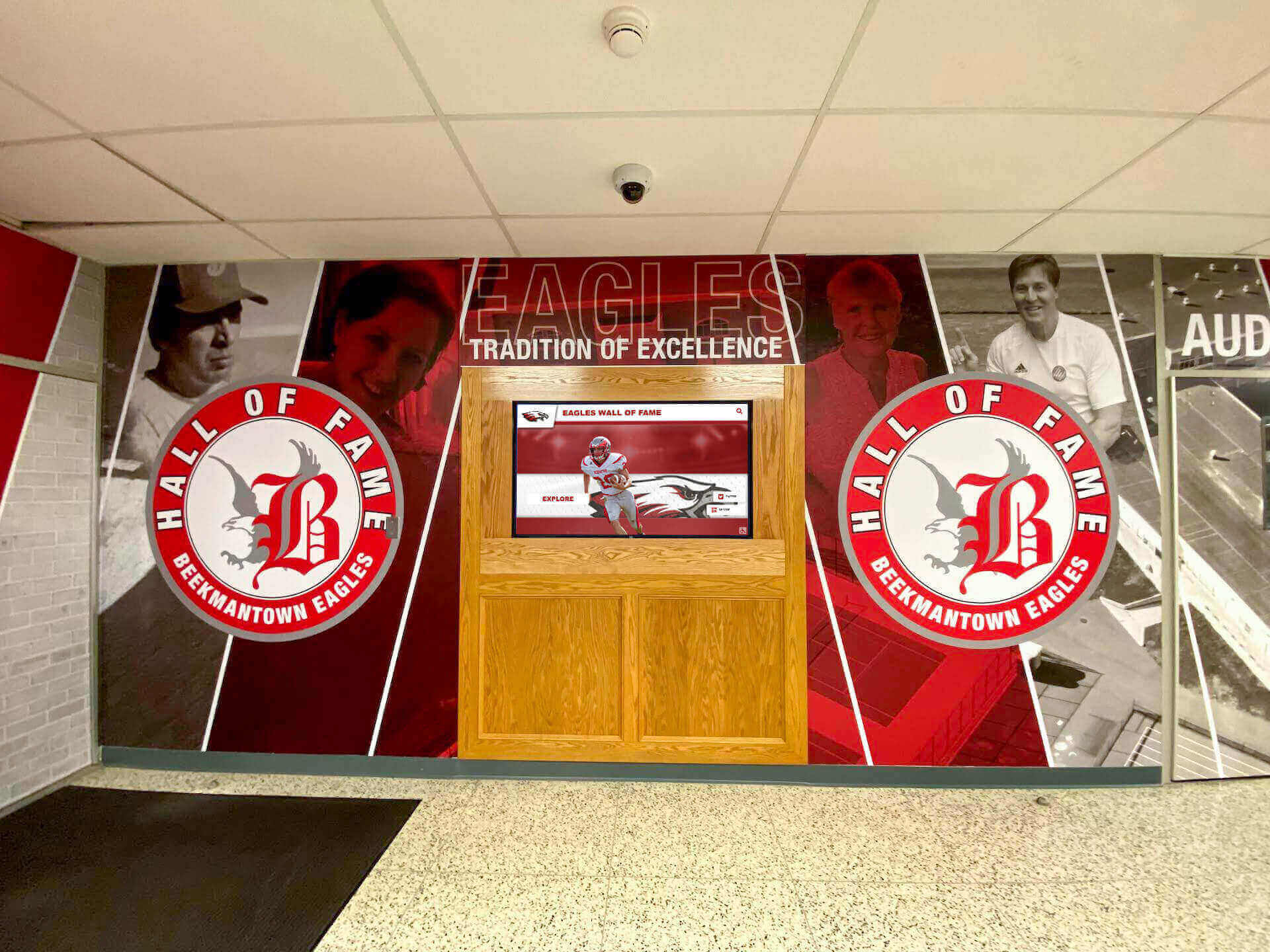
Successful recognition programs combine appropriate software platforms with comprehensive content and sustained administrative commitment
Emerging Touchscreen Software Trends and Future Developments
Recognition technology continues evolving with broader interactive software advancements:
Artificial Intelligence and Machine Learning Integration
AI capabilities enhancing recognition software:
Automated Content Enhancement
- Facial recognition technology enabling automatic photo tagging and identification
- Image quality improvement automatically enhancing historical photographs
- Optical character recognition digitizing printed records and newspaper archives
- Natural language processing understanding conversational search queries
- Automatic transcription converting audio and video content to searchable text
- Content recommendation engines suggesting related achievements and interesting connections
Predictive Analytics and Personalization
- User behavior prediction optimizing featured content placement and timing
- Personalized discovery pathways adapting to individual exploration preferences
- Anomaly detection identifying unusual engagement patterns suggesting emerging interests
- Content gap identification revealing underrepresented achievements requiring enhancement
- Optimal timing suggestions for content releases maximizing community engagement
Progressive Web Application (PWA) Capabilities
According to industry analysis, progressive web applications offer compelling benefits for interactive touchscreen deployments: cross-platform compatibility with single codebases working across Windows, Android, iOS, ChromeOS, and Linux; instant updates appearing without user downloads; lower development costs; offline capability through service workers; and responsive design scaling from large touchscreens to mobile phones.
Modern PWA technology enables:
- Offline functionality through service workers caching content locally
- Native-like experience with smooth performance and app-like interactions
- Installation on home screens appearing like native applications without app stores
- Background synchronization updating content when connectivity restores
- Push notifications engaging users with timely recognition updates
- Seamless updates deploying instantly without user intervention or downloads
These capabilities blur distinctions between web-based and native applications, providing web architecture benefits while delivering native-like user experiences.
Voice Interface and Conversational Interaction
Voice-enabled recognition exploration emerging in accessibility contexts:
- Voice search enabling hands-free discovery for accessibility and convenience
- Audio content playback for visually impaired users or multitasking exploration
- Conversational queries understanding natural language rather than structured searches
- Voice-guided navigation assisting users with vision or coordination challenges
- Multilingual voice support serving diverse communities effectively
- Voice analytics understanding how community members describe and seek achievements
Augmented Reality and Extended Reality Integration
AR capabilities enhancing physical recognition spaces:
- Mobile AR applications overlaying digital content on physical recognition displays
- Virtual recognition walls accessible anywhere through smartphones or tablets
- 3D visualizations bringing flat photographs to life through depth and animation
- Historical context layers revealing facility evolution and recognition location changes
- Interactive timelines connecting past and present recognition visually
- Virtual tours enabling remote exploration of physical recognition installations
While emerging technologies promise enhanced capabilities, organizations should prioritize proven functionality serving immediate needs over experimental features lacking demonstrated value in educational recognition contexts.
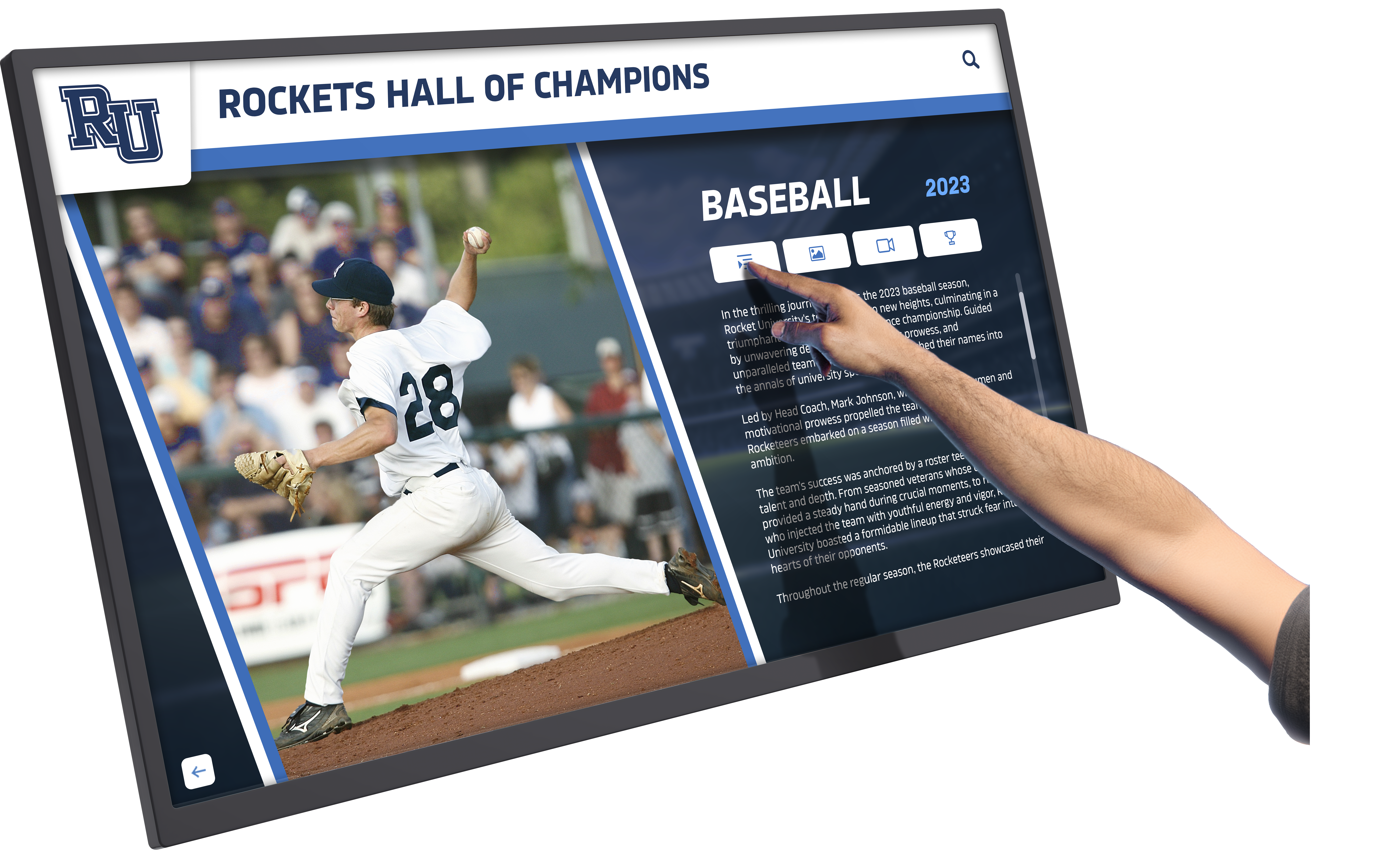
Intuitive touchscreen software creates engaging experiences enabling deep exploration of individual achievements and accomplishments
Conclusion: Selecting Recognition Software for Long-Term Success
Touchscreen software determines whether recognition programs deliver engaging exploration experiences celebrating achievement comprehensively or become underutilized technology disappointments failing to justify investment. Organizations implementing purpose-built recognition platforms specifically designed for achievement celebration create systems that honor accomplishments meaningfully, engage communities effectively, and remain manageable within real-world resource constraints throughout years of sustainable operation.
The software considerations explored throughout this comprehensive guide provide frameworks for evaluating platforms, understanding essential capabilities, and making informed decisions aligned with institutional recognition philosophy and operational realities. From distinguishing purpose-built recognition platforms from generic digital signage systems to evaluating cloud-based versus native architectures and assessing administrative usability and long-term support quality, each decision affects program success and community impact.
Ready to implement touchscreen recognition software that serves your organization effectively while remaining sustainable within real-world resource constraints? Modern platforms like Rocket Alumni Solutions provide comprehensive software specifically designed for educational and organizational recognition, combining intuitive content management with engaging interactive experiences and professional touchscreen interfaces—all delivered through web-based architecture eliminating complex installation and maintenance requirements.
Whether implementing your first recognition display or enhancing existing systems with better software, success depends on selecting platforms aligned with your recognition needs, ensuring software provides features your specific applications require, and verifying solutions remain manageable within available administrative resources and technical capabilities. Schedule a custom demonstration to explore how purpose-built recognition software transforms achievement celebration from administrative burden into sustainable programs honoring excellence effectively.
Your community’s achievements deserve software that celebrates accomplishments comprehensively while creating meaningful engagement and lasting institutional value. The most important consideration isn’t selecting platforms with longest feature lists or most sophisticated technology—it’s choosing software aligned with your recognition philosophy, sustainable within your resources, and designed specifically to serve achievement celebration rather than generic information display purposes.
With thoughtful evaluation prioritizing recognition-specific capabilities over generic features, administrative usability over theoretical sophistication, and long-term sustainability over impressive demonstrations, you can implement touchscreen software that transforms recognition from selective space-constrained acknowledgment into comprehensive equitable celebration honoring all deserving achievements effectively throughout decades of meaningful operation.
Begin your software evaluation by clearly defining recognition requirements, distinguishing purpose-built platforms from adapted alternatives, requesting comprehensive demonstrations focused on actual recognition workflows, speaking with current customers about real-world experiences, and selecting vendors demonstrating genuine commitment to educational recognition applications. The right software foundation enables recognition programs celebrating your community’s excellence appropriately while remaining practical and sustainable for years to come.
Sources
Information about touchscreen software trends and market growth:































