




Intent: Define — Organizations implementing touchscreen kiosks for recognition displays, wayfinding systems, self-service applications, or public information terminals face a critical software decision: selecting kiosk browser software that securely locks down devices while delivering reliable, professional user experiences. The wrong choice leads to security vulnerabilities, unauthorized access, device tampering, and frustrated users—while the right solution provides comprehensive lockdown protection, intuitive operation, and sustainable long-term management.
The Touchscreen Kiosk App available on Google Play Store and Mac App Store represents a compelling free alternative to commercial kiosk browser solutions like Fully Kiosk Browser, KioWare, and other paid platforms. This comprehensive guide explores why organizations across educational institutions, museums, corporate facilities, and public spaces increasingly choose this free locked-down kiosk browser over expensive commercial alternatives—examining features, security capabilities, implementation approaches, and practical advantages that make it particularly well-suited for recognition displays and interactive installations.
Whether you’re deploying a single hall of fame display or managing dozens of interactive kiosks across multiple locations, understanding your kiosk browser options—including capable free alternatives to commercial solutions—ensures informed decisions that protect investments while serving communities effectively within realistic budget constraints.
Organizations implementing touchscreen kiosks require software that balances comprehensive security lockdown with intuitive user experiences, reliable performance, and sustainable management within available resources. The emergence of capable free alternatives challenges assumptions that professional kiosk deployments require expensive commercial software subscriptions.

Professional kiosk installations require secure browser software that prevents unauthorized access while delivering engaging user experiences
Understanding Kiosk Browser Software: Purpose and Requirements
Before exploring specific solutions, understanding what kiosk browser software accomplishes helps organizations evaluate options effectively:
What Kiosk Browsers Do
Kiosk browser software transforms standard touchscreen devices into secure, locked-down terminals:
Device Lockdown and Access Control
Kiosk browsers prevent users from accessing device functions beyond intended purposes:
- Block access to device settings, system menus, and configuration panels
- Disable hardware buttons including home, back, and recent apps buttons
- Prevent application switching or launching unauthorized apps
- Lock down browser settings preventing tampering with configurations
- Disable file downloads and uploads protecting device security
- Prevent access to underlying operating systems and file structures
- Require administrative passwords or PINs for exiting kiosk mode
Browser Security and Content Control
Secure browsing capabilities protect both devices and users:
- URL whitelisting limiting access to approved websites only
- JavaScript control enabling or restricting scripting capabilities as needed
- Cookie and cache management clearing user data automatically between sessions
- SSL/TLS support ensuring secure encrypted connections
- Pop-up blocking preventing unwanted windows and potential malicious content
- Auto-reload capabilities recovering from errors or connection failures
- Idle timeout returning displays to home screens after inactivity periods
Remote Management and Administration
Efficient management capabilities reduce operational burden:
- Remote configuration updates eliminating physical device access requirements
- URL and content updates deployed instantly to all managed devices
- Device monitoring showing operational status and identifying issues proactively
- Usage analytics tracking engagement patterns and popular content
- Scheduled reboots maintaining device performance and applying updates
- Over-the-air updates delivering new features and security patches
- Centralized administration managing multiple devices from single control panels
Organizations implementing interactive touchscreen software for recognition or information applications require these comprehensive lockdown capabilities ensuring secure, reliable operation in public environments.
Why Organizations Need Dedicated Kiosk Browsers
Standard web browsers lack security controls necessary for public kiosk deployments:
Security Vulnerabilities in Standard Browsers
Using Chrome, Safari, Firefox, or Edge without kiosk lockdown creates risks:
- Users can access browser settings and change configurations
- Address bars allow navigation to any website including inappropriate content
- File menus provide download capabilities potentially introducing malware
- Bookmarks and history accumulate sensitive information from previous users
- Extensions and add-ons can be installed compromising security
- Device menus remain accessible enabling system tampering
- No automatic session clearing leaves personal information exposed
Operational Challenges Without Lockdown
Standard browsers create management complexity:
- Displays drift from intended content as users explore freely
- Browser crashes or errors leave devices in unusable states
- Manual recovery required when devices enter unintended states
- User complaints about confusing interfaces and available functions
- Staff time consumed resetting devices and restoring proper operation
- Inconsistent experiences across devices as configurations diverge
- Hardware button presses exit applications disrupting intended use
Professional kiosk browser software eliminates these vulnerabilities through comprehensive lockdown ensuring devices remain secure, stay on intended content, and operate reliably without continuous intervention.

Kiosk browsers enable confident public interaction by preventing access to system functions and unauthorized content
The Commercial Kiosk Browser Landscape: Costs and Limitations
Understanding commercial kiosk software options provides context for evaluating alternatives:
Fully Kiosk Browser: The Market Leader
Fully Kiosk Browser represents the most widely-known commercial kiosk solution for Android:
Capabilities and Features
Fully provides comprehensive Android kiosk functionality:
- Full device lockdown with hardware button disabling and app access restrictions
- Remote device management through web-based admin console
- Motion detection and proximity sensor integration
- REST API and MQTT support for advanced integrations
- Screensaver and daydream integration for idle state management
- Device motion wake-up and scheduled operations
- Camera integration for QR code scanning and photo capture
Pricing Structure
Fully Kiosk Browser follows freemium model:
- Free basic version includes core lockdown with advertising watermarks
- Plus license costs approximately $20-25 per device for watermark removal
- Additional features require ongoing subscription commitments
- Enterprise licensing available for large deployments with bulk discounts
- Lifetime licenses no longer available forcing recurring payment models
Limitations and Considerations
Organizations implementing Fully encounter constraints:
- Android-only solution requiring different software for other platforms
- Complex feature set creating learning curves for administrators
- Occasional compatibility issues with specific Android device manufacturers
- Support quality varies with free versus paid licensing tiers
- Privacy concerns from data collection and analytics capabilities
- According to AirDroid Business, some organizations seek alternatives due to feature complexity and support challenges
Other Commercial Kiosk Browser Options
Additional paid solutions serve specific market segments:
KioWare
Professional kiosk software supporting Windows and Android:
- Comprehensive security and lockdown capabilities
- Remote monitoring and management tools
- Pricing ranges from approximately $200-500+ per device
- Free version available with popup advertisements every 15 minutes
- Best suited for retail and hospitality kiosk deployments
Scalefusion and Hexnode
Mobile device management platforms with kiosk modes:
- Enterprise-focused with comprehensive device management beyond kiosk functionality
- Subscription pricing typically $2-8 per device monthly
- Suitable for organizations already using MDM infrastructure
- May be overkill for simple kiosk-only deployments
Porteus Kiosk
Linux-based kiosk operating system:
- Lightweight dedicated kiosk OS rather than lockdown software
- Free for personal use; commercial licensing required for business deployment
- Excellent security through OS-level restrictions
- Requires technical expertise for configuration and customization
- According to Porteus Kiosk, touchscreen support is included through Linux kernel drivers
These commercial options provide professional capabilities but require ongoing financial commitments that strain budgets for schools, nonprofits, and smaller organizations implementing limited kiosk deployments.
Introducing Touchscreen Kiosk App: Free Locked Down Browser
The Touchscreen Kiosk App available on Google Play Store and Mac App Store provides comprehensive kiosk lockdown without licensing costs:
Platform Availability and Downloads
Android Version
Available through Google Play Store:
- Download from Google Play Store
- Supports Android devices including tablets and phones
- Compatible with commercial-grade touchscreen displays
- Free download with full functionality included
- Regular updates delivering improvements and security patches
Mac Version
Available through Mac App Store:
- Supports macOS-based kiosk deployments
- Enables Mac mini, Mac Studio, or other Mac hardware for kiosk use
- Cross-platform consistency for organizations using multiple device types
- Same locked-down browser capabilities as Android version
Understanding touchscreen software options for Mac helps organizations evaluate whether Mac-based kiosk deployments fit their infrastructure and expertise.
Core Capabilities and Features
The Touchscreen Kiosk App provides essential lockdown functionality:
Comprehensive Device Lockdown
Secure kiosk mode prevents unauthorized access:
- Completely locks device to kiosk browser preventing app switching
- Disables hardware buttons including home, back, and power buttons
- Prevents access to system settings and configuration menus
- Requires PIN or password for exiting kiosk mode
- Automatic launch on device boot for unattended operation
- Blocks notifications and alerts from interrupting kiosk operation
- Prevents status bar access and system tray visibility
Browser Security Controls
Focused browsing capabilities ensure appropriate content access:
- URL whitelisting restricting navigation to approved websites
- Single-website mode for dedicated application kiosks
- Homepage lock ensuring displays return to intended starting content
- Automatic session clearing removing browsing history and cookies
- Download blocking preventing file storage on kiosk devices
- Right-click disabling on desktop/laptop deployments
- Keyboard shortcut blocking preventing browser manipulation
Management and Configuration
Administrative controls simplify deployment:
- PIN-protected admin access preventing unauthorized configuration changes
- Remote configuration through deployment tools and scripts
- Scheduled restart capabilities maintaining device performance
- Idle timeout returning to homepage after inactivity periods
- Customizable appearance reducing visible browser chrome
- Multi-device deployment through standard app distribution methods

Free kiosk browser software enables professional installations without expensive per-device licensing fees
Why Touchscreen Kiosk App Excels as Fully Kiosk Alternative
Organizations considering kiosk browser options find compelling advantages in free alternatives:
Zero Licensing Costs
Eliminating per-device fees provides substantial savings:
Direct Cost Elimination
Free software removes ongoing financial burden:
- No per-device licensing fees saving $20-50+ per display
- Savings multiply across multiple kiosk deployments
- Example: 10 kiosks save $200-500+ compared to paid alternatives
- 50 kiosks save $1,000-2,500+ enabling budget allocation elsewhere
- Predictable costs without surprise renewal fees or price increases
- Pilot programs and testing without financial commitment
Budget Reallocation Opportunities
Savings enable investment in other program elements:
- Higher-quality touchscreen hardware improving user experiences
- Professional content development creating engaging recognition displays
- Better mounting solutions and installation quality
- Backup devices providing redundancy for critical installations
- Network infrastructure improvements supporting reliable operation
For schools and organizations implementing digital hall of fame displays, eliminating kiosk software costs enables focusing resources on comprehensive content development and professional hardware that communities experience directly.
Simplified Feature Set
Focused functionality reduces complexity:
Easier Configuration and Management
Streamlined capabilities speed deployment:
- Essential lockdown features without overwhelming options
- Faster administrator training requiring less technical expertise
- Reduced configuration time getting kiosks operational quickly
- Lower likelihood of misconfiguration causing security vulnerabilities
- Intuitive settings accessible to non-technical staff
Reduced Maintenance Burden
Simpler software requires less ongoing attention:
- Fewer features mean fewer things requiring regular review
- Straightforward troubleshooting when issues occur
- Less complex update processes reducing disruption
- Lower support requirements freeing staff for other priorities
Organizations with limited IT resources particularly benefit from software designed for essential functionality without commercial platform feature bloat creating unnecessary complexity.
Cross-Platform Support
Single solution serving multiple device types:
Unified Approach Across Platforms
Consistency simplifies multi-device deployments:
- Same software solution for Android and Mac devices
- Consistent administrator knowledge across platforms
- Similar configuration approaches reducing training requirements
- Unified troubleshooting processes applicable to all devices
Platform Flexibility
Freedom to select optimal hardware:
- Android tablets for portable or space-constrained installations
- Mac minis for permanent installed kiosks requiring desktop performance
- Mix platforms based on location-specific needs without software constraints
- Avoid vendor lock-in from platform-specific kiosk software
When evaluating web-based versus native touchscreen applications, cross-platform kiosk browsers complement web-based content platforms enabling hardware flexibility throughout technology lifecycles.
No Data Collection Concerns
Privacy advantages over commercial alternatives:
User Privacy Protection
Free software without analytics reduces concerns:
- No usage data collected and transmitted to vendors
- No tracking of visitor interactions and content access
- Reduced privacy policy complexity for public installations
- Compliance advantages for organizations with strict data protection requirements
Institutional Data Security
Organizational information remains private:
- No vendor access to deployed URLs and content
- Device information and installation details not shared externally
- Network configuration and infrastructure details remain private
- Reduced attack surface from eliminated cloud analytics connections
Schools and organizations managing sensitive information or operating under restrictive data policies benefit from software avoiding cloud-based analytics and usage tracking common in commercial platforms.
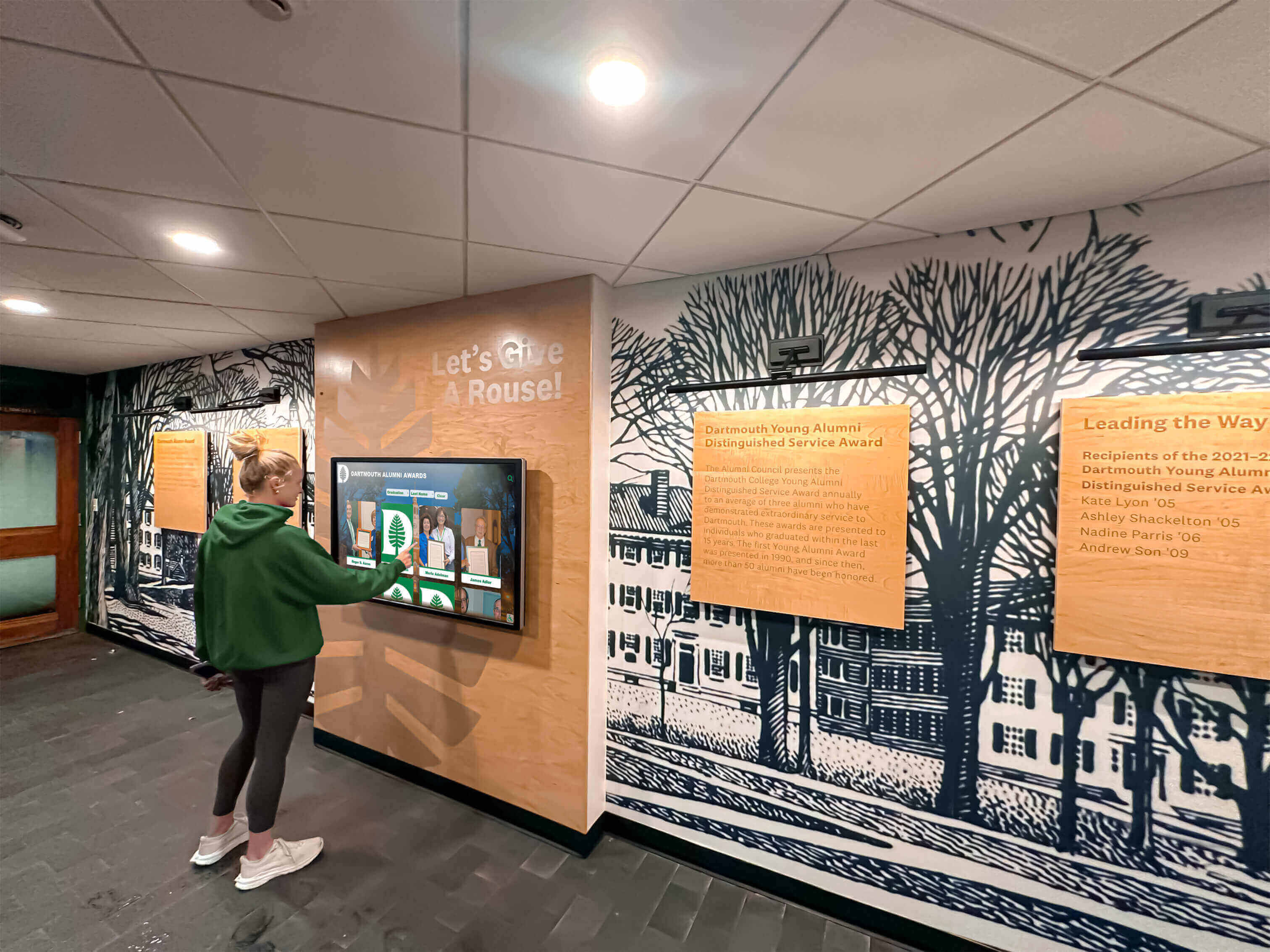
Free kiosk browsers deliver professional functionality enabling confident public deployments
Implementing Touchscreen Kiosk App: Practical Deployment Guide
Successful kiosk browser implementation follows systematic approaches:
Installation and Initial Configuration
Android Device Setup
Deploy on Android tablets and displays:
- Download Touchscreen Kiosk App from Google Play Store
- Install application on device through standard installation process
- Open app and grant necessary permissions for full lockdown functionality
- Configure homepage URL pointing to intended kiosk content
- Enable URL whitelisting if restricting access to specific sites
- Set PIN or password for admin access protecting configuration
- Enable kiosk mode locking device to browser application
- Test lockdown verifying hardware buttons disabled and app switching prevented
- Configure auto-start ensuring kiosk launches on device boot
- Deploy device to installation location with mounting hardware
Mac Device Setup
Deploy on Mac computers:
- Download Touchscreen Kiosk App from Mac App Store
- Install application through standard macOS installation
- Configure homepage URL and whitelisting rules
- Set administrative PIN protecting configuration access
- Enable full-screen mode removing visible browser chrome
- Configure launch on startup for unattended operation
- Disable keyboard shortcuts preventing browser manipulation
- Test all lockdown features verifying secure operation
- Mount display and connect touchscreen hardware if applicable
- Configure network connectivity and content access
Organizations implementing touchscreen kiosk software benefit from testing complete deployment workflows with single pilot devices before rolling out to multiple locations.
Integration with Recognition Display Platforms
Kiosk browsers work seamlessly with web-based recognition systems:
Optimal Content Platform Pairing
Combine free kiosk browsers with professional content platforms:
- Point kiosk browser to web-based hall of fame or recognition platform URL
- Recognition content managed through cloud-based CMS remains completely separate from kiosk browser
- Browser provides device security and lockdown functionality
- Content platform delivers engaging recognition experiences and interactive exploration
- Updates to recognition content deploy instantly without kiosk browser reconfiguration
Rocket Alumni Solutions Integration
Professional recognition platforms work perfectly with free kiosk browsers:
- Set kiosk browser homepage to Rocket Alumni Solutions display URL
- Full-featured interactive recognition operates within secure locked browser
- Search, filtering, and profile exploration function normally
- Social sharing, QR codes, and advanced features remain accessible
- Remote content management through Rocket CMS completely independent of kiosk browser
- Hardware flexibility from web-based recognition platform combined with free kiosk lockdown
Solutions like Rocket Alumni Solutions provide comprehensive web-based recognition specifically designed for touchscreen displays—combining intuitive content management with professional interactive interfaces that work seamlessly within any kiosk browser environment.
Security Hardening and Best Practices
Maximize security through comprehensive configuration:
Physical Security Measures
Protect devices from tampering:
- Secure mounting preventing device removal or theft
- Cable management hiding power and network connections
- Enclosures protecting hardware buttons from physical access when possible
- Screen protectors preventing damage from repeated touch interaction
- Ventilation ensuring adequate cooling for reliable continuous operation
- Power management preventing accidental shutdowns
Network Security Configuration
Protect network infrastructure:
- Isolated network VLANs separating kiosk devices from sensitive systems
- Content filtering at network level providing additional protection
- VPN connections for remote management when appropriate
- Firewall rules restricting kiosk device communication to essential services
- Regular network monitoring identifying unusual activity
Operational Security Practices
Maintain security through ongoing procedures:
- Unique strong PINs for each kiosk preventing widespread compromise
- Regular PIN rotation reducing exposure from potential disclosure
- Staff training on configuration protection and security importance
- Incident response procedures for suspected tampering or unauthorized access
- Periodic security audits verifying configurations remain properly locked down
Organizations implementing comprehensive touchscreen maintenance and security practices ensure kiosk deployments remain secure and reliable throughout years of operation.
Multi-Location Deployment Strategies
Scale efficiently across distributed installations:
Standardized Configuration Approach
Consistency simplifies management:
- Document complete configuration settings for organizational standard
- Create standard deployment checklists ensuring consistent setup
- Develop training materials for location-specific setup and testing
- Establish naming conventions and PIN management systems
- Define support escalation procedures for troubleshooting
Deployment Logistics
Systematic rollout reduces problems:
- Pilot deployments testing complete workflow before large-scale rollout
- Staged implementation allowing learning from early locations
- Local champion identification at each site assisting with ongoing operation
- Centralized inventory tracking device assignments and configurations
- Replacement device preparation enabling quick swaps during failures
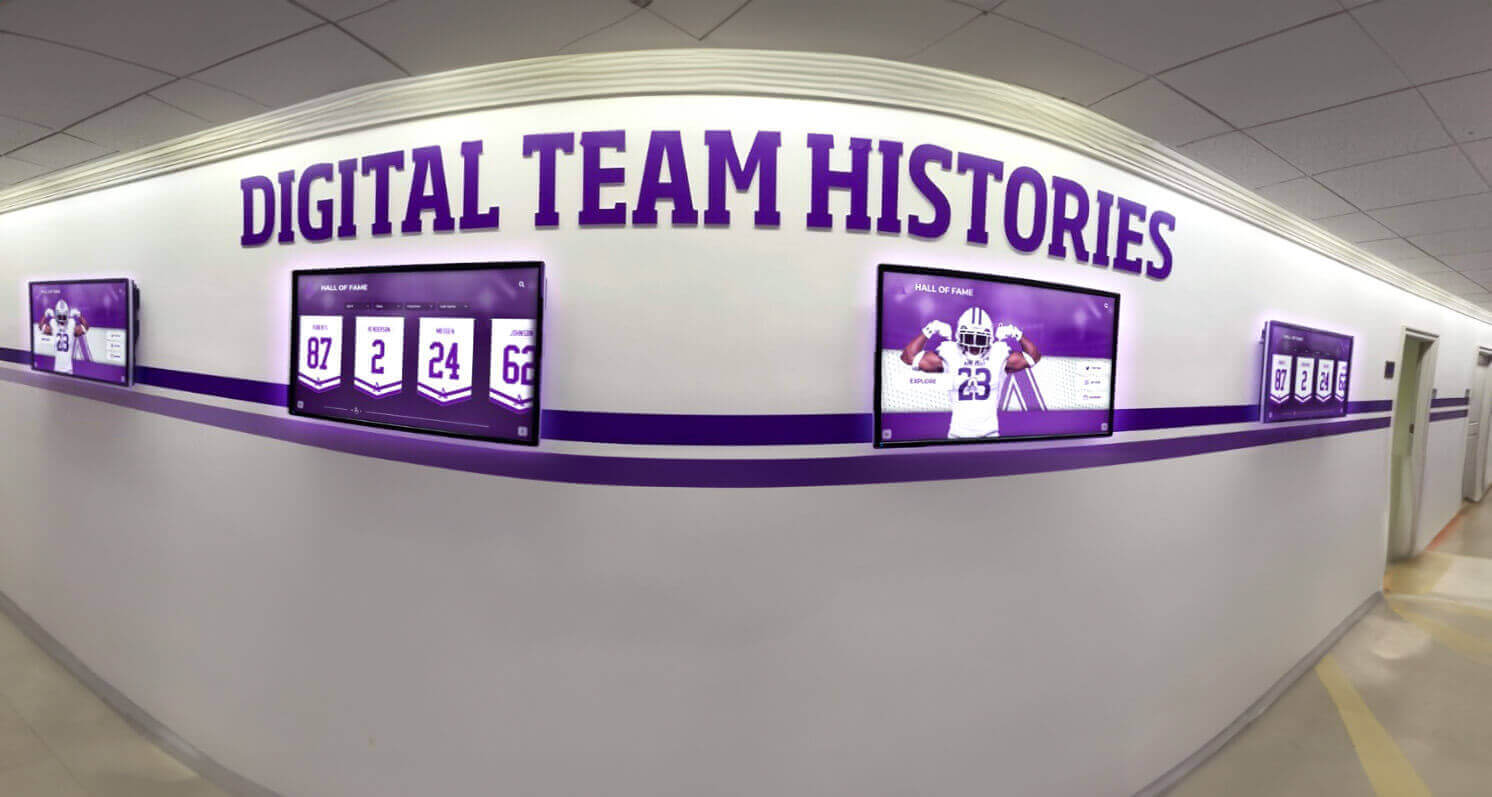
Free kiosk browser software enables cost-effective multi-location deployments without per-device licensing fees
Use Cases: Where Free Kiosk Browsers Excel
Specific organizational contexts particularly benefit from free alternatives:
Educational Institution Recognition Displays
Schools implementing digital hall of fame programs benefit substantially:
Athletic Recognition Kiosks
Free kiosk browsers enable comprehensive athletic celebration:
- Hall of fame displays in gyms and athletic facilities
- Record boards showcasing team and individual achievements
- Historical archives preserving program heritage
- Championship team recognition across all sports
- Coaching history and legacy documentation
Academic Achievement Displays
Celebrate scholastic excellence through locked-down kiosks:
- Honor roll recognition in main lobbies and hallways
- National Merit Scholar and AP Scholar showcases
- Academic competition team achievements
- Science fair and project competition winners
- Perfect attendance and academic milestone recognition
Performing Arts Recognition
Theater, music, and arts programs deserve visibility:
- Musical and theatrical production history archives
- All-state and honor ensemble member recognition
- Competition awards and festival achievements
- Student artwork and creative accomplishment galleries
- Performance video archives from concerts and shows
Budget-conscious schools allocate limited technology funds toward quality touchscreen hardware and comprehensive content rather than expensive per-device kiosk licensing—maximizing recognition program impact within realistic financial constraints.
Museum and Cultural Institution Wayfinding
Visitor information systems require secure browsers:
Interactive Maps and Directories
Help visitors navigate facilities:
- Touchscreen facility maps showing exhibit locations
- Event schedules and daily program information
- Accessibility information and accommodation details
- Dining and amenity location guidance
- Parking and transportation information
Exhibit Information and Education
Enhance visitor experiences through digital content:
- Exhibit background information and context
- Artist biographies and creative process documentation
- Historical context and related collections
- Multimedia content including videos and audio tours
- Interactive educational activities and games
Free kiosk browsers enable museums to deploy numerous information points throughout facilities without substantial licensing fees consuming limited technology budgets.
Corporate and Office Environments
Workplace kiosk applications benefit from cost savings:
Employee Recognition and Communications
Celebrate achievements in common areas:
- Employee of the month and recognition programs
- Anniversary and service milestone celebrations
- Team accomplishment and project success highlights
- Company news and announcement displays
- Event calendars and workplace activity promotion
Visitor Management and Wayfinding
Reception area kiosks serve guests:
- Visitor check-in and registration systems
- Building directories and office locations
- Conference room schedules and availability
- Campus maps for multi-building facilities
- Safety information and emergency procedures
Corporate facilities implementing dozens of kiosks across campuses save thousands annually through free kiosk browser alternatives to commercial licensing.
Public Space Information Terminals
Community facilities serve diverse populations:
Government and Civic Buildings
Public information access points:
- Department directories and contact information
- Service descriptions and application processes
- Event schedules and facility rental information
- Public meeting livestreams and archived recordings
- Community resource directories
Libraries and Community Centers
Patron self-service terminals:
- Catalog search and resource discovery
- Program registration and event information
- Community bulletin boards and local announcements
- Digital literacy tutorials and technology help
- Historical archives and local heritage materials
Free kiosk software enables resource-constrained public facilities to deploy comprehensive information systems serving communities effectively within limited budgets.
Limitations and Considerations
Understanding constraints helps organizations make informed decisions:
Feature Comparison with Commercial Alternatives
Free kiosk browsers provide essential functionality but lack some commercial platform capabilities:
Missing Advanced Features
Commercial platforms offer capabilities absent from free alternatives:
- Built-in remote monitoring and centralized device management
- Advanced analytics and usage reporting dashboards
- Motion detection and proximity sensor integration
- Camera integration for QR scanning and photo capture
- REST API and MQTT support for custom integrations
- Scheduled content changes and rotation capabilities
- Integrated screensaver and idle state content management
When Commercial Solutions Make Sense
Specific scenarios justify commercial kiosk software investment:
- Large deployments requiring centralized remote management (50+ devices)
- Sophisticated integrations with other systems through APIs
- Detailed usage analytics for program evaluation and optimization
- Sensor-based interactive experiences requiring hardware integration
- Complex content rotation schedules and automated management
- Enterprise support requirements with SLA guarantees
Organizations implementing comprehensive kiosk management systems may find commercial platforms’ advanced capabilities justify licensing costs when deployment scale and complexity reach thresholds where manual management becomes impractical.
Technical Support Availability
Free software provides different support models:
Community-Based Support
Free alternatives rely on user communities:
- Documentation and guides created by developers and users
- Forum discussions and community knowledge sharing
- GitHub issues and bug reporting for open-source projects
- No guaranteed response times or dedicated support staff
- Solutions require research and troubleshooting initiative
Commercial Support Advantages
Paid platforms provide professional assistance:
- Dedicated support teams responding to tickets and calls
- Documented troubleshooting procedures and knowledge bases
- Software updates addressing specific customer issues
- Training resources and onboarding assistance
- Escalation paths for critical operational problems
Organizations with limited technical expertise or requiring guaranteed support responsiveness should carefully evaluate their capabilities for independent troubleshooting versus requiring professional assistance.
Update and Maintenance Considerations
Free software follows different development models:
Update Frequency and Control
Free alternatives vary in maintenance:
- Update schedules depend on developer availability and priorities
- Security patches may be less rapid than commercial alternatives
- Feature additions occur based on community needs rather than roadmaps
- End-of-life risk if developers discontinue maintenance
Commercial Platform Predictability
Paid software provides stability assurances:
- Regular update schedules with announced timelines
- Security vulnerability rapid response commitments
- Long-term support guarantees for deployed versions
- Migration assistance when major version changes occur
Organizations should evaluate free kiosk browser development activity, recent update history, and developer responsiveness before committing to large-scale deployments dependent on ongoing maintenance.

Professional kiosk deployments succeed with appropriate hardware, content, and browser software—regardless of licensing costs
Alternative Kiosk Browser Options
Organizations should evaluate multiple solutions:
Other Free Kiosk Browsers
Additional no-cost alternatives serve specific needs:
Fully Kiosk Browser Free Version
Limited free option from commercial vendor:
- Core lockdown features included without payment
- Advertising watermark on displays reduces professional appearance
- Plus license purchase removes branding and unlocks additional features
- Good option for testing kiosk concepts before committing to solutions
Platform-Native Kiosk Modes
Operating systems include basic lockdown:
- Android offers native kiosk mode (screen pinning) with limited capabilities
- iOS guided access provides single-app restriction for iPads
- ChromeOS kiosk mode serves Chromebox and Chromebook deployments
- Require technical configuration and lack browser-specific security controls
- Suitable for simple single-website kiosks without advanced requirements
Commercial Alternatives Worth Considering
Organizations with specific needs may find commercial platforms valuable:
When Fully Kiosk Plus Makes Sense
One-time per-device licensing provides value:
- Complex integrations requiring API access
- Motion detection and sensor-based interactive experiences
- Remote management of distributed deployments
- Advanced idle state content and screensaver capabilities
- Approximately $20-25 one-time purchase per device
When Enterprise MDM Solutions Fit
Organizations already using device management platforms:
- Scalefusion, Hexnode, or similar MDM with kiosk capabilities
- Makes sense when managing devices for multiple purposes beyond kiosks
- Comprehensive device management, security, and application control
- Higher recurring costs justified by broader device management needs
When Professional Support Is Critical
Mission-critical kiosk deployments warrant commercial solutions:
- Revenue-generating kiosks requiring guaranteed uptime
- Applications where failures create substantial operational disruption
- Organizations lacking internal technical expertise for troubleshooting
- Deployment scale justifying centralized management investment
Making the Right Kiosk Browser Decision
Systematic evaluation ensures appropriate choices:
Decision Framework
Consider these key factors:
Budget Reality
- Available funds for per-device licensing across full deployment
- One-time versus recurring cost preferences
- Opportunity cost of licensing fees versus other program investments
Deployment Scale
- Number of kiosk devices planned currently and future expansion
- Geographic distribution and remote management requirements
- Consistency needs across all installations
Technical Capabilities
- Internal staff expertise for configuration and troubleshooting
- Support requirements and response time expectations
- Complexity tolerance for initial setup and ongoing maintenance
Feature Requirements
- Essential versus nice-to-have capabilities
- Integration needs with other systems and platforms
- Analytics and monitoring importance for program evaluation
Content Platform Selection
- Web-based versus native application content approach
- Existing recognition or information platform capabilities
- Long-term content management and update processes
Recommended Approach for Most Organizations
For typical recognition displays and information kiosks:
Start with Free Alternatives
Test capabilities before committing funds:
- Deploy Touchscreen Kiosk App for pilot installations
- Evaluate whether free solution meets operational requirements
- Identify any gaps requiring commercial platform capabilities
- Gain experience with kiosk deployment and management
Invest Savings in Quality Content and Hardware
Maximize user experience through strategic resource allocation:
- Higher-quality commercial touchscreen displays
- Professional content development and recognition archive creation
- Better mounting hardware and installation quality
- Network infrastructure ensuring reliable connectivity
Upgrade Selectively When Justified
Move to commercial platforms only when clear benefits exist:
- Deployment scale reaching threshold where centralized management essential
- Specific feature requirements unavailable in free alternatives
- Support needs exceeding capabilities for independent troubleshooting
This approach minimizes financial risk while ensuring organizations don’t overpay for capabilities they don’t require or won’t utilize.
Conclusion: Effective Kiosk Browser Selection for Recognition Displays
Organizations implementing touchscreen kiosks for recognition displays, wayfinding systems, and public information terminals benefit from understanding the complete kiosk browser landscape—including capable free alternatives challenging assumptions that professional deployments require expensive commercial software. The Touchscreen Kiosk App available on Google Play Store and Mac App Store provides comprehensive device lockdown, secure browsing capabilities, and reliable operation without per-device licensing fees that strain budgets for schools, museums, nonprofits, and smaller organizations.
For most recognition display applications, free kiosk browsers deliver essential functionality enabling professional secure deployments while freeing resources for investment in quality hardware and comprehensive content development that communities experience directly. Commercial alternatives like Fully Kiosk Browser, KioWare, and enterprise MDM platforms provide advanced capabilities justifying costs for large-scale deployments, complex integrations, or organizations requiring professional support—but represent unnecessary expenses for straightforward kiosk applications serving single websites or web-based recognition platforms.
Ready to implement secure touchscreen recognition displays that celebrate your community’s achievements professionally while remaining practical within budget constraints? Free kiosk browser software like the Touchscreen Kiosk App provides comprehensive device lockdown enabling confident public deployments—while web-based recognition platforms like Rocket Alumni Solutions deliver engaging interactive content experiences specifically designed for schools and organizations implementing hall of fame displays and achievement recognition programs.
The optimal recognition technology stack combines free secure kiosk browsers providing device lockdown with professional purpose-built recognition platforms managing content—delivering comprehensive functionality while remaining financially sustainable within typical institutional budgets. Request your free custom demo or schedule a consultation to explore how the right combination of kiosk browser software and recognition content platforms can serve your community effectively and sustainably.
Your achievers deserve professional recognition technology that honors accomplishments appropriately while remaining practical within available resources. The best kiosk browser isn’t necessarily the most expensive or feature-rich—it’s the solution delivering security and functionality your specific deployment requires while remaining sustainable operationally and financially. By understanding free alternatives like Touchscreen Kiosk App alongside commercial options, organizations make informed decisions that protect investments, serve communities effectively, and ensure recognition programs succeed throughout years of operation.
Download the Touchscreen Kiosk App from Google Play Store or Mac App Store today and discover how capable free kiosk browser software enables professional recognition displays, wayfinding systems, and information terminals that communities access confidently while organizations manage sustainably within realistic budget constraints. Your community’s achievements deserve celebration through technology that works reliably, remains secure consistently, and fits practically within the resources available for honoring excellence appropriately.
Sources:































