



Every school’s athletic history lives somewhere between faded program covers, coaching binders, and alumni memories—scattered and inconsistent until someone finally sits down to build something permanent. When that moment comes, administrators and communications staff quickly discover the same problem: they need information from hundreds of former athletes, and they need it in a format that actually fits their recognition displays, team history pages, and hall of fame profiles. A standardized sports alumni questionnaire solves that problem before the first outreach email goes out.
This guide provides a complete question bank organized by category, so athletic directors, advancement teams, and communications staff can assemble the exact intake form their program needs. Whether you are launching a new digital recognition display, refreshing a hall of fame profile library, updating season records on your athletics website, or preparing for an alumni weekend, consistent intake questions produce consistent, display-ready content across every athlete you contact.
Gathering alumni data without a standardized form creates downstream problems that compound over time. Staff spend hours chasing follow-up questions for missing details, profiles end up formatted inconsistently across graduating classes, statistics use different metrics between sports, and photo specifications vary in ways that break display templates. A well-constructed sports alumni questionnaire eliminates those issues by setting expectations upfront and collecting complete records in a single interaction.

Consistent intake data makes portrait card displays, team history walls, and hall of fame profiles significantly easier to build and maintain over time
Program Snapshot: What a Sports Alumni Questionnaire Powers
Before deciding which questions to include, map each question category to its downstream use. This prevents over-asking—an excessively long form reduces completion rates—while ensuring every display and archive function has the data it requires.
| Question Category | Primary Use | Secondary Use |
|---|---|---|
| Core Identity & Contact | Profile record creation | Reunion outreach, mailing list |
| Athletic Career & Stats | Team history pages, record boards | Hall of fame nomination eligibility |
| Season Records & Highlights | Digital record displays, archives | Annual report content |
| Academic & Off-Field Achievements | Scholar-athlete profiles | Advancement donor storytelling |
| Photos & Media | Recognition display visuals | Website, social media content |
| Hall of Fame Profile Details | Formal induction profiles | Printed ceremony programs |
| Current Life & Career | Alumni engagement, network maps | Advancement gift officer context |
| Event & Engagement Interest | Alumni weekend planning | Speaking, mentorship pipeline |
This mapping ensures your questionnaire collects everything needed without asking alumni for information your displays will never use. Review it with the communications team before finalizing your form.
Why Standardized Questions Improve Recognition Quality
Ad-hoc alumni outreach—emails with open-ended requests for “anything you want to share”—produces wildly inconsistent results. Some alumni send three paragraphs; others send two sentences. Some include high-resolution headshots; others attach a 2003 thumbnail. Standardized questions set clear expectations and make it straightforward for alumni to respond completely.
Schools using consistent intake processes report that updating team history displays takes a fraction of the time compared to unstructured collection, because the data arrives formatted for direct entry rather than requiring staff to rewrite, reformat, or chase missing details. When you connect this questionnaire data to a digital display platform, the efficiency gain compounds: modern hall of fame tools are designed to ingest structured profile data and render it consistently across touchscreen kiosks, lobby walls, and web-based archives without manual reformatting.
Section 1: Core Identity and Contact Questions
These questions create the record that anchors every other piece of data. Collect them first and verify before distributing the form widely—they cannot be recovered if the form is abandoned.
Required Fields
- First name, middle initial, last name (at time of graduation)
- Preferred display name (if different from legal name)
- Name changes since graduation (maiden name / married name)
- Graduation year
- Sport(s) played
- Years active in the program (example: 2015–2019)
- Jersey number(s)
- Position(s) played
- Current preferred email address
- Current city and state (display optional—used for alumni mapping)
- Permission to contact for future updates: Yes / No
Optional Fields
- LinkedIn profile URL (for advancement team use)
- Best phone number (for high-priority outreach only)
- Preferred contact method: Email / Phone / Text / Mail
Keep the required list to eleven fields maximum. Alumni who complete the required section can always return for optional fields in a follow-up interaction.
Section 2: Athletic Career and Statistics Questions
This section produces the core factual content for team history pages, record boards, and sport-specific display panels. Tailor the sub-questions to each sport—a swimmer’s stats differ substantially from a football lineman’s—but keep the parent question structure consistent across sports.
Career Overview
- What varsity letter(s) did you earn, and in which sport(s)?
- Were you a team captain? If yes, which year(s)?
- Did you play at the collegiate level after graduating? If yes: school, division, sport, and years.
- Did you receive athletic scholarship offers? (Yes/No — details optional)
Individual Performance Statistics
- Career statistics (provide sport-specific fields — see stat templates below):
- Track & Field / Cross Country: Personal records in each event, conference records held, state meet finishes
- Swimming & Diving: Personal records per event, conference records, state meet finishes
- Team Sports (Football, Basketball, Soccer, Volleyball, Baseball, Softball, Lacrosse): Career totals for primary statistical categories; season-high marks; all-time school records held
- Individual Sports (Wrestling, Tennis, Golf, Gymnastics): Career win/loss, tournament placements, conference titles, state placements
- Other Sports: Primary measurable achievements in format appropriate to the sport
Honors and Recognition
- All-conference selections: Year(s), conference name, sport, position
- All-state selections: Year(s), sport, classification, position
- All-American recognition: Year(s), sport, awarding organization
- Team MVP or most valuable player awards: Year(s), team, award name
- Other individual awards received while at your school: Award name, year, description
Records Held
- Do you hold any school records? If yes: record category, mark or statistic, year set
- Did you hold a record that has since been broken? (For historical archive purposes)
Section 3: Team History and Season Records Questions
These questions capture the collective accomplishments that form your program’s historical record—information that often exists only in coaching archives or alumni memory rather than centralized documentation.
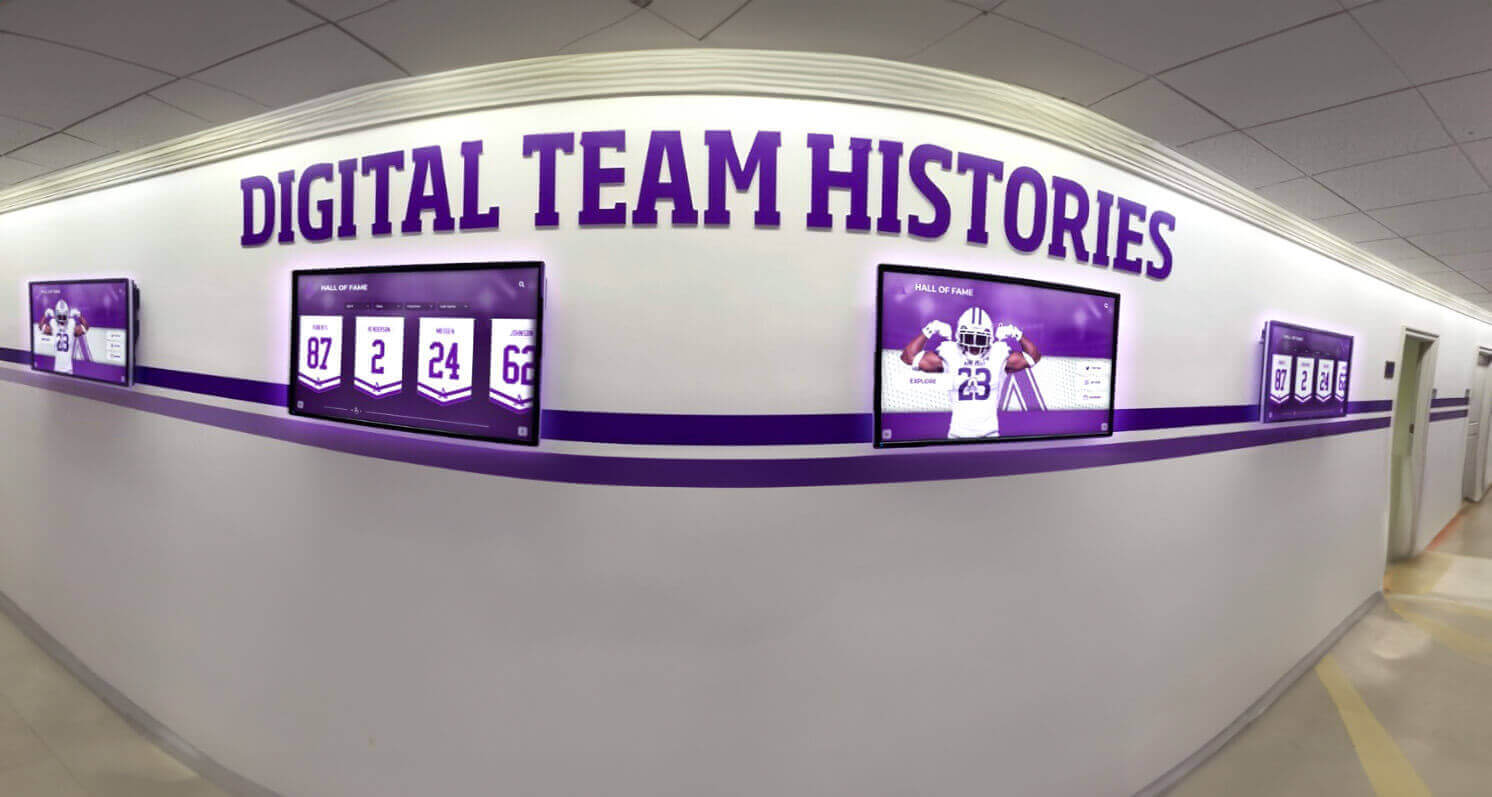
Team history data gathered through alumni questionnaires feeds directly into hallway digital displays and season record archives
Season Outcomes
- Which season(s) were the most successful during your time, and what were the outcomes? (State titles, conference championships, undefeated records, etc.)
- What was the team’s season record during your senior year?
- Did the team qualify for state, regional, or national competition? Which year(s), and how far did the team advance?
- Were there any undefeated seasons, consecutive winning streaks, or milestone victories during your time? Provide details.
Coaching and Program Context
- Who was your head coach? Spell the full name carefully—it will appear in permanent records.
- Were there assistant coaches who significantly influenced your development? Names and roles.
- Did the program change significantly during your time (new facilities, coaching transitions, enrollment changes)? Brief description for archive context.
Team Culture and Legacy
- Is there a team achievement, tradition, or milestone from your era that you believe deserves permanent recognition?
- Are there teammates from your era who you believe should be considered for hall of fame recognition? Names and brief explanation. (This seeds nomination pipelines without requiring a separate referral form.)
Section 4: Academic and Scholar-Athlete Recognition Questions
Many recognition displays and alumni profiles highlight the full portrait of the student-athlete. Advancement teams also use this data to contextualize alumni in donor relations and major gift conversations. These questions are optional but high-value.
Academic Achievements
- Did you receive academic all-conference, academic all-state, or scholar-athlete recognition? Year(s) and awarding body.
- Were you a National Honor Society member? Year inducted.
- Did you receive any academic awards, scholarships, or honors connected to your athletic participation?
Post-Secondary Education
- Did you continue your education after high school? If yes: institution, degree earned, graduation year.
- Advanced degrees: institution, field, year completed.
Community and Leadership
- Were you involved in student government, service organizations, or community leadership while in school? Role and organization.
- Did you receive any community service awards or recognition during your school years?
Section 5: Photos, Media, and Display Content Questions
Photo and media requirements derail more alumni projects than any other category. Set specifications clearly in the questionnaire itself so alumni understand what to submit before they go searching through old albums or phone backups.
Photo Submission Instructions to Include in the Form
Include this language verbatim or adapt it to your institution’s style:
We are looking for high-quality photos suitable for permanent display. Please submit images meeting as many of these specifications as possible: minimum 1,000 pixels on the shortest side; action or portrait orientation (portrait preferred for display cards); clear face visibility; school-related setting preferred. Acceptable formats: JPG, PNG, TIFF. If you only have older print photos, we can arrange scanning.
Photo Questions
- Please attach your best available headshot or portrait photo. (If digital, attach file. If print, mail to the address below.)
- Do you have action photos from your athletic career that you would permit the school to use for display purposes? (Attach or describe how to obtain)
- Do you have team photos from your era that the school does not already have in its archives?
- Do you hold copyright on your submitted photos, or do you have permission from the photographer to release them for school use?
- Photo release: Do you grant [School Name] permission to use submitted images in recognition displays, digital archives, and printed materials? Yes / No / Limited (describe)
Multimedia
- Are you aware of video footage from your athletic career (game film, highlight reels, news coverage)? If yes, please describe the source.
- Are there newspaper clippings, program covers, or other printed memorabilia from your career that you would be willing to share or allow the school to scan?
Section 6: Hall of Fame Profile Questions
If your questionnaire feeds directly into a hall of fame nomination or profile process, add this dedicated section. For schools connecting questionnaire data to touchscreen-based hall of fame displays, these fields populate the extended profile view that visitors access when they tap an athlete’s portrait card.

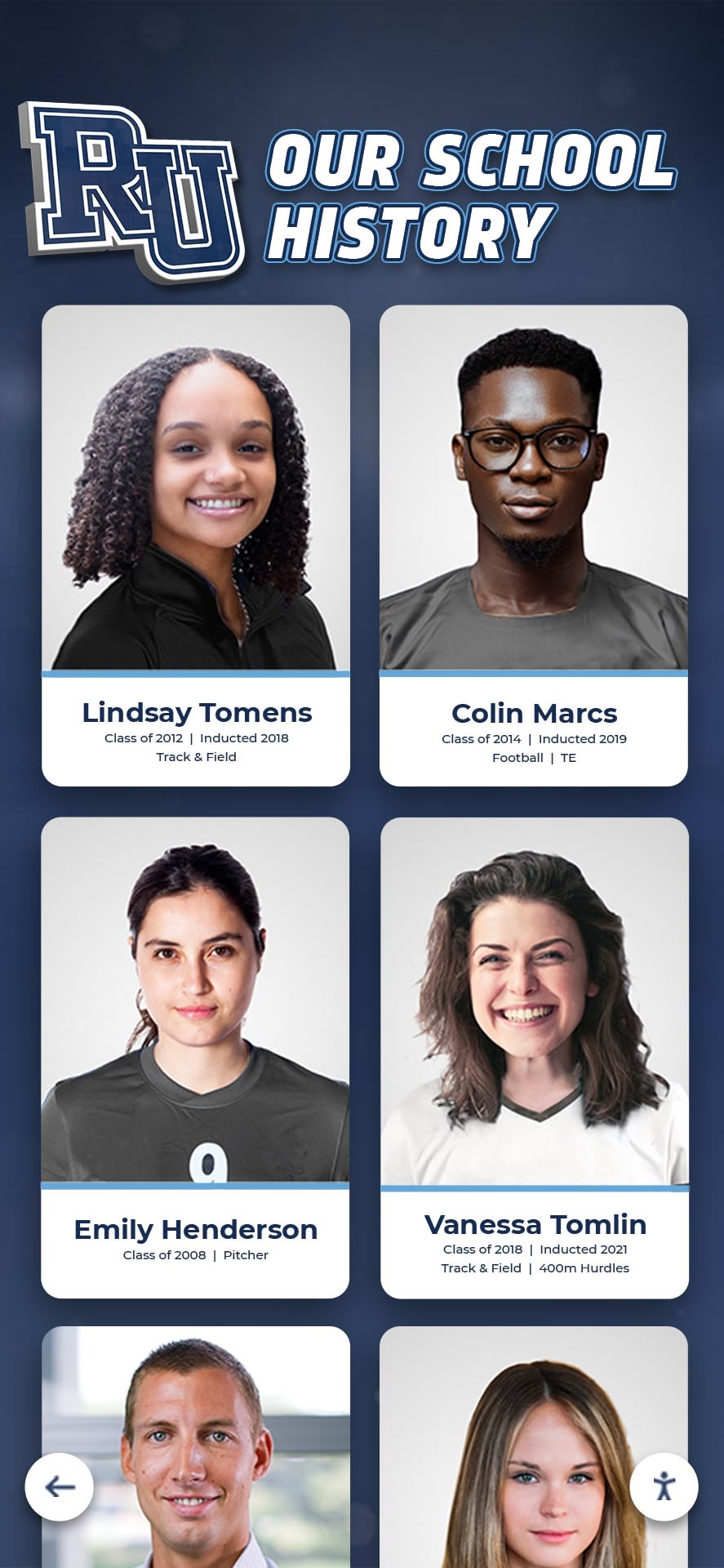
Touchscreen hall of fame profiles display the extended athlete narrative that questionnaire responses populate—structured intake questions make this content consistent across inductees
Profile Narrative
- In 150–250 words, describe your athletic career at [School Name]: What you were known for, your most memorable moments, and what the program meant to you. (This text will appear in your official profile.)
- What is one achievement, moment, or lesson from your time in the program that you most want future generations to read about?
- Were there any obstacles you overcame during your athletic career that shaped who you became?
Influence and Mentorship
- Who influenced your athletic development most while at [School Name]? (Coaches, teammates, family members — this may appear in your profile.)
- Have you mentored athletes, coached youth sports, or given back to athletics in any way since graduating? Brief description.
Post-Graduation Athletic or Professional Connection
- Current profession or industry (optional — for alumni network display):
- Are you involved in any professional or civic roles you would be comfortable highlighting in your profile?
- Would you be willing to be contacted for speaking engagements, mentorship programs, or athletics events at your school? Yes / No / Occasionally
Section 7: Engagement and Event Participation Questions
Alumni questionnaires double as engagement surveys when you include a short section on participation interest. This data feeds reunion planning, homecoming outreach, speaker pipelines, and mentorship matching. For schools building alumni event programs, this section generates the list of alumni most likely to say yes to an invitation.
Event Interest
- Would you be interested in attending a hall of fame induction ceremony or athletic recognition event? Yes / No / Depends on timing
- Would you be interested in speaking to current athletes about your career or professional path? Yes / No
- Are you interested in participating in alumni panels, Q&A sessions, or clinic events for current athletes? Yes / No
- Would you like to be added to the athletics department alumni mailing list for future events and recognition announcements? Yes / No
Reunion and Reconnection
- Is there a reunion event or milestone year gathering for your team that the school should be aware of when planning recognition activities?
- Are you connected to other alumni from your era who may not be in the school’s current records? Would you be willing to pass along this questionnaire to them?
Feedback
- Is there anything the athletics department should know about your records, your era’s history, or how your information should be displayed that this form did not capture?
Content Architecture: Organizing Questionnaire Data for Display
Completing the questionnaire is only the first step. The data must flow into a system that staff can maintain without rebuilding every time a new class is inducted or a record changes. The architecture below maps questionnaire sections to display destinations.
Data → Display Mapping
- Sections 1–2 feed individual athlete profile cards, portrait displays, and record board entries
- Section 3 populates team history panels, season archive pages, and championship banners
- Section 4 feeds scholar-athlete recognition and dual-achievement displays
- Section 5 provides visual assets for all display types—portrait cards, touchscreens, web galleries
- Section 6 builds full induction profiles for hall of fame walls and interactive kiosks
- Section 7 flows into event management and alumni engagement systems
Staff Workflow After Collection
- Import verified responses into athlete profile database
- Assign a staff reviewer to each submission for accuracy check
- Request corrections or clarifications within 14 days of submission
- Export approved data to display platform using consistent field names
- Archive original submissions with date stamp for future reference
- Flag incomplete submissions for follow-up outreach
Schools with robust hall of fame recognition tools can often connect their data intake directly to the display platform through structured CSV import or API fields, eliminating manual re-entry entirely. Map your questionnaire field names to the display platform’s field names before you finalize the form—this alignment saves significant staff time downstream.
Execution Timeline: From Form Launch to Display Update
Run this timeline in reverse from your target display update date or recognition event.
| Timeline | Task |
|---|---|
| 10–12 weeks out | Finalize questionnaire sections; get legal review of photo release language; configure form platform |
| 8–10 weeks out | Draft outreach email and letter; build alumni mailing list from existing records; identify alumni champions who will help recruit responses |
| 6–8 weeks out | Launch questionnaire; send initial outreach via email, direct mail, and alumni social channels |
| 4–6 weeks out | First follow-up to non-respondents; open scanning services for alumni with print photos only |
| 3–4 weeks out | Close questionnaire; begin data review and profile drafting |
| 2–3 weeks out | Send drafts to alumni for fact-checking approval |
| 1–2 weeks out | Incorporate corrections; finalize display content; import to display platform |
| Event week | Verify display accuracy; prepare printed programs using same data |
| Post-event | Archive submissions; update digital records; begin next outreach cycle |
For schools running annual recognition cycles, compress this to a rolling eight-week window that opens each fall and closes in early spring, giving the summer for display updates before the new academic year.
Outreach strategy matters as much as the questionnaire itself. Schools that pair digital outreach with a letter from the current athletic director or a well-respected alumni coach typically see response rates 25–40 percent higher than email-only campaigns—a consistent finding in alumni engagement literature tracked by advancement associations. The 10-year reunion planning resources at digitalrecordboard.com include outreach templates applicable to athletic alumni campaigns, particularly for multi-year class cohorts.
Display Integration: Connecting Questionnaire Data to Recognition Systems
A sports alumni questionnaire produces its full value only when the data it collects connects directly to visible, permanent recognition. Schools that treat questionnaire responses as static documents—filed but not displayed—miss the motivational and engagement benefits that visible recognition creates.

Interactive touchscreen displays transform structured questionnaire data into explorable athlete profiles that visitors can browse by sport, year, or achievement category
Touchscreen and Kiosk Displays
Questionnaire Sections 1–2 and 6 feed portrait card grids on interactive touchscreen kiosks. When a visitor taps an athlete’s card, the extended profile—narrative text, statistics, photos, and career highlights—appears in a detail view. The accuracy and depth of that content depends entirely on what the questionnaire captured. Athletic touchscreen display tools are designed to display exactly this kind of structured, categorized content.
Static Wall Displays and Lobby Installations
Sections 1–3 provide the data for printed shield displays, banner walls, and lobby recognition panels. Season records, championship years, and all-time statistical leaders all require the same verified data the questionnaire collects. Teams should design display templates before finalizing the questionnaire to confirm that required fields align.
Digital Team History Archives
Section 3 is the primary source for season-by-season team history pages on athletics websites and digital archive displays. Coaches’ names, season records, state tournament results, and milestone victories require alumni verification because official school records often have gaps, particularly for seasons predating current record-keeping systems.
Web-Based Hall of Fame Profiles
Section 6 profiles translate directly to web-based hall of fame entries. Schools using web platforms that display alumni profiles across multiple devices benefit from having narrative text, statistics, and photos organized in standard fields—the questionnaire structure creates that standardization before content ever reaches the platform.
Recognition Events and Printed Programs
Section 6 profiles and Section 4 academic achievements feed printed program content for induction ceremonies, annual awards banquets, and athletic recognition events. Having this data in a verified, structured format eliminates the rushed last-minute fact-checking that characterizes many event programs.
Adapting the Questionnaire by Program Size and Purpose
A small high school updating its hall of fame for the first time needs a different scope than a large university building an annual digital archive. Adapt accordingly.
Small Programs (First-Time Build)
Prioritize Sections 1, 2, and 6. Focus on collecting verified basic information and narrative profiles for hall of fame inductees. Keep the form to 25–30 questions maximum for first-time respondents and plan a more detailed follow-up once relationships are established.
Mid-Size Programs (Annual Update Cycle)
Run the full questionnaire for new inductees and hall of fame nominees. Run an abbreviated five-question update form annually for alumni already in the system: current contact info, any new honors, updated photo, corrections, and engagement interest. This keeps the archive current without burdening alumni who already completed the full intake.
Large Programs (Comprehensive Archive Build)
Segment by sport or graduation decade and run concurrent outreach campaigns. Build sport-specific questionnaire variants using the same parent structure but with sport-appropriate stat templates for Section 2. Use a project management tool to track completion rates by cohort and flag underrepresented graduation years for targeted outreach.
For programs building toward a major recognition event—such as a centennial celebration, new facility opening, or dedicated athletic hall of fame launch—planning tools built for hall of fame programs provide frameworks for scaling these efforts systematically across large alumni populations.
Conclusion: Building the Athletic Record Your Program Deserves
A thoughtfully constructed sports alumni questionnaire is the foundation of every accurate team history page, credible hall of fame profile, and data-driven recognition display. It replaces fragmented, effort-intensive outreach with a single structured interaction that collects what staff need and what alumni want to share—organized in a format that flows directly into permanent recognition.
The question bank in this guide covers core identity, athletic career statistics, team history records, academic achievements, photo and media assets, hall of fame narrative content, and alumni engagement interest. Use it as a complete starting point or select the sections that match your current program needs, then adapt field names to match your display platform’s data structure before launch.
Programs that invest in consistent intake processes build archives that remain accurate across staff transitions and display platform changes, because the underlying data is verified, structured, and owned by the institution—not locked in staff email threads or coaching binders.
Ready to connect your questionnaire data to a recognition display that does it justice? Rocket Alumni Solutions builds interactive hall of fame platforms, touchscreen kiosks, and web-based athletic archives designed to display exactly the kind of structured profile data a well-run sports alumni questionnaire produces—portrait cards, career statistics, team history panels, and full induction profiles, accessible year-round in your lobby, online, and at recognition events.
Request your free custom demo and see how your alumni data becomes a permanent, visible record of your program’s history.
The athletes who built your program’s legacy deserve recognition that is accurate, complete, and built to last. A standardized sports alumni questionnaire is how you make sure the record reflects everything they achieved—and everything your program stands for.































