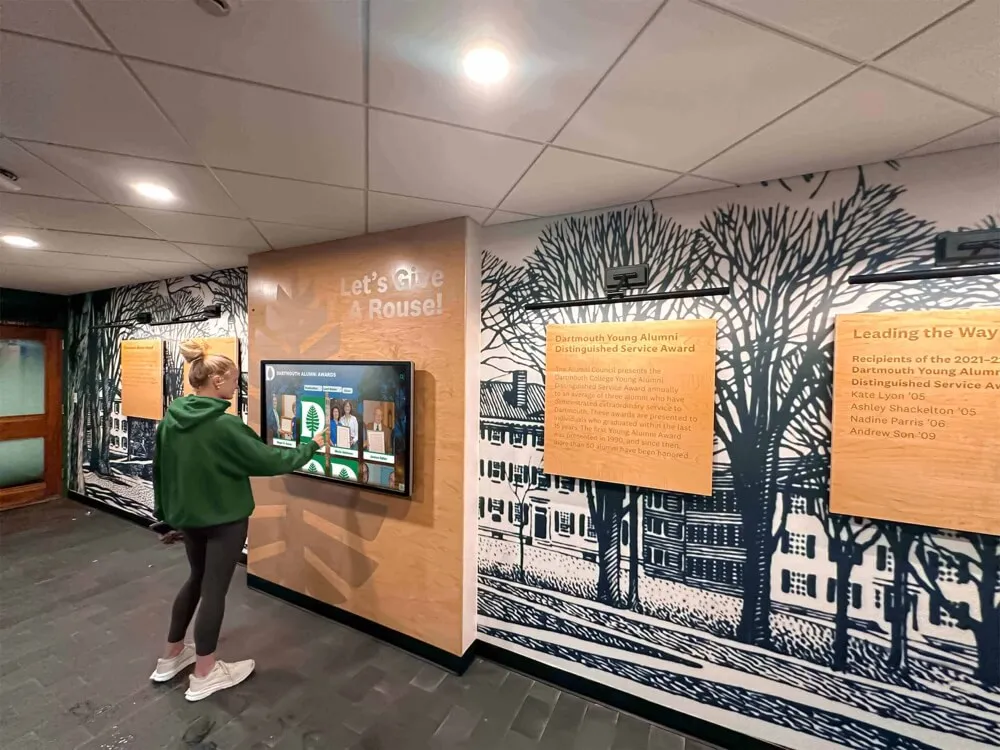




Public library digital archive collections represent the modern evolution of historical preservation, transforming how communities access, explore, and engage with their cultural heritage. These sophisticated systems combine digitized historical materials—including photographs, manuscripts, newspapers, maps, and multimedia recordings—with interactive display technology that makes local history accessible and engaging for current and future generations. Libraries worldwide are investing in digital archive initiatives that preserve deteriorating physical materials while creating dynamic discovery experiences impossible with traditional archival approaches.
Traditional library archives faced fundamental limitations that restricted public engagement: fragile materials requiring controlled access, limited physical space constraining what could be displayed, specialized knowledge needed to navigate filing systems, and preservation concerns preventing casual handling. These barriers meant invaluable historical collections remained largely inaccessible to general public audiences, with community heritage essentially locked away from the people it represents. Meanwhile, libraries struggled with deteriorating materials, storage capacity constraints, and the challenge of making historical collections relevant to modern visitors unfamiliar with traditional archival research methods.
This comprehensive guide explores how public library digital archive collections overcome these limitations through modern technology, examining digitization processes, interactive display systems, visitor engagement strategies, and implementation approaches that transform libraries from passive storage facilities into dynamic community heritage centers where history comes alive through accessible, engaging digital experiences.
The digital transformation of library archives addresses critical challenges affecting both preservation and public access. As physical materials age and deteriorate—photographs fading, newspapers becoming brittle, film degrading—digitization creates permanent preservation while simultaneously opening collections to unlimited access without risk of damage. When combined with interactive display technology specifically designed for heritage exploration, these digital collections become powerful community resources that educate, engage, and inspire connection with local history across all age groups and technical abilities.

Interactive touchscreen displays enable intuitive exploration of library digital archive collections through user-friendly interfaces requiring no specialized research training
Understanding Public Library Digital Archive Collections
Before exploring implementation strategies and technology solutions, understanding what constitutes effective digital archive collections helps libraries plan initiatives aligned with community needs and institutional capabilities.
What Comprises Digital Archive Collections
Comprehensive library digital archives encompass diverse historical materials documenting community heritage:
Photographic Collections
Visual documentation representing the foundation of most library archives:
- Historical photographs capturing community development, landmarks, and daily life across decades or centuries
- Portrait collections documenting prominent community members, families, and organizational leadership
- Event photography preserving celebrations, disasters, social movements, and significant moments
- Architectural photography showing building evolution, neighborhoods, and urban development
- Glass plate negatives and early photographic formats requiring specialized digitization
- Personal photograph donations from families documenting private community history
According to the Digital Public Library of America, photographic collections represent the most frequently accessed digital archive materials, with visual content generating 3-5 times more engagement than text-only resources.
Manuscript and Document Collections
Written materials providing detailed historical context:
- Personal letters and correspondence revealing daily life, relationships, and community concerns
- Business records documenting economic development and commercial activity
- Government documents including ordinances, meeting minutes, and official correspondence
- Legal documents such as deeds, wills, and court records
- Personal diaries and journals offering intimate perspectives on historical periods
- Organizational records from churches, clubs, schools, and community groups
Newspaper and Periodical Archives
Published materials documenting community narratives chronologically:
- Local newspaper collections providing comprehensive community history documentation
- Special interest publications serving specific demographic or professional communities
- High school and college newspapers preserving institutional and student perspectives
- Trade publications documenting industry development and commercial evolution
- Regional magazines capturing cultural trends and community identity
- Historical advertisements revealing economic activity and consumer culture
The Library of Congress Digital Collections demonstrates how newspaper digitization projects create searchable historical databases enabling keyword discovery impossible with physical archives requiring page-by-page examination.
Multimedia Archives
Audio and video materials preserving voices and motion:
- Oral history recordings capturing personal memories and first-hand historical accounts
- Community event recordings including celebrations, speeches, and ceremonies
- Radio broadcast archives documenting news, entertainment, and cultural programming
- Television footage when available showing visual community history
- Personal home movies donated by families
- Documentary projects commissioned by libraries or historical societies
Cartographic Collections
Maps and geographic materials showing spatial community development:
- Historical maps illustrating urban development, boundary changes, and infrastructure evolution
- Property plat maps documenting land ownership and real estate development
- Transportation maps showing road, rail, and transit system development
- Special purpose maps including fire insurance maps, topographic surveys, and zoning documents
- Comparative map presentations showing change over time
- Digital overlays enabling historical maps to align with current geography
Explore comprehensive approaches to digitizing historical materials for preservation and public access.
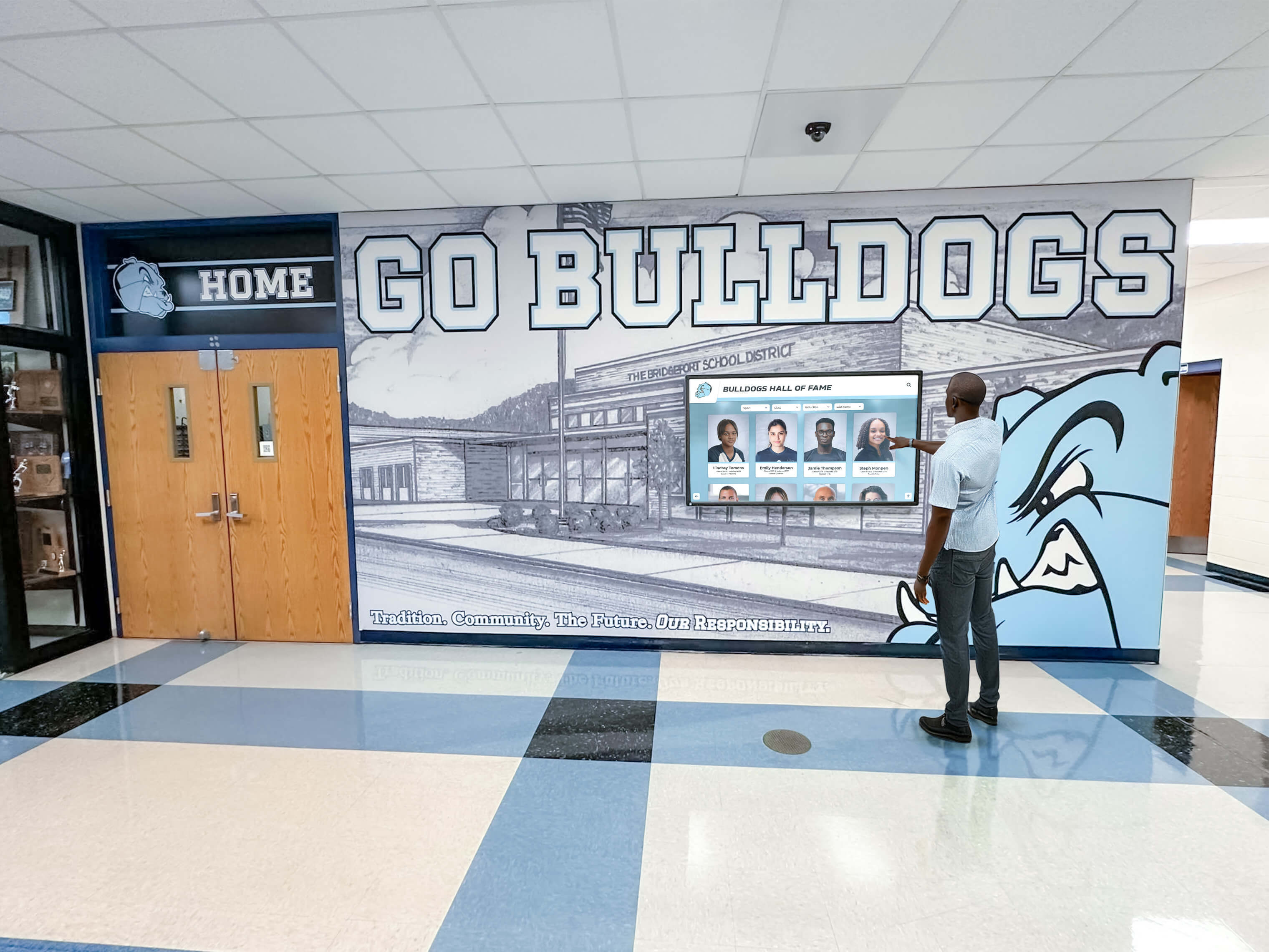
Modern touchscreen technology creates intuitive discovery experiences enabling visitors of all ages to explore historical archive collections independently
Benefits of Digitizing Library Archive Collections
Digital transformation delivers substantial advantages over traditional archival approaches:
Preservation and Protection
Digitization creates permanent safeguards for deteriorating materials:
- High-resolution digital copies preserve content even if physical originals continue degrading
- Elimination of handling damage as researchers access digital versions rather than fragile originals
- Protection from disasters including fire, flood, and environmental damage
- Multiple backup copies stored in separate locations ensuring continuity
- Future-proofing through format migration as technology evolves
- Reduction in climate control and storage costs for physical materials
Libraries report that digitization projects consistently reveal materials in such deteriorated condition that access becomes impossible within years without digital preservation intervention.
Unlimited Public Access
Digital collections eliminate traditional archival access barriers:
- Simultaneous access by unlimited users rather than single-researcher physical limitations
- Geographic accessibility enabling worldwide exploration of local collections
- Keyword searching across complete collections rather than manual catalog navigation
- Immediate access without appointment scheduling or retrieval delays
- After-hours availability extending access beyond library operating schedules
- Accessibility features supporting users with visual or mobility limitations
According to Digital Commonwealth, digital archives increase material access by 10-20 times compared to physical archives, with collections reaching audiences impossible with traditional facilities.
Enhanced Discovery and Research
Digital platforms enable research approaches impossible with physical materials:
- Full-text search across entire document collections finding specific references instantly
- Metadata filtering by date, location, subject, or format
- Image recognition technology identifying specific people, buildings, or objects across collections
- Comparison views examining multiple materials simultaneously
- Citation and sharing tools facilitating academic research and journalism
- Integration with external resources connecting local collections to broader historical contexts
Community Engagement and Education
Digital archives support educational initiatives and community connection:
- Classroom integration enabling teachers to incorporate local history into curriculum
- Student research projects using primary sources without physical archive access requirements
- Family history research supporting genealogical investigation and personal heritage discovery
- Public program content providing materials for presentations, exhibitions, and events
- Social media sharing enabling community members to disseminate historical materials broadly
- Storytelling platforms creating narrative presentations around archival materials
Learn about strategies for preserving institutional history through comprehensive digital archives.
Cost Efficiency Over Time
While initial digitization requires investment, long-term economics favor digital archives:
- Reduced physical storage requirements freeing valuable library space
- Decreased preservation costs as digital access reduces physical material handling
- Minimal ongoing access costs compared to staffing traditional research rooms
- Scalability as collections grow without proportional cost increases
- Grant eligibility as digitization projects attract foundation and government funding
- Volunteer engagement opportunities reducing paid labor requirements
Many libraries find digital archives achieve cost neutrality within 5-7 years compared to traditional archival operations while delivering vastly superior public access and community impact.

Professional kiosk installations provide complete interactive archive display solutions without requiring wall mounting or extensive facility modifications
Interactive Display Technology for Library Archives
Beyond digitization, presentation technology determines how effectively archives engage public audiences and fulfill educational missions.
Touchscreen Display Systems for Archive Exploration
Interactive displays transform passive viewing into active discovery:
Large-Format Touchscreen Displays
Professional display hardware designed for institutional environments:
- Commercial-grade touchscreens ranging from 55 to 86 inches providing excellent visibility
- Capacitive touch technology delivering smartphone-like responsiveness visitors intuitively understand
- Multi-touch capabilities supporting gestures including zooming, swiping, and rotation
- Commercial displays engineered for 16-18 hours daily continuous operation
- Enhanced brightness (400-700 nits) ensuring visibility in well-lit library environments
- 50,000-70,000 hour lifespans providing 6-8 years of reliable operation
- Protective glass surfaces resisting damage in public settings
Consumer televisions lack the durability, operational specifications, and warranty coverage required for continuous institutional use, making commercial displays essential for sustainable archive display programs.
Archive-Specific Interface Design
Purpose-built software creating intuitive exploration experiences:
- Visual browsing interfaces showcasing archive highlights through attractive presentations
- Powerful search functionality enabling keyword discovery across complete collections
- Hierarchical navigation organizing materials by category, date, location, or subject
- High-resolution image viewers supporting zoom to examine document details
- Timeline presentations showing historical progression and community development
- Map-based interfaces connecting materials to geographic locations
- Related content suggestions encouraging extended exploration
Generic digital signage software cannot replicate the database-driven, interactive exploration capabilities archive displays require, making purpose-built platforms essential for effective implementations.
Integration with Web Platforms
Effective archive systems extend beyond physical displays:
- Web-accessible collections enabling global access to local archives
- Mobile-responsive design ensuring excellent smartphone and tablet experiences
- Social sharing capabilities allowing visitors to disseminate discoveries
- Direct linking to specific materials facilitating academic citation
- API access enabling integration with external research platforms
- Analytics tracking engagement patterns and popular content
- Feedback mechanisms enabling community contribution of additional information or corrections
Solutions like Rocket Alumni Solutions provide comprehensive platforms specifically designed for heritage and archival display, combining intuitive interfaces with powerful search capabilities and web accessibility extending archive reach far beyond library facilities.
Explore detailed guides to library touchscreen interactive displays and implementation best practices.
Archive Display Installation Strategies
Strategic placement maximizes archive visibility and community engagement:
High-Traffic Location Selection
Optimal display placement includes:
- Main library entrances greeting all visitors with historical content
- Reading rooms and study areas serving researchers and students
- Community meeting spaces hosting programs and events
- Children’s areas introducing young visitors to local history
- Genealogy and local history departments serving dedicated researchers
- Exhibition spaces complementing curated displays
- Branch libraries extending archive access throughout library systems
Libraries report that entrance lobby installations generate 5-10 times more engagement than locations in specialized departments, as casual visitors discover collections they didn’t specifically seek.
Display Format Options
Various configurations serve different applications:
- Wall-mounted displays creating clean, space-efficient installations
- Freestanding kiosk systems providing complete solutions without wall mounting requirements
- Table-height installations supporting seated research and extended engagement
- Multiple coordinated displays showing different collection categories or periods
- Video wall configurations creating impressive focal points in large spaces
- Integration with physical exhibits combining digital and traditional presentation
Accessibility Considerations
Inclusive design ensures archives serve entire communities:
- ADA-compliant mounting heights ensuring wheelchair user access
- Adequate clearance space for maneuvering assistive mobility devices
- Audio description options for visually impaired visitors
- High-contrast modes supporting low vision users
- Text size adjustment capabilities
- Seating nearby enabling extended comfortable engagement
- Intuitive interfaces requiring no technical expertise or instructions
Review comprehensive guides to school history digital displays for approaches applicable to library archive implementations.
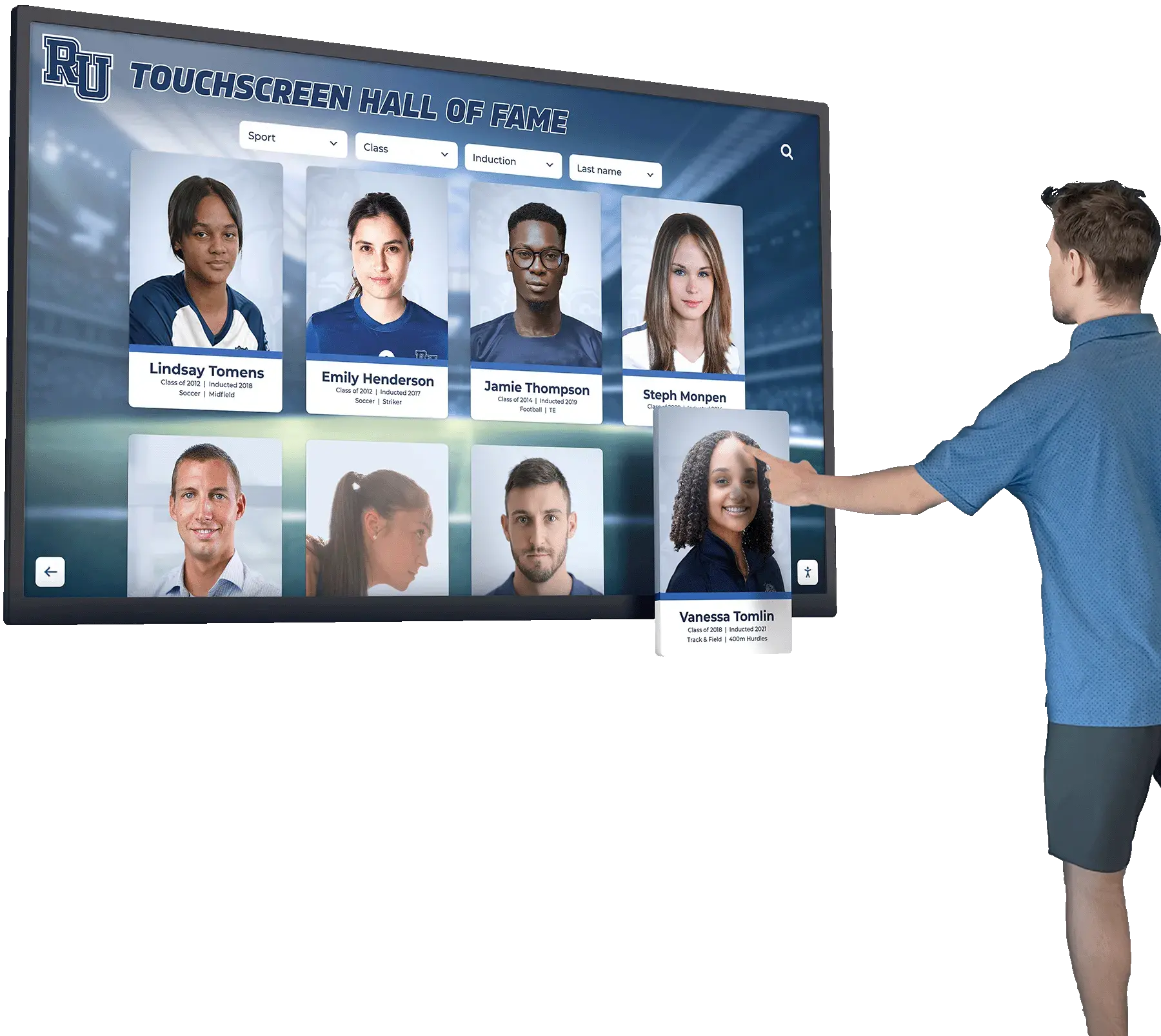
Intuitive interfaces enable visitors to explore complex archive collections through simple touch interactions without requiring research expertise or staff assistance
Implementing Digital Archive Display Programs
Successful digital archive initiatives require systematic planning addressing both digitization and presentation components.
Planning Digital Archive Collections
Strategic planning ensures projects align with community needs and institutional capabilities:
Collection Assessment and Prioritization
Evaluate existing archives to identify digitization priorities:
- Physical condition assessment identifying materials requiring immediate preservation
- Community interest analysis determining collections generating most public demand
- Research value evaluation prioritizing materials supporting academic and educational use
- Uniqueness assessment emphasizing collections not available elsewhere
- Copyright status review ensuring legal compliance with digitization and publication
- Estimated workload calculation determining realistic project scopes
- Partnership opportunities identifying collections held by other community organizations
Most libraries adopt phased approaches digitizing highest-priority collections first rather than attempting comprehensive digitization simultaneously, ensuring visible progress while building expertise and refining workflows.
Community Input and Engagement
Stakeholder involvement improves project relevance and support:
- Public surveys identifying historical topics and materials generating community interest
- Researcher consultation understanding academic and genealogical needs
- Educator engagement identifying curriculum connections and educational applications
- Historical society partnerships leveraging specialized knowledge and volunteer support
- Donor outreach encouraging personal collection contributions
- Advisory committee formation providing ongoing guidance and advocacy
- Youth involvement engaging younger generations in heritage preservation
Budget Development and Funding
Comprehensive budgets address all project components:
- Equipment costs including scanners, computers, storage systems, and display hardware
- Software licensing for digitization tools, database platforms, and display interfaces
- Staff time for scanning, metadata creation, quality control, and project management
- Contractor services for specialized digitization or software development when needed
- Storage and hosting for digital collections and backup systems
- Training for staff on digitization standards and system operation
- Marketing and programming to promote completed archives and drive engagement
Funding Source Strategies
Multiple approaches help libraries secure digitization funding:
- Operating budget integration incorporating archive projects into regular library budgets
- Grant applications pursuing state library agencies, humanities councils, and private foundations
- Community fundraising campaigns connecting heritage preservation with donor interests
- Corporate sponsorship from businesses benefiting from community historical research
- Partnership cost-sharing with museums, historical societies, and universities
- Volunteer labor leveraging retired professionals and community service programs
- Phased implementation spreading costs across multiple budget cycles
Many successful projects combine multiple funding sources rather than relying on single large grants, creating sustainable programs that continue beyond initial implementation phases.
Digitization Processes and Standards
Quality standards ensure digital archives serve preservation and access goals effectively:
Scanning and Image Capture
Technical specifications affect usability and preservation value:
- Resolution requirements typically 300-600 DPI for documents, 600-1200 DPI for photographs
- Color depth supporting accurate reproduction of original materials
- File format selection balancing quality and accessibility (TIFF for preservation, JPEG for access)
- Consistent lighting and color calibration ensuring accurate reproduction
- Quality control processes verifying acceptable image capture
- Handling protocols protecting fragile materials during scanning
- Batch processing workflows maximizing efficiency
Metadata Creation
Descriptive information makes archives discoverable and usable:
- Standardized cataloging following recognized metadata schemas (Dublin Core, MODS)
- Comprehensive descriptions including title, date, creator, subject, and format
- Geographic information connecting materials to specific locations
- Named entity recognition identifying people, organizations, and places
- Subject headings enabling thematic browsing and discovery
- Rights information clarifying copyright status and usage permissions
- Transcription when appropriate making text searchable
- Crowdsourcing opportunities enabling community members to contribute descriptive information
According to research on digital archives, well-developed metadata increases material usage by 3-5 times compared to minimal descriptions, making cataloging investment essential for effective collections.
Quality Assurance
Systematic review maintains collection standards:
- Image quality verification ensuring scans meet technical specifications
- Metadata accuracy checking preventing errors in descriptions and dates
- Consistency audits maintaining standardized practices across collections
- Usability testing confirming materials display properly and function as intended
- Accessibility compliance ensuring collections serve all users appropriately
- Regular maintenance updating links, fixing errors, and improving descriptions over time
Learn about how to digitize old yearbooks for techniques applicable to various library archival materials.
Selecting Display Technology and Software
Technology choices determine long-term program success and user experience quality:
Display Hardware Selection
Several factors guide appropriate equipment choices:
- Display size balanced between visibility, space constraints, and budget (55-75 inches most common)
- Touch technology ensuring responsive, reliable interaction (capacitive preferred over resistive)
- Commercial-grade specifications supporting continuous institutional operation
- Installation requirements including wall mounting, freestanding kiosks, or table configurations
- Environmental considerations including lighting conditions and potential glare
- Maintenance and warranty coverage ensuring long-term reliability
- Future expansion planning if multiple displays anticipated
Archive Display Software
Platform capabilities determine functional effectiveness:
- Intuitive interface design requiring no instruction for public use
- Powerful search across complete collections with auto-complete and filtering
- High-resolution image display supporting zoom to examine document details
- Multimedia support for audio, video, and mixed-format presentations
- Customization options for branding and institutional identity
- Web integration extending collections beyond physical displays
- Administrative tools enabling non-technical staff to manage content
- Analytics providing engagement data and popular content identification
Purpose-built heritage display platforms like Rocket Alumni Solutions offer comprehensive functionality specifically designed for archival applications rather than adapting generic digital signage systems that lack essential discovery and exploration capabilities.
Integration with Existing Systems
Effective displays connect with broader library infrastructure:
- Catalog integration linking archive materials to main library collections
- Institutional repository connections for academic libraries
- External platform integration with Digital Public Library of America, HathiTrust, or regional consortia
- Authentication systems for restricted materials requiring permissions
- Preservation system integration ensuring digital archive materials receive appropriate backup and migration
Review touchscreen software options designed for heritage and recognition applications.
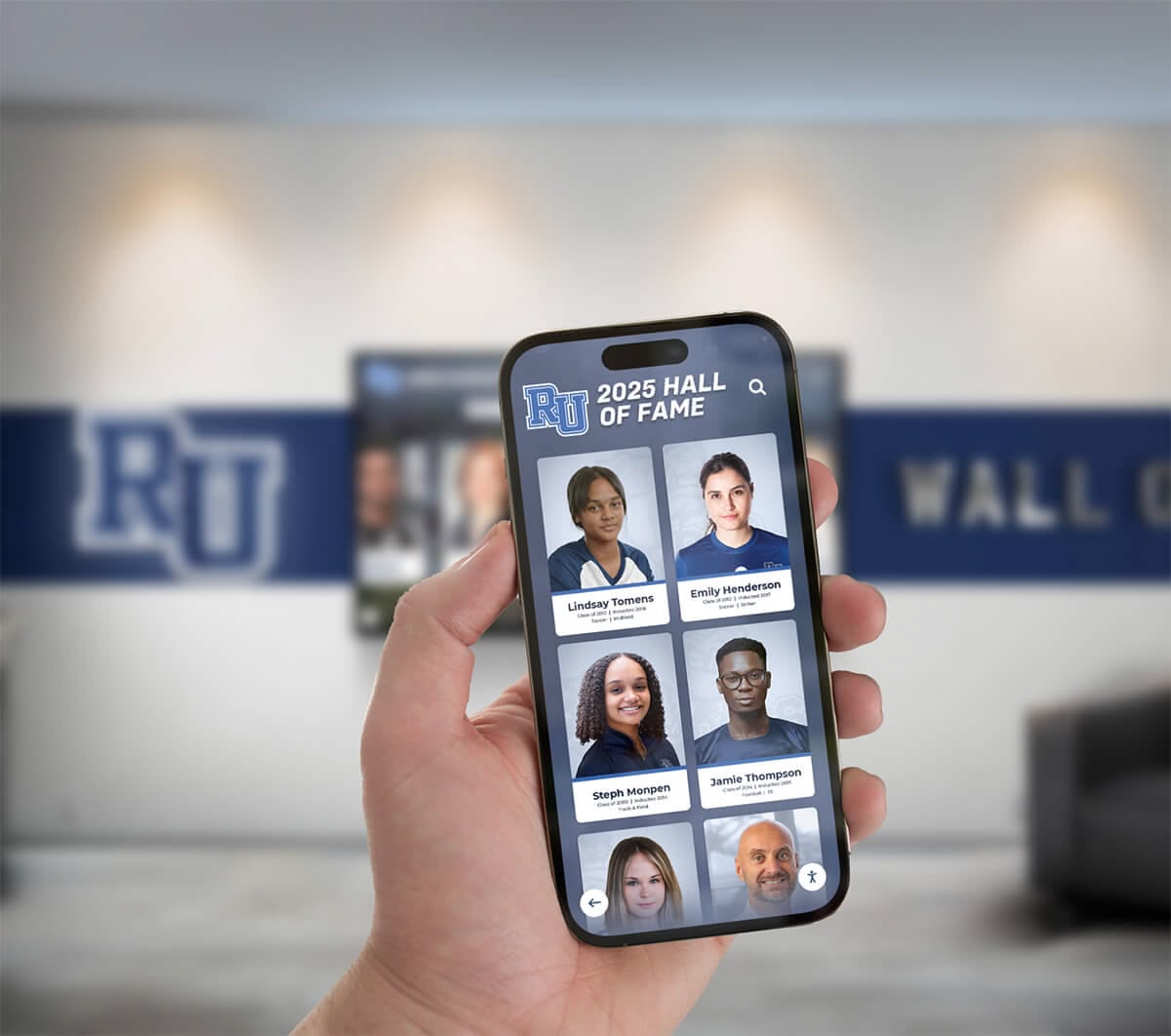
Web-accessible archive platforms extend collection reach beyond library facilities, enabling global exploration of local history from any device
Creating Engaging Archive Experiences
Beyond basic access, thoughtful design creates compelling experiences that connect communities with heritage.
Thematic Collections and Curated Presentations
Organized content helps visitors discover relevant materials:
Thematic Organization Strategies
Curated collections create focused exploration experiences:
- Chronological presentations showing community development through specific periods
- Geographic collections focusing on particular neighborhoods, landmarks, or regions
- Topical groupings around industries, cultural groups, or historical events
- Biographical collections documenting prominent community members
- Event-focused presentations examining significant moments in community history
- Comparative presentations showing change over time through before/after sequences
- Anniversary commemorations connecting current dates to historical events
Featured Content and Highlights
Attractive presentations invite exploration and discovery:
- Rotating featured materials highlighting collection diversity and interesting items
- Seasonal presentations connecting archives to current calendar events
- Recently added content showcasing ongoing collection development
- Most popular materials based on user engagement data
- Staff picks with context explaining significance and interest
- Mystery photo challenges engaging community in identification and information contribution
- Story-based presentations weaving narrative around related archival materials
Educational Resources
Structured content supports learning objectives:
- Lesson plan integration connecting archives to curriculum standards
- Primary source analysis guides helping students evaluate historical materials
- Research tutorials teaching archive navigation and discovery strategies
- Historical context presentations providing background for archival materials
- Discussion questions encouraging critical thinking about historical sources
- Activity suggestions for teachers incorporating archives into assignments
- Student showcase featuring exemplary projects using archive materials
Libraries implementing curated thematic presentations report 40-60% longer visitor engagement compared to simple chronological or format-based organization, demonstrating the value of thoughtful content structure.
Interactive Features Enhancing Engagement
Technology capabilities create compelling discovery experiences:
Map-Based Exploration
Geographic interfaces create intuitive navigation:
- Historical maps showing community at specific time periods
- Contemporary map overlays enabling users to see historical locations in current context
- Location-based browsing where touching map areas reveals relevant archival materials
- Building-specific collections documenting individual landmarks
- Street-level exploration showing neighborhood development
- Transportation route presentations documenting infrastructure evolution
- Disaster mapping showing fires, floods, or other significant events
Nashville Public Library’s interactive archive display demonstrates this approach effectively, allowing visitors to touch current city map locations to access historical photographs and documents from those specific areas.
Timeline Presentations
Chronological organization shows historical progression:
- Interactive timelines enabling navigation across decades or centuries
- Decade-specific deep dives highlighting materials from particular periods
- Simultaneous timelines comparing community development with national or world events
- Personal timeline creation where users select materials to build custom chronological sequences
- Anniversary highlighting noting historical events on current calendar dates
- Before/after comparisons showing change over specific intervals
- Continuous scroll interfaces enabling smooth chronological browsing
Social Features and Sharing
Community participation extends archive impact:
- Social media sharing enabling visitors to post discoveries to personal networks
- Comment systems allowing community members to add information and memories
- Story submission platforms where families contribute personal historical narratives
- Photo identification crowdsourcing engaging community in archival enhancement
- Family tree integration connecting genealogical research with archival materials
- Email and download capabilities supporting research and personal use
- Print-on-demand options enabling high-quality reproduction for personal collections
Explore approaches to interactive displays for community engagement applicable to library archive implementations.
Programming and Promotion
Active marketing ensures archives achieve community impact potential:
Launch Events and Unveiling
Formal introduction creates awareness and excitement:
- Public unveiling ceremonies with local officials, donors, and community leaders
- Historical society partnerships co-hosting launch events
- Media coverage including press releases and journalist demonstrations
- Behind-the-scenes presentations explaining digitization processes
- Donor recognition honoring financial and material contributors
- Technology demonstrations showing navigation and discovery capabilities
- First-user experiences inviting attendees to explore archives
Ongoing Educational Programming
Regular programs maintain engagement and attract diverse audiences:
- Local history lecture series using archives as primary sources
- Genealogy workshops teaching family history research using digital collections
- School partnerships bringing classes for primary source instruction
- Digital literacy classes teaching archive navigation to older adults
- Mystery photo identification sessions engaging community knowledge
- Historical book clubs reading materials connected to archival documents
- Living history presentations bringing archival periods to life
Marketing and Communication
Multi-channel promotion ensures community awareness:
- Social media campaigns featuring interesting discoveries and collection highlights
- Email newsletters showcasing recently added materials
- Bookmarks and printed materials distributed throughout library facilities
- School outreach to teachers and media specialists
- Website features on library homepage
- Partnership promotion through historical societies, genealogy groups, and civic organizations
- Local media stories highlighting unique or significant archival materials
Libraries implementing comprehensive promotion strategies report 3-5 times higher archive usage compared to passive launch approaches relying solely on organic discovery.

Interactive archive displays create natural gathering points where community members explore shared heritage together, fostering connection and conversation
Special Considerations for Library Archive Displays
Several additional factors affect digital archive effectiveness and sustainability.
Copyright and Rights Management
Legal compliance protects libraries while respecting intellectual property:
Copyright Assessment
Determining usage rights requires systematic evaluation:
- Public domain determination for materials published before 1929 or meeting other criteria
- Orphan works where copyright holders cannot be identified despite reasonable search
- Fair use analysis for materials supporting educational and research purposes
- Permission seeking for materials where copyright holders can be identified
- Donor agreements clarifying rights when accepting personal collection contributions
- Restricted access for materials requiring permission but valuable for preservation
- Takedown procedures responding to legitimate copyright concerns
Rights Statements
Clear communication protects libraries and users:
- Standardized rights statements using recognized terminology (RightsStatements.org)
- Visible attribution providing creator credit and copyright information
- Usage guidance explaining permitted uses and restrictions
- Contact information for permission requests
- Citation formats helping users properly credit sources
- Commercial use restrictions when appropriate
- Regular review updating status as materials enter public domain
Privacy and Sensitive Materials
Balancing access with privacy protection:
Privacy Considerations
Appropriate restrictions respect individual rights:
- Living individual privacy protecting people in historical photographs and documents
- Family notification before publishing sensitive personal materials
- Redaction of social security numbers, financial information, and other protected data
- Restricted access for materials involving minors
- Medical record protection following HIPAA requirements when applicable
- Legal proceeding sensitivity particularly for criminal cases
- Community consultation regarding culturally sensitive materials
Sensitive Content Management
Thoughtful approaches address difficult historical materials:
- Content warnings for materials depicting violence, tragedy, or disturbing subjects
- Historical context explaining offensive materials within their period
- Educator guides helping teachers use problematic sources as teaching opportunities
- Community advisory input on potentially controversial materials
- Balanced collection development ensuring diverse perspectives
- Regular review updating interpretations as social understanding evolves
Sustainability and Long-Term Maintenance
Effective archives require ongoing stewardship:
Technical Maintenance
Systems require regular attention:
- Display hardware maintenance including cleaning and component replacement
- Software updates addressing security vulnerabilities and adding capabilities
- Backup verification ensuring preservation copies remain accessible
- Format migration as file formats become obsolete
- Link maintenance updating external references
- Storage expansion as collections grow
- Performance monitoring ensuring acceptable system response
Content Development
Growing collections maintain relevance:
- Ongoing digitization expanding archive coverage
- Recently donated material integration
- Metadata enhancement improving existing descriptions
- Transcription projects making text searchable
- Community contribution integration adding crowdsourced information
- Related content linking connecting similar materials
- Quality improvement addressing errors and inconsistencies
Staffing and Expertise
Successful programs require appropriate support:
- Dedicated project coordination rather than added duties for overloaded staff
- Technical expertise for system administration and troubleshooting
- Cataloging knowledge ensuring metadata quality
- Digitization training maintaining quality standards
- Reference support helping visitors navigate archives
- Marketing capabilities promoting collections
- Volunteer coordination leveraging community support
Many libraries find that comprehensive digital archives require 0.5-1.0 FTE dedicated staff initially, with reduced ongoing effort after implementation, making realistic staffing critical for sustainability.
Review strategies for building online digital archives with sustainable long-term approaches.
Conclusion: Transforming Community Heritage Through Digital Archives
Public library digital archive collections represent transformative opportunities to preserve community heritage while creating accessible, engaging experiences that connect current and future generations with local history. When libraries combine thoughtful digitization processes with interactive display technology specifically designed for heritage exploration, they transform from passive storage facilities into dynamic community centers where history comes alive through intuitive discovery experiences.
The strategies explored throughout this guide provide comprehensive frameworks for planning, implementing, and sustaining digital archive programs that serve preservation goals while maximizing public access and community engagement. From collection assessment and digitization standards to interactive display technology and promotional strategies, these approaches enable libraries to overcome traditional archival limitations while building programs that deliver lasting value to communities for generations.
Ready to transform how your library preserves and presents community heritage? Modern digital archive display solutions help libraries celebrate local history comprehensively while creating engaging experiences that connect diverse audiences with cultural heritage. Solutions like Rocket Alumni Solutions provide comprehensive platforms specifically designed for heritage display, offering intuitive interfaces, powerful search capabilities, web accessibility, and professional support ensuring successful long-term programs that preserve community stories while making them accessible to current and future generations.
Whether establishing your first digital archive initiative or enhancing existing collections with interactive displays, start with clear planning that establishes realistic goals and sustainable approaches, select technology aligned with your specific needs and resources, implement quality digitization standards that serve both preservation and access, and develop compelling presentations that invite exploration and connection with local history.
Your community’s heritage deserves preservation and presentation that honors its significance while making history accessible and relevant to current generations. With thoughtful planning, appropriate technology selection, quality digitization practices, and sustained commitment to collection development, libraries can create digital archive programs that preserve cultural heritage while inspiring community connection, supporting education, and ensuring that local history remains vibrant and accessible for generations to come.
The most important consideration isn’t budget size, collection scope, or facility quality—it’s genuine commitment to community heritage preservation combined with systematic implementation ensuring archives serve real community needs rather than creating impressive displays that fail to achieve meaningful engagement. Your community stories deserve preservation and presentation that makes history accessible, engaging, and relevant to current and future generations.
Start planning your digital archive display implementation today, exploring how interactive technology can transform your library’s historical collections from locked-away materials into vibrant community resources. Learn more about school history timeline displays for approaches applicable to library implementations, or explore comprehensive digital archive systems to begin your heritage preservation transformation journey.
Sources:































