Hall of Fame Website Search Indexing Checklist: Verify Profiles, Categories, and Updates
- Home /
- Digital Hall of Fame Insights & Resources /
- Hall of Fame Website Search Indexing Checklist: Verify Profiles, Categories, and Updates

The Easiest Touchscreen Solution




Live Example: Rocket Alumni Solutions Touchscreen Display
Interact with a live example (16:9 scaled 1920x1080 display). All content is automatically responsive to all screen sizes and orientations.
A hall of fame website search indexing checklist is a structured verification process that confirms every inductee profile page, sport category page, award directory, and recently updated record is crawlable by search engines and publicly discoverable—so that alumni, families, and prospective students can actually find recognition content when they search for it. Without this check, entire induction classes can sit invisible in your CMS for months after they are published, and corrections to existing profiles may never reach Google’s index at all.
This checklist is designed for school administrators, athletic directors, school IT staff, facilities coordinators, and booster leaders who manage a digital hall of fame website and need a repeatable workflow to confirm that every page the program publishes is indexed, surfaced, and accurate in search results.
Alumni and families searching for an honoree’s name, a sport category, or a championship year expect to find that content on the first page of results. When they cannot, the recognition program loses credibility even if the data is perfectly maintained inside the CMS. The five-phase checklist below walks you through baseline coverage verification, per-profile auditing, category-page indexing, new-inductee submission, and corrections re-indexing—giving you a complete framework to manage before each induction cycle.

A search-indexed hall of fame website should surface the same profile content whether a visitor arrives from Google on a phone or a laptop
Indexing Snapshot
| Dimension | Details |
|---|---|
| Primary audience | Athletic directors, school IT staff, advancement leaders, facilities coordinators, booster leaders |
| Content at risk | Inductee profile pages, sport and category index pages, award directories, recently added or corrected records |
| Common triggers | New induction class published, platform migration, profile corrections, annual SEO review, touchscreen kiosk launch |
| Recommended cadence | Full check before each induction cycle; quick spot-check 48–72 hours after any batch publish |
| Tools required | Google Search Console (free), Bing Webmaster Tools (free), XML sitemap viewer, site: search operator |
| Core outcome | Every live profile and category page confirmed indexed, no crawl errors, corrections re-submitted and refreshed |
Why Search Indexing Is a Recognition Problem, Not Just a Technical One
Search indexing is the process by which Google, Bing, and other search engines discover, crawl, and add web pages to their databases so that they appear in search results. For most websites, a missing page in the index is an inconvenience. For a hall of fame website, it is a recognition failure.
When an inductee’s profile page is not indexed, a family member searching for that honoree’s name finds nothing. When a sport category page is blocked from crawling, the entire body of recognition for that program disappears from public search. When a corrected profile—a name spelled correctly, a stat updated, a photo replaced—has not been re-crawled, the wrong version persists in results for weeks.
Building a complete athletic hall of fame for a school involves far more content architecture decisions than most administrators anticipate, and indexing is among the most overlooked. The checklist below gives you specific verification steps organized into the five phases where indexing problems most commonly appear.
Phase 1 — Baseline Coverage Audit: Confirm What Google Knows About Your Site
Before reviewing individual pages, establish how many pages Google has indexed compared to how many your CMS contains.
1a. Run a site: search
Open any browser and type site:yourdomain.com into Google. The result count at the top is Google’s best estimate of your indexed page count. Compare this to the total live page count from your CMS export. A large gap—more than 10–15 percent—signals that crawling or indexing is blocked somewhere.
1b. Open Google Search Console Coverage report
Navigate to Index → Pages in Google Search Console. Look for pages listed under “Not indexed” and sort by reason. Common reasons specific to hall of fame websites include:
- Discovered — currently not indexed: Google found the URL but has not yet crawled it. Common with large induction batches published on the same day.
- Crawled — currently not indexed: Google visited the page but chose not to index it. Often caused by thin content (profiles with no photo, no stats, and a single sentence of biography).
- Excluded by ’noindex’ tag: A developer or CMS template has inadvertently set a noindex directive. Check every profile and category template for a stray
<meta name="robots" content="noindex">tag. - Blocked by robots.txt: A rule in your robots.txt file is preventing Googlebot from accessing profile or category directories.
1c. Verify robots.txt allows crawling
Fetch your robots.txt file at yourdomain.com/robots.txt. Confirm there are no Disallow: rules targeting your profiles directory, your categories path, or your search results pages that contain canonical profile links.
1d. Check XML sitemap submission
In Google Search Console, go to Sitemaps. Confirm your sitemap is submitted and that the “Discovered URLs” count is close to your live page count. If your platform generates separate sitemaps for profiles, categories, and static pages, submit each one individually.
Phase 2 — Individual Profile Pages: Verify Each Inductee Is Findable
The most common indexing failure on hall of fame websites is the long tail of individual profile pages—each one a distinct URL, each one needing its own crawl and index decision.

Every inductee portrait card corresponds to a profile URL that search engines must individually discover and index
2a. Audit canonical URLs for consistency
Each inductee should have exactly one canonical URL. Common duplication patterns that confuse crawlers include:
/profiles/firstname-lastname/and/inductees/firstname-lastname/both resolving to the same content- Profile accessible via CMS ID (
/profiles/1042/) and via slug (/profiles/maria-chen-soccer/) simultaneously - Query-string variants (
?year=2019&sport=soccer) generating duplicate profile content
Identify duplicates by exporting all profile URLs from your CMS and looking for names that appear on more than one URL pattern. Set a <link rel="canonical"> tag on every secondary URL pointing to the preferred slug.
2b. Flag thin-content profiles that risk exclusion
Google is more likely to skip indexing profiles that contain no photo, a blank statistics section, and fewer than 150 words of biography. Before publishing a new induction class, require each profile to include at minimum: a headshot, the induction year, the sport or category, a brief biographical paragraph, and at least one career achievement. Well-structured nomination form fields gathered during the selection process give you the source material to meet this threshold.
2c. Verify internal linking connects profiles to category pages
Every profile page should contain at least one internal link pointing to its parent category—the sport page, the decade page, or the award-type page. This internal link helps crawlers discover the profile from an already-indexed category page, and it distributes page authority downward into the profile layer.
2d. Spot-check the 10 most recently added profiles with URL Inspection
In Google Search Console, use the URL Inspection tool on the 10 most recently published profiles. Each should return “URL is on Google” with a recent last-crawl date. If any return “URL is not on Google,” request indexing immediately from that same tool.
Phase 3 — Category and Directory Pages: Ensure Every Classification Is Searchable
Category pages—sport directories, year or decade indexes, award-type listings—carry more SEO weight per page than individual profiles because they aggregate many honorees under a single, searchable topic. A broken or de-indexed category page can wipe out the discoverability of every profile it contains.
3a. List every category type your site uses
Map out your full category taxonomy:
- Sport-specific directories (Football, Basketball, Track & Field, Swimming, etc.)
- Classification indexes (Individual, Team, Coaching Staff, Distinguished Alumni)
- Year or decade pages (/class-of-2024/, /inductees-1990s/)
- Award-type pages (/scholar-athlete/, /community-service-award/)
Confirm each category has a corresponding live URL in your CMS and that the URL is listed in your sitemap.
3b. Check that category pages return HTTP 200
A category page returning a 301 redirect, 302 redirect, or 404 is still “findable” by a human who follows links—but Google treats redirects as signals to re-evaluate and may consolidate authority to the destination URL or drop the page from the index. Run every category URL through a status-code checker and resolve any non-200 responses before the next induction cycle.
3c. Verify pagination is crawlable
If your sport directories paginate across multiple pages (/football/page/2/), confirm that each pagination URL is crawlable and not blocked by robots.txt. Blocking paginated category pages is a common accident that prevents Google from discovering profiles that appear only on page two or beyond.
3d. Confirm each category page has unique title and meta description
Generic titles like “Hall of Fame” or “Inductees” on every category page force Google to treat multiple pages as near-duplicates. Each category page should carry a unique title (e.g., “Football Hall of Fame Inductees — Lincoln High School”) and a unique meta description that includes the sport, the institution name, and the induction year range.
Check whether the CMS generates unique, crawlable category pages automatically or requires manual SEO configuration for each one.
Phase 4 — New Inductee Submission: Get New Profiles Indexed Within Days, Not Months
Publishing a new induction class does not automatically prompt Google to crawl every new page. Without active submission, new profiles can sit unindexed for weeks or longer on low-traffic websites.
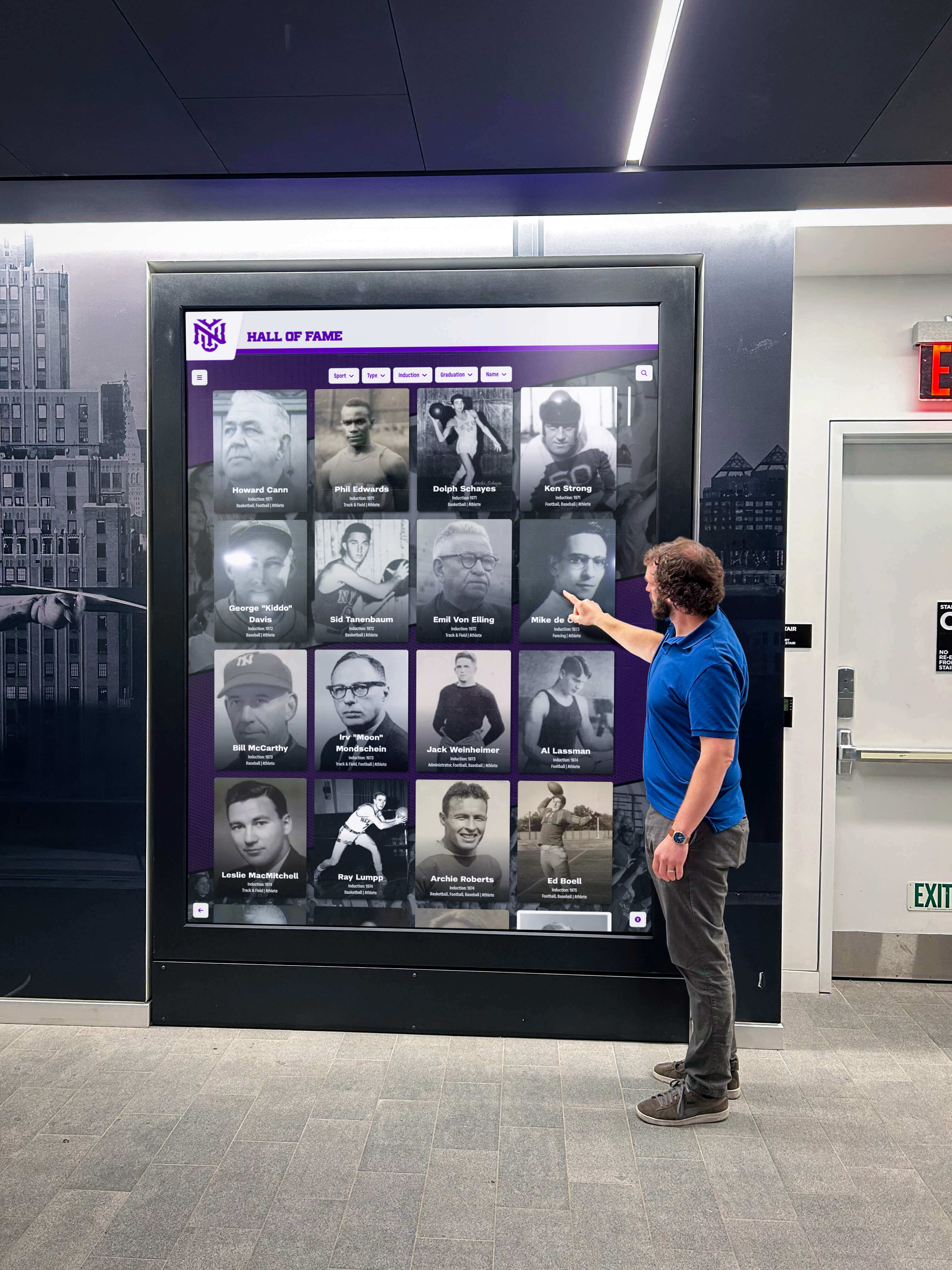
Inductees displayed on a lobby screen should be equally discoverable through Google—profile publishing and index submission must happen in tandem
4a. Regenerate and resubmit your sitemap on publish day
Every time a batch of new profiles is published, regenerate your XML sitemap and resubmit it in Google Search Console under Sitemaps → Resubmit. This is the fastest signal you can send to Google that new content exists and is ready to crawl.
4b. Use URL Inspection to request indexing for high-priority profiles
For your ceremony’s featured inductees—the honorees most likely to be searched by name immediately after the event—use the URL Inspection tool to request indexing individually. Google processes these requests within hours to a few days. Limit individual requests to 10–15 URLs per day; bulk requests beyond that are processed at the same rate as sitemap discovery.
4c. Publish an announcement post that links to every new profile
A blog post or news announcement published on ceremony day and linking to every new inductee profile creates a fresh, dated internal link signal. Google crawls news content quickly. Those outbound links from a freshly crawled page act as a secondary discovery path for each new profile URL.
4d. Share profile URLs on the school’s social media accounts
Google’s crawlers index content linked from high-traffic external pages faster than content with no external links. Sharing inductee profile URLs on the school’s official social media accounts and alumni email newsletter creates external link signals that accelerate initial indexing.
Phase 5 — Corrections and Re-Indexing: Ensure Updated Profiles Reflect Current Data
A corrected profile—whether the fix is a misspelled surname, an updated graduation year, a replaced photo, or a revised stat line—must be re-crawled before the correction reaches search results. Publishing the fix in the CMS is not the same as confirming Google has seen it.
5a. Use URL Inspection to confirm the cached version matches your update
In Google Search Console, paste the corrected profile URL into the URL Inspection tool. Click View crawled page to see the version Google currently holds. If it shows the old content, the crawl has not yet occurred since your edit.
5b. Request indexing for any corrected profile page
After confirming the cached version is stale, click Request Indexing in the URL Inspection tool. Google typically re-crawls requested URLs within 1–4 days. Check back using the same tool after 72 hours to confirm the updated version is now cached.
5c. Update your sitemap’s <lastmod> date for corrected pages
If your CMS supports it, update the <lastmod> value in your sitemap entry for any corrected profile to the date of the correction. This signals to Googlebot that the page has changed since the last crawl, making re-crawl prioritization faster.
5d. Check structured data after corrections involving names or dates
If your profiles use schema.org structured data (such as Person markup for inductees), confirm that any name, date, or award-field correction is also reflected in the structured data output. A page whose visible content says “Maria Chen” but whose structured data still reads “Marie Chen” creates a consistency conflict that may suppress rich result eligibility.
Indexing Issue Decision Table
Use this table to diagnose and resolve the most common search indexing failures on hall of fame websites.
| Symptom | Likely Cause | Verification Step | Fix |
|---|---|---|---|
| Profile not appearing in Google at all | New URL not yet crawled | URL Inspection tool → “URL is not on Google” | Submit sitemap; request indexing via URL Inspection |
| Profile appearing with old content after a correction | Stale cached version | URL Inspection → View crawled page shows old data | Request indexing; update sitemap <lastmod> |
| Category page missing from search results | robots.txt disallow rule or noindex tag | Check robots.txt; inspect page source for meta robots | Remove disallow rule or noindex tag; resubmit sitemap |
| Duplicate profiles appearing for same inductee | Multiple URL patterns resolving to identical content | Export all profile URLs; check for slug + ID duplicates | Add rel="canonical" on secondary URLs pointing to preferred slug |
| Profile indexed but not ranking for inductee name | Thin content; no bio paragraph or stats | Check profile completeness; review character count | Add biographical content, career highlights, and statistics |
| Entire sport category absent from search results | Category page returning 301/302 redirect or 404 | Run status-code check on all category URLs | Fix server-side redirect or recreate missing page; resubmit |
| Pagination pages not indexed; profiles on page 2+ invisible | Paginated URLs blocked by robots.txt | Check robots.txt for /page/ or equivalent pattern | Remove pagination block from robots.txt; resubmit sitemap |
| Rich results (name, sport, induction year) not showing | Missing or malformed structured data | Google Rich Results Test on the profile URL | Correct structured data markup to match page content |
Structured Data: Schema Markup for Profile and Category Pages
Properly implemented schema.org markup helps search engines understand and display hall of fame content accurately in results—including name, sport, induction year, and affiliated organization.
Profile pages
Use Person schema on each inductee profile page and include:
name: Full legal name of the inducteehonorificPrefixorhonorificSuffixif applicableaward: The specific hall of fame or recognition categoryalumniOformemberOf: The school or organizationdescription: A brief biographical summary matching the visible page content
Category pages
Use CollectionPage or ItemList schema on sport-directory and classification pages. Each inductee listed should appear as a ListItem with a url property pointing to the individual profile URL.
Organization schema on the homepage or about page
Add Organization schema to your homepage or hall of fame landing page, including the institution’s name, url, and sameAs references to official school web properties. This anchors your recognition content within the broader institutional identity that Google associates with your domain.
Accurate structured data is particularly important for hall of fame websites because profile names, sports, and award years are the exact entities families and alumni type into search. Getting this data right increases the likelihood that Google surfaces the correct page for a name-based search.
Connecting Indexing to Your Touchscreen Display Program
Search indexing and physical display management share the same data layer on most modern hall of fame platforms. When profile data is accurate and complete enough to earn a Google index entry, it is also complete enough to render cleanly on a lobby touchscreen.
The reverse is equally true: a profile that was rushed to the touchscreen display without a complete biography, a confirmed photo, and a verified induction year is also the profile most likely to be excluded from Google’s index for thin content. Maintaining a single publication standard—complete before publish—serves both the touchscreen audience and the web search audience simultaneously.
Comparing digital hall of fame tools for athletics, donors, and the arts confirms that platforms designed for school recognition programs handle profile publishing, sitemap generation, and structured data output automatically, reducing the manual SEO configuration burden on staff.
Platforms like Rocket Alumni Solutions generate search-ready profile URLs, produce XML sitemaps automatically on publish, and apply consistent structured data templates across every inductee—so the indexing verification steps in this checklist become confirmations rather than corrections. Learn more about Rocket Alumni Solutions for athletic halls of fame to understand how purpose-built platforms reduce the ongoing SEO maintenance workload.
Reusable Indexing Verification Checklist
Copy the following checklist to a shared document and assign ownership before each induction cycle.
HALL OF FAME WEBSITE SEARCH INDEXING CHECKLIST

PHASE 1 — BASELINE COVERAGE
[ ] Run site:yourdomain.com and note indexed page count
[ ] Compare indexed count to CMS live page count; flag gaps >10%
[ ] Open Google Search Console Coverage report; review "Not indexed" reasons
[ ] Verify robots.txt has no unintended Disallow rules on profile/category paths
[ ] Confirm XML sitemap is submitted in Search Console with accurate URL count

PHASE 2 — INDIVIDUAL PROFILE PAGES
[ ] Identify and resolve duplicate URL patterns for the same inductee
[ ] Flag profiles with missing photo, empty stats, or <150-word biography
[ ] Confirm every profile links internally to its parent category page
[ ] Spot-check 10 most recently published profiles with URL Inspection tool
[ ] Request indexing for any profiles showing "URL is not on Google"

PHASE 3 — CATEGORY AND DIRECTORY PAGES
[ ] List all category types and confirm each has a live, non-redirected URL
[ ] Run status-code check on all category URLs; resolve all non-200 responses
[ ] Confirm paginated category pages (/page/2/, etc.) are not blocked
[ ] Verify each category page has a unique title tag and meta description

PHASE 4 — NEW INDUCTEE SUBMISSION (POST-CEREMONY)
[ ] Regenerate and resubmit sitemap on ceremony publish day
[ ] Request indexing via URL Inspection for featured/high-priority inductees
[ ] Publish announcement post linking to every new inductee profile
[ ] Share profile URLs through official school social media and alumni channels

PHASE 5 — CORRECTIONS AND RE-INDEXING
[ ] Run URL Inspection on any corrected profile; check cached version date
[ ] Request indexing for all corrected profiles with stale cache
[ ] Update sitemap <lastmod> for corrected profile entries
[ ] Verify structured data fields match corrected visible page content

ONGOING MONITORING
[ ] Set Google Search Console email alerts for coverage errors
[ ] Schedule quarterly Coverage report review with IT or web staff
[ ] Log every batch publish date and corresponding resubmit action
Frequently Asked Questions
How long does it take for a new inductee profile to appear in Google search results?
After you request indexing through Google Search Console, Google typically crawls and indexes the page within 1–7 days. High-authority domains with strong crawl budgets can see results within hours. Pages with no prior external links or social sharing may take longer. Submitting a regenerated sitemap and publishing an announcement post on the same day as the inductee release speeds this process.
What is a crawl budget and does it affect hall of fame websites with hundreds of profiles?
Crawl budget is the number of pages Google will crawl on your site within a given time window, allocated based on your site’s authority and server capacity. A hall of fame website with 500 profiles published at once may find that Google prioritizes crawling the most recently updated pages first and works through the full batch over several weeks. Resubmitting your sitemap and requesting indexing for the highest-priority profiles manually ensures the most visible pages receive early crawl attention.
Can a profile appear in search results with the correct name but wrong biographical information?
Yes. Google caches a snapshot of each page at the time of crawl. If you correct a profile after the most recent crawl, the cached version—which is what Google displays in some rich results—may still contain the old information until the next crawl. Use the URL Inspection tool to request a re-crawl immediately after publishing any correction to a publicly visible biographical field.
Does indexing the hall of fame website affect the touchscreen display?
Not directly—the touchscreen display reads from the same CMS database, not from Google’s index. However, an indexed website extends recognition reach to any device with internet access, while the touchscreen serves only on-site visitors. Maintaining complete, accurate profile data satisfies both audiences simultaneously.
What happens to a profile’s search ranking when it is moved to a new URL?
A 301 (permanent) redirect from the old URL to the new URL passes the majority of the original URL’s indexing signals to the destination. Without a redirect, the old URL remains indexed (often returning a 404 over time) and the new URL starts from zero authority. Always implement 301 redirects whenever a profile slug changes—for example, after a name correction or a platform migration—and update your sitemap and internal links to reference the new URL.
Measurement: How to Know Your Indexing Checklist Is Working
After completing this checklist before an induction cycle, establish these baseline metrics so future runs have a benchmark for comparison.
| Metric | Where to Find It | Target |
|---|---|---|
| Indexed page count vs. CMS live count | Google Search Console Coverage report | Gap <5% |
| Coverage errors | Search Console → Pages → Not indexed | 0 critical errors before publish |
| Average time to first index for new profiles | URL Inspection tool log | <7 days post-publish |
| Structured data errors | Google Rich Results Test; Search Console Enhancements | 0 errors on profile and category pages |
| Organic impressions for inductee name queries | Search Console → Performance → Queries | Upward trend each cycle |
| Crawl error rate | Search Console → Coverage → Error pages | <1% of total indexed pages |
Review these metrics 30 days after each induction cycle and document the results in a shared log. Over two or three cycles, patterns emerge that identify recurring issues—a category template that resets to noindex after CMS updates, a sitemap that fails to regenerate when new profiles are bulk-uploaded, or a staff workflow that skips the announcement post on ceremony day.
Display Integration: Connecting the Index to Your Physical Recognition Program
A fully indexed hall of fame website completes the recognition loop between the physical lobby display and every screen a family, alumnus, or recruit carries in their pocket.
When a touchscreen kiosk in your gymnasium or main hallway shows an inductee profile, the natural next step for a visitor is to search that person’s name later on their phone. If the profile is not indexed, that follow-through search fails. The web and physical display layers reinforce each other only when both are complete and accurate.

Each tap on a lobby kiosk represents a search that may also happen on Google—both channels require the same accurate, complete profile data
Schools that treat search indexing as an annual checklist rather than a ceremony-by-ceremony discipline typically discover indexing gaps only when an honoree or family member reports not finding the profile in search. Running this checklist before each induction cycle prevents that reactive cycle and keeps recognition visible to the broadest possible audience year-round.
Rocket Alumni Solutions generates search-optimized profile URLs, automatic XML sitemaps, and schema-ready structured data output for every inductee—so your annual indexing verification becomes a confirmation workflow rather than a remediation project. If you are evaluating platforms that reduce ongoing SEO management time while maintaining complete recognition records across physical displays and web search, request a free custom demo to see how the platform handles indexing, profile publishing, and display integration as a unified system.
Live Example: Rocket Alumni Solutions Touchscreen Display
Interact with a live example (16:9 scaled 1920x1080 display). All content is automatically responsive to all screen sizes and orientations.































