Hall of Fame Website Content Audit Checklist: Find Stale, Missing, and Duplicate Profiles
- Home /
- Digital Hall of Fame Insights & Resources /
- Hall of Fame Website Content Audit Checklist: Find Stale, Missing, and Duplicate Profiles

The Easiest Touchscreen Solution




Live Example: Rocket Alumni Solutions Touchscreen Display
Interact with a live example (16:9 scaled 1920x1080 display). All content is automatically responsive to all screen sizes and orientations.
A hall of fame website content audit checklist is a structured inventory process that surfaces stale inductee profiles, missing photos and stats, outdated biographical facts, orphaned category pages, and duplicate profile URLs before they become permanent errors in your school’s recognition record. Running this audit before any major expansion—adding a new induction class, migrating platforms, or launching a touchscreen kiosk—prevents compounding problems that grow harder to untangle with every new honoree added on top of faulty data.
This checklist is designed for school administrators, athletic directors, advancement leaders, facilities coordinators, and school IT staff who own the accuracy and completeness of a hall of fame website and need a repeatable workflow they can hand to any team member or volunteer.
Every profile published on a hall of fame website is a permanent institutional record. A missing action photo, a graduation year carried forward from a nomination form that was never verified, or a duplicate URL created during a CMS migration are small errors in isolation—but they accumulate into a recognition program that alumni, families, and current students can no longer trust. The five-phase checklist below gives you a complete framework for inventorying what you have, identifying every gap and redundancy, and prioritizing fixes before the next induction cycle opens.

A content audit should begin with a full inventory of every inductee profile URL, regardless of how the page looks on any single device
Audit Snapshot
| Dimension | Details |
|---|---|
| Primary audience | Athletic directors, school administrators, advancement leaders, IT coordinators, facilities teams |
| Content at risk | Inductee profiles, sport and category index pages, championship records, award histories, team photo archives |
| Common triggers | New induction class, platform or CMS migration, annual website review, expansion to touchscreen kiosk |
| Recommended cadence | Full audit before each induction cycle; lightweight check after adding any batch of new profiles |
| Core outcome | Every profile accurate, complete, discoverable, and free of duplicates before new honorees are added |
Why a Content Audit Belongs Before Expansion—Not After
Athletic directors and advancement teams often plan a hall of fame expansion—adding a new sport, a new award category, or a new induction class—while the existing profile catalog contains errors accumulated over years of manual data entry, CMS migrations, and staff turnover. Adding new profiles to a database that already contains stale or duplicate content multiplies the problem rather than isolating it.
A pre-expansion content audit resets the foundation. It confirms how many profiles the site actually contains, which ones carry incomplete or outdated information, which URLs are duplicated across the CMS, and which media assets are missing entirely. Schools that complete this audit before an induction cycle consistently find that 10–20 percent of existing profiles need at least one substantive correction before they are display-ready.
Alumni engagement through athletic programs and digital recognition depends on the accuracy of the underlying profile data. An alumna searching for her own record 30 years after graduation who finds a misspelled surname or a blank photo field loses confidence in the entire recognition program—not just the one error.
Phase 1 — Profile Inventory: Count What You Actually Have
Before evaluating individual profiles, establish a baseline count so you know the scope of the audit and can measure completeness at the end.
1a. Export the full profile list from your CMS
Pull a CSV or spreadsheet export that includes: inductee name, profile URL slug, sport or category, year of induction, and publication status (published, draft, archived). Most CMS platforms support this export directly; if yours does not, build the list by crawling the site with a tool like Screaming Frog or a sitemap parser.
1b. Count profiles by category
Sort the export by sport, award category, and decade of induction. Anomalies become visible immediately: a sport with 40 inductees over 30 years showing only 12 profiles in the CMS, or a decade that produced no inductees despite active programming, signals missing records rather than an accurate gap.
1c. Cross-reference against nomination and ceremony records
Compare the CMS profile count against the official induction registry—paper programs, emailed announcements, board meeting minutes, or physical plaques in the building. Every name that appears in the official record but not in the CMS is a missing profile that needs to be created.
1d. Identify profiles with no public URL
Some CMS platforms allow a profile to exist as a database record without ever generating a public-facing page. These “ghost profiles” appear in your export but return 404 errors or redirect to a generic listing. Flag every profile that lacks a confirmed, live URL for correction in Phase 4.
Phase 2 — Stale Content Check: Find Outdated Facts and Dead Media
Stale content is any profile element that was accurate when it was published but is no longer correct—or was never correct because it was copied from an unverified nomination form.
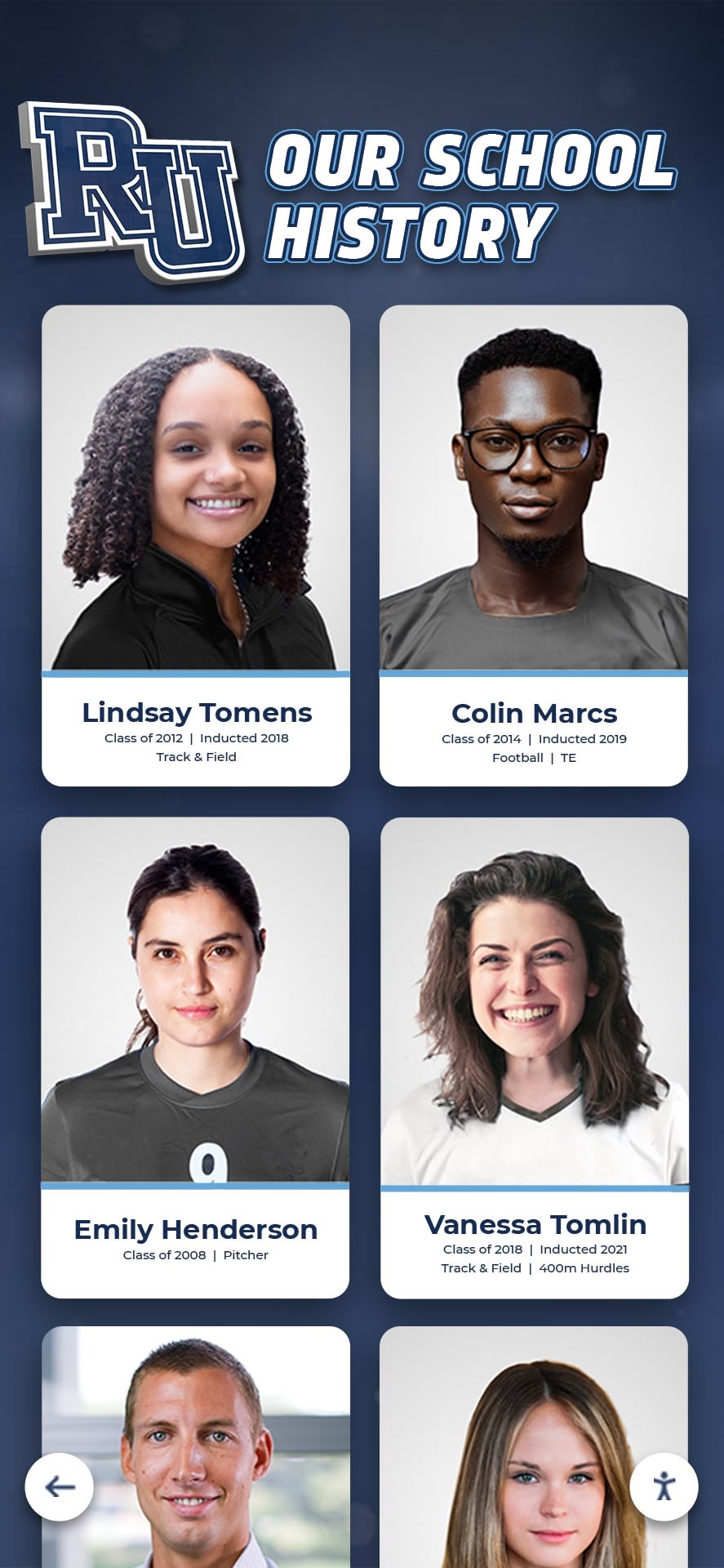
Portrait card completeness—name, photo, sport, year, and stat summary—is the first signal of stale or missing profile data
2a. Verify biographical facts against primary sources
For a representative sample of profiles (aim for 100% if the catalog is under 200 profiles; a stratified 25% sample for larger catalogs), confirm graduation year, team affiliation, and career statistics against primary sources: registrar records, athletic department rosters, official scorebooks, or yearbooks. Nomination forms and newspaper clippings are secondary sources and should be treated as starting points, not verified facts.
Unverified data entered into recognition systems can propagate errors across multiple display channels—the same principle applies to manually entered CMS records that were never checked against source documents.
2b. Flag outdated honorific information
Profiles published five or more years ago often contain titles, coaching roles, or professional positions that have changed. An inductee listed as “Head Coach, Riverside High School” who retired or moved to a different institution should have that field either updated or removed from the public display. Personal update contact—an email asking inductees to review their own profiles—is the most accurate method and also serves as a re-engagement touchpoint.
2c. Audit all linked media for broken URLs
Open each profile and test every embedded link: video URLs (YouTube, Vimeo, school video archive), external article references, PDF award documents, and social media links. Broken media links are invisible errors that degrade the profile’s completeness score without showing a visible error to the casual reader.
2d. Check photo and image status
Confirm that every published profile has at least one photo. A profile displaying a generic avatar or a broken image tag is functionally incomplete on a touchscreen kiosk even if the biographical text is accurate. Document every profile missing a display-ready photo as a media gap requiring action before launch.
Phase 3 — Missing Content Gaps: Find What Was Never Built
Missing content differs from stale content: these are profiles, pages, or media assets that should exist but were never created.
3a. Build the missing profile list
Using the cross-reference from Phase 1c, list every inductee name appearing in the official registry with no corresponding CMS profile. Sort by year of induction, starting with the most recent five years (where nomination records are most likely still accessible) and working backward.
3b. Identify missing sport and category index pages
A well-structured hall of fame website includes an index page for each sport, award category, and induction decade—pages that aggregate profiles, serve as navigation anchors, and support search engine discoverability. If your catalog includes 15 varsity sports but only 8 sport index pages, the 7 missing pages leave an entire group of inductees without a browsable category entry point.
3c. Audit for missing career statistics
Profiles that contain biographical text but no career statistics provide an incomplete record. Create a field-by-field checklist for your program’s standard profile template (example below) and score each profile against it. Profiles below a completion threshold—such as fewer than 60% of standard fields filled—go into the missing content queue.
Standard Profile Completion Checklist
INDUCTEE PROFILE COMPLETION CHECKLIST

IDENTITY
[ ] Full legal name (or verified display name) entered
[ ] Preferred name documented separately if different
[ ] Graduation year verified against primary source
[ ] Induction year confirmed from official ceremony record

SPORT / CATEGORY
[ ] Primary sport or award category assigned
[ ] Level confirmed (Varsity, JV, multi-sport noted)
[ ] Team name as used during career entered
[ ] Position or event entered

STATISTICS & RECORDS
[ ] Career statistics populated from official source
[ ] School records held, with dates, documented
[ ] Team championships documented with year and opponent
[ ] Individual awards and honors listed

MEDIA
[ ] Action photo or portrait uploaded (minimum 1)
[ ] Photo alt text written and saved
[ ] Video link tested and confirmed playable
[ ] Photo file name follows naming convention

BIOGRAPHY
[ ] Narrative biography written (minimum 100 words)
[ ] Biography reviewed for factual accuracy
[ ] Contact obtained from inductee or family
[ ] Inductee review or approval documented

TECHNICAL
[ ] Profile URL slug follows site convention
[ ] Canonical URL confirmed (no www/non-www split)
[ ] Profile appears in sitemap
[ ] Profile appears in correct category index
[ ] Profile tested on mobile and desktop
Phase 4 — Duplicate Profile Detection: Resolve Redundant and Conflicting Pages
Duplicate profiles—two or more pages representing the same inductee—are the most disruptive content audit finding because they split search traffic, split data history, and create a conflict that families and staff cannot easily resolve on their own.
Alumni recognition wall complete guide covers how physical and digital recognition programs both require a single-record approach to inductee identity—the same principle applies to CMS architecture, where one inductee should map to exactly one canonical URL.
4a. Run a name-based duplicate check
Sort the full profile export alphabetically by last name. Near-duplicates—“John Smith” and “Johnny Smith,” “Maria Gonzalez” and “Maria González,” “Coach Williams” and “Coach Bill Williams”—may represent the same person entered twice under different name forms. Flag any pairing where the graduation year and sport also overlap.
4b. Check for URL variants of the same profile
A single inductee may have profiles at /inductees/john-smith/, /hall-of-fame/john-smith/, and /inductees/john-smith-football/ as a result of CMS migrations or category restructuring. Run a crawl of all profile-path URL patterns and compare slugs. Every slug that resolves to a different page but represents the same inductee is a duplicate requiring consolidation.
4c. Identify parameterized duplicate views
Category filter parameters (e.g., /inductees/john-smith/?sport=football) often generate indexable URLs that are not true duplicates but are treated as separate pages by search engines. Document every profile URL appearing with query parameters and confirm that canonical tags point to the base profile URL.
4d. Document the consolidation plan before making changes
Before redirecting or merging any profiles, document the canonical URL, the duplicate URLs to be redirected, and the data fields that appear only in the duplicate and must be migrated to the canonical record. Make changes in a staging environment first and verify that the 301 redirect chain works end-to-end before pushing to production.

Duplicate and incomplete profiles create poor search experiences on touchscreen kiosks—consolidation before kiosk launch is critical
Phase 5 — Display Integration: Connect Audit Findings to Touchscreen Readiness
A content audit does not end with a clean CMS database. For schools that present recognition content on in-building touchscreen kiosks, the audit must also verify that corrected profiles are publishing correctly to the display platform and that the kiosk search interface reflects the updated data.
5a. Verify cloud CMS synchronization
On platforms that power both a website and a physical touchscreen display from a shared cloud CMS, confirm that profile additions, edits, and deletions propagate to both channels. A profile corrected on the website but not updated in the kiosk feed creates a split record—one version visible to visitors in the building, a different version visible to alumni searching online.
Best ways to showcase athletic achievement awards digitally outlines the content requirements that support consistent display across web and touchscreen channels—the same completeness standards that the audit checklist above enforces.
5b. Test profile search on the kiosk interface
After completing profile corrections, run representative searches on the touchscreen: a common surname, a sport filter, a year-of-induction filter, and a keyword that should match career statistics. A profile that passes every checklist item but fails to surface in the kiosk search interface has a technical indexing issue that requires escalation to the platform provider.
5c. Review ADA compliance for corrected profiles
Any profile that received a photo update during the audit should be checked for proper alt text. WCAG 2.1 AA compliance—required for public-facing school technology in most states—mandates descriptive alt text for all non-decorative images. A photo of an inductee with alt text “IMG_4523.jpg” is a compliance gap as well as a content quality issue.
Donor recognition displays for booster clubs and hall of fame displays share the same ADA accessibility requirements, making post-audit compliance review a unified task for facilities and IT teams managing both programs.
Content Architecture: How Audit Findings Map to Display Modules
A well-audited profile database directly improves how recognition content performs across every display module a platform supports.
| Profile Data Element | Display Module It Feeds |
|---|---|
| Inductee photo (portrait) | Portrait card grid, spotlight carousel, touchscreen search result |
| Sport / category | Category filter nav, sport-specific index page, kiosk sport selector |
| Year of induction | Year-of-induction archive, decade browsing filter, timeline display |
| Career statistics | Auto-ranking leaderboard, stat comparison module, career summary card |
| Video link | Video reel autoplay, QR unlock share, highlights module |
| Biography text | Profile detail page, read-more expand panel, printed ceremony program |
| School records held | Record board module, “Active Records” category on touchscreen |
| Canonical URL | Sitemap feed, touchscreen deep-link QR, share-to-social URL |
Each module is only as reliable as the audit quality behind it. A portrait card grid that displays generic gray avatars for one-third of inductees signals to every visitor that the recognition program is under-resourced. A leaderboard that omits inductees because their career statistics were never entered signals that the program’s historical record is incomplete.
Church sports touchscreen recognition programs use the same modular display architecture as school hall of fame platforms—the lesson that content completeness determines display quality applies across all recognition contexts.
Schools also integrating corporate-style digital signage into alumni and advancement spaces can review corporate digital signage workplace communication and recognition for parallel display completeness standards that translate directly to the school setting.
Execution Timeline: Plan → Audit → Fix → Monitor
Structure the content audit as a four-phase workflow to keep athletic directors, IT, and content staff aligned on ownership and deadlines.
Phase 1 — Plan (Weeks 1–2)
- Assign an audit owner with CMS access (athletic director or web administrator)
- Pull the full profile export and conduct the Phase 1 inventory
- Identify the official induction registry source (ceremony programs, board minutes, plaques)
- Schedule a kick-off meeting with facilities, IT, and advancement stakeholders
- Set a target completion date tied to the next induction cycle or platform migration
Phase 2 — Audit (Weeks 3–6)
- Complete stale content checks for the full catalog or stratified sample
- Build the missing profile list and prioritize by induction year (most recent first)
- Run the duplicate detection workflow and document the consolidation plan
- Score each profile against the completion checklist; flag below-threshold profiles
Phase 3 — Fix (Weeks 7–10)
- Create missing profiles for all names identified in Phase 1c cross-reference
- Correct stale biographical facts against verified primary sources
- Consolidate duplicate profiles and implement 301 redirects
- Fill media gaps: collect missing photos, re-test broken video links, add alt text
Phase 4 — Monitor (Ongoing)
- Add the profile completion checklist to the new-inductee intake workflow
- Schedule a lightweight stale-content check 90 days after each new induction class
- Assign a CMS owner responsible for broken-link monitoring quarterly
- Document the audit findings and fixes for the next staff member who inherits the program
Basketball game touchscreen recognition and program management is one context where the ongoing monitor phase matters most—sports programs with frequent statistical updates require a regular content review cadence, not a one-time audit.
Measurement: How to Know the Audit Worked
Track these indicators before and after the audit to confirm that the corrections improved recognition discoverability and display quality.
| Metric | Pre-Audit Baseline | Post-Audit Target |
|---|---|---|
| Profile completion rate | % of profiles meeting all standard fields | 90%+ complete profiles before next induction class |
| Missing media rate | % of profiles with no photo | Under 5% (zero for inductees added since 2010) |
| Duplicate profile count | Number of duplicate URL pairs found | Zero duplicates in production; all consolidated |
| Broken media links | Number of video/photo links returning errors | Zero broken links on published profiles |
| Stale biography flags | Profiles flagged with outdated facts | Resolved before next induction cycle |
| CMS-to-sitemap match rate | % of CMS profiles appearing in sitemap | 100% match after sitemap regeneration |
A platform built specifically for recognition—such as Rocket Alumni Solutions—enforces profile completion at the point of data entry, automates sitemap publication for every new inductee, and provides an administrative dashboard that surfaces incomplete profiles without requiring a manual audit. Request a custom demo to see how the content management workflow prevents the stale, missing, and duplicate profile issues that a manual audit is designed to catch.

A completed content audit produces profile cards that are display-ready across every channel—website, kiosk, and printed ceremony program
Reusable Artifact: Hall of Fame Website Content Audit Checklist (Copy-Paste)
Copy this master checklist into a shared document, project management tool, or email thread to coordinate the audit across your athletic department, IT team, and advancement office.
HALL OF FAME WEBSITE CONTENT AUDIT CHECKLIST

PHASE 1 — PROFILE INVENTORY
[ ] Full profile list exported from CMS (name, URL, sport, year, status)
[ ] Profile count sorted by sport, category, and decade
[ ] Missing profiles identified by cross-reference against official induction registry
[ ] "Ghost profiles" (CMS records with no live URL) flagged for correction
[ ] Total confirmed profile count recorded: ___
[ ] Total expected profile count (per official registry) recorded: ___
[ ] Gap count (expected minus confirmed): ___

PHASE 2 — STALE CONTENT
[ ] Representative sample (100% or 25% stratified) pulled for fact-checking
[ ] Graduation years verified against primary source (registrar, diploma, yearbook)
[ ] Team affiliations and levels confirmed against athletic department rosters
[ ] Career statistics cross-checked against official scorebooks or athletic archives
[ ] Outdated titles or positions flagged for inductee contact and update
[ ] All embedded video links tested — broken links documented
[ ] All external article or PDF links tested — broken links documented
[ ] Photo status confirmed for every profile — missing photos flagged

PHASE 3 — MISSING CONTENT GAPS
[ ] Missing profile list built from registry cross-reference
[ ] Missing profiles sorted by year (most recent first)
[ ] Sport and category index pages inventoried — missing index pages listed
[ ] Profile completion score assigned to each existing profile (using field checklist)
[ ] Profiles below 60% completion threshold flagged for priority remediation
[ ] Media gaps (missing photos, missing videos) documented with source priority

PHASE 4 — DUPLICATE DETECTION
[ ] Name-based duplicate check run on full profile export
[ ] Near-duplicate name pairings reviewed (nickname variations, diacritical differences)
[ ] URL variant check run for all profile-path patterns
[ ] Parameterized URL variants documented for canonical tag review
[ ] Consolidation plan documented: canonical URL, duplicates to redirect, data to migrate
[ ] Staging test of 301 redirects confirmed before production changes

PHASE 5 — DISPLAY INTEGRATION
[ ] CMS-to-touchscreen synchronization verified for corrected profiles
[ ] Kiosk search interface tested: name search, sport filter, year filter
[ ] ADA alt text confirmed for all new or updated profile photos
[ ] Sitemap regenerated after duplicate consolidation and profile additions
[ ] Sitemap URL count matches CMS published profile count (within expected delta)
[ ] Sitemap resubmitted in Google Search Console

POST-AUDIT MONITORING
[ ] Profile completion checklist added to new-inductee intake workflow
[ ] 90-day stale content check scheduled after next induction class
[ ] Broken-link monitoring cadence set (quarterly minimum)
[ ] Audit findings and fix log saved for next content administrator
Build a Recognition Archive That Never Needs Emergency Remediation
A content audit done well before expansion prevents the stale data, missing profiles, and duplicate URLs that turn a manageable hall of fame into a backlog no one has time to fix. The most efficient next step is a platform that enforces profile completeness at the point of entry, publishes canonical URLs automatically, and keeps your website and touchscreen kiosk synchronized from a single cloud CMS—so every induction class launches clean.
Live Example: Rocket Alumni Solutions Touchscreen Display
Interact with a live example (16:9 scaled 1920x1080 display). All content is automatically responsive to all screen sizes and orientations.































