Hall of Fame Biography Fact-Check Checklist: Names, Dates, Teams, and Honors
- Home /
- Digital Hall of Fame Insights & Resources /
- Hall of Fame Biography Fact-Check Checklist: Names, Dates, Teams, and Honors

The Easiest Touchscreen Solution




Live Example: Rocket Alumni Solutions Touchscreen Display
Interact with a live example (16:9 scaled 1920x1080 display). All content is automatically responsive to all screen sizes and orientations.
A hall of fame biography fact-check checklist is a structured verification workflow that confirms every inductee name, graduation date, team affiliation, and honor is accurate before a profile appears on a permanent recognition display, a school website, or a searchable digital archive. One transposed year or misspelled surname on a public touchscreen is not a minor typo—it is an institutional record that may circulate for decades, be discovered by the inductee’s grandchildren, and undermine the credibility of every other profile in the archive.
This checklist is designed for school athletic directors, hall-of-fame committees, alumni archive teams, and booster leaders who own the accuracy of inductee biographies and need a repeatable process they can hand to any volunteer or new staff member without retraining from scratch.
Accuracy in a hall of fame biography is not optional—it is the foundation that makes a recognition program trustworthy, searchable, and worthy of permanent display. The five-step verification workflow below covers every field a biography typically contains, along with a quick-reference table, a common-error guide, and a section on how accurate data connects to searchable digital recognition displays.

Accurate inductee data is the prerequisite for every searchable, display-ready profile card a committee publishes
Program Snapshot
| Element | Details |
|---|---|
| Audience | Athletic directors, hall-of-fame committee members, archives staff, booster leaders, school administrators |
| Outcome | Every inductee biography verified against primary sources before permanent display |
| Time per profile | 15–30 minutes for a thorough first pass; 5–10 minutes for annual updates |
| Key deliverables | Verified name record, confirmed dates, team roster cross-check, honors documentation, and a signed-off proof sheet |
| Display payoff | Profiles feed accurate search results, browsing filters, and display modules without requiring manual corrections after launch |
Why Biographical Accuracy Sets the Floor for Every Recognition Program
Hall of fame committees often concentrate effort on selecting the right inductees and overlook the verification step that ensures the right facts are attached to those inductees. The downstream consequences of errors are disproportionately large.
A single transposed digit in a graduation year causes a profile to appear in the wrong decade filter on a digital display. A maiden name entered as a legal surname means a fan searching for a married alumna’s achievements finds nothing. A team affiliation listed as “Varsity Basketball” when the record was set on the JV roster creates a factual dispute the institution has to resolve publicly.
Schools that publish school historical timeline guides know that chronological accuracy in recognition materials directly shapes how an institution’s legacy is understood by current students, visiting families, and alumni returning for reunions.
Errors in permanent recognition materials also create a social cost: inductees notice mistakes in their own profiles and lose confidence in the program. The accuracy standard for a hall of fame biography is the same as a court record—facts must be verified before they become permanent.
The Hall of Fame Biography Fact-Check Checklist
Work through all five steps in sequence. Complete each step before moving to the next. Assign a second reviewer to sign off on steps 3, 4, and 5 independently.
Step 1: Verify the Inductee’s Full Name
Name errors are the most common and the hardest to correct once they appear on a physical plaque or a searchable digital record.
1a. Confirm legal name against primary documentation
Request one of the following: a copy of the original athletic eligibility form, a yearbook page showing the name in print, an official diploma, or a signed inductee verification form. Do not rely on memory, social media profiles, or third-party accounts.
1b. Record preferred display name separately
Ask the inductee directly whether they use a preferred name, a shortened first name, or a current surname that differs from the name used during their athletic career. Document both the verified legal name and the approved display name in separate fields. Many digital platforms support both fields so that a search for either name returns the correct profile.
1c. Check for hyphenation, diacritical marks, and suffixes
Hyphens in compound surnames (e.g., Soto-Garcia), accent marks (e.g., Martínez), and generational suffixes (Jr., III) must be copied character-for-character from the primary source. A suffix omitted from the display name is a factual error when the inductee actively uses it in their public identity.
1d. Cross-check the name against all existing program materials
Search your existing database, printed programs from induction ceremonies, and any prior website listings for this inductee. If the name appears differently across sources, flag the discrepancy and resolve it before publishing.
Step 2: Confirm All Dates
Dates govern how profiles are sorted, filtered, and discovered on digital displays. An error in a year cascades through every date-dependent feature the platform provides.
2a. Graduation or completion year
Verify against the official school transcript, diploma, or registrar record. “Class of 1994” should mean the inductee graduated—or, if the inductee did not graduate, left the institution—in the spring of 1994. Confirm that the program uses a consistent definition and apply it uniformly.
2b. Athletic eligibility years
The years a student competed are distinct from the graduation year. A four-year athlete who graduated in 1994 may have competed from 1990–91 through 1993–94. Verify eligibility years against athletic department rosters, coaching records, or school archives rather than the inductee’s recollection alone.
2c. Induction year and ceremony date
Confirm the official induction year from the program’s own records. If an inductee was inducted at the spring 2007 ceremony, the induction year is 2007—not the year the nomination was submitted. Lock this field in your database and treat it as immutable after the ceremony occurs.
2d. Record-setting dates
Any date attached to a statistical record (e.g., “set the school record on November 3, 2001”) must be verified against official scorebooks, game programs, or a third-party statistical archive. Do not carry forward record dates from earlier profile drafts without re-verifying the source.
Understanding how basketball hall of fame history and inductee selection processes handle date verification at the professional level gives committees a useful reference point for building rigorous institutional practices.
Step 3: Confirm Team Affiliations and Roster Membership
Team affiliation errors are common when an inductee participated in multiple sports, transferred between schools, or competed during a period when team names or classification levels changed.
3a. Verify sport and level
Confirm that the profile lists the correct sport (e.g., “Girls’ Cross Country,” not “Track and Field”) and the correct level (Varsity, JV, or both). Use the official athletic department roster for each season the inductee competed.
3b. Verify team name and mascot as they existed at the time
Schools rename teams, change mascots, and reclassify from conference to conference. A biography should reflect the team name in use during the inductee’s career, with a parenthetical note if the name has since changed: “Riverside Rockets (now the Riverside Eagles).”
3c. Cross-reference with coaching staff records
Request the coaching roster or program notes from the inductee’s playing years. If a coach confirms the inductee’s roster position, note the coach’s name and the date of the confirmation in your verification log. This gives you a documented source if the record is ever disputed.
3d. Flag multi-sport athletes
If an inductee competed in more than one sport, every sport listed in the biography must be independently verified. Do not assume that a soccer player also competed in track because a nominator mentioned it—verify each sport against a separate roster record.
Schools that manage interactive displays in lobbies and common spaces know that multi-sport profiles are among the most-searched content on public touchscreens, making accuracy in this field especially consequential.
Step 4: Validate Honors, Awards, and Statistical Records
Honors are the recognition program’s primary content. An unverified award claim damages the institution’s credibility with the inductee, with peers who did not receive the same award, and with governing bodies that may dispute the claim.
4a. All-conference and all-state selections
Verify against the official press releases, league records, or governing body archives for each year cited. If the selection body no longer exists, a contemporary newspaper clipping or a signed letter from the league administrator at the time is an acceptable substitute. Scan and store the source document.
4b. School records
School record claims (“holds the school record for…”) must be verified against the official record book maintained by the athletic department. If no official record book exists, this is the moment to establish one. Do not publish a record claim that is not supported by a documented source.
4c. Championship participation and individual awards
Confirm team championships against official bracket or playoff records from the state or regional governing body. Confirm individual awards (MVP, team captain, academic athlete of the year) against the original award documentation, program archives, or contemporaneous newspaper coverage.
4d. Academic honors
If the biography includes academic distinctions (honor roll, academic all-conference, scholarship recipient), verify each against the registrar’s office, the granting organization, or the scholarship fund’s records. Academic claims carry the same verification requirement as athletic records.
Programs building a digital hall of fame archive find that honors documentation is most efficiently gathered at the time of nomination—before committee review—because inductees have the clearest access to their own records and can produce documentation quickly when prompted by the nomination form.
Step 5: Review Supporting Media and Captions
Every photograph, video clip, or document attached to an inductee biography carries its own fact-check requirements.
5a. Confirm photo identification
Every photograph used in an inductee profile must show the person named in that profile. Request that the inductee or a direct family member confirms the identity of the person in each image before the photo is attached to the live record. Document the confirmation.
5b. Verify caption data
Photo captions often repeat biographical facts (name, year, sport, jersey number). Treat every caption as a separate fact-check item. Verify the year the photo was taken, the event or game depicted, and any statistics mentioned in the caption.
5c. Confirm media rights
Before publishing a photograph, confirm that the institution holds the rights or has written permission from the rights holder (typically the photographer or a media outlet). This is a legal verification step, not an editorial one—but it belongs in the fact-check workflow because unpermissioned images must be removed before the profile goes live.
5d. Check video content for accuracy
If a profile includes a video highlight or archival interview, review the video for any on-screen text, lower-third graphics, or narrator statements that contain biographical data. All on-screen text must match the verified facts in the written profile.
Quick-Reference Fact-Check Table
Use this table as a one-page sign-off sheet for each inductee biography. Assign a primary reviewer and a secondary reviewer to each profile.
| Field | Source to Verify Against | Primary Reviewed | Secondary Reviewed |
|---|---|---|---|
| Full legal name | Eligibility form, diploma, or official school record | ☐ | ☐ |
| Preferred display name | Inductee-signed confirmation form | ☐ | ☐ |
| Suffix / diacritical marks | Primary source document, character-for-character | ☐ | ☐ |
| Graduation year | Official transcript or diploma | ☐ | ☐ |
| Athletic eligibility years | Athletic department roster records | ☐ | ☐ |
| Induction year | Committee ceremony records | ☐ | ☐ |
| Record-setting dates | Official scorebook or third-party archive | ☐ | ☐ |
| Sport and level | Athletic department roster | ☐ | ☐ |
| Team name at time of career | Historical program records | ☐ | ☐ |
| Multi-sport affiliations | Separate roster for each sport | ☐ | ☐ |
| All-conference / all-state | Official governing body records | ☐ | ☐ |
| School records | Official athletic record book | ☐ | ☐ |
| Championship participation | State / regional governing body records | ☐ | ☐ |
| Academic honors | Registrar or granting organization | ☐ | ☐ |
| Photo identification | Inductee or family member confirmation | ☐ | ☐ |
| Caption data | Re-verified against written profile | ☐ | ☐ |
| Media rights | Written permission on file | ☐ | ☐ |
| Video on-screen text | Cross-checked against written profile | ☐ | ☐ |
Common Biography Errors and How to Prevent Them
Q: Why do we keep finding name errors even when staff are careful?
A: Most name errors originate in the nomination stage, not the publication stage. Nominees are often identified by a nominator using a nickname, a maiden name, or a remembered spelling rather than a verified document. Build name verification into the nomination form itself—require the nominator to attach a primary source document, and require the nominee to sign off on their own name display before the committee votes.
Q: How do we handle an inductee who disputes their own bio after it is published?
A: Maintain a correction log separate from the main database. When a dispute arises, document the claim, retrieve the original verification source, and resolve the discrepancy in writing before updating the display. If the inductee’s documentation overrides your source, update the record, document the change, and note the correction date in the profile’s audit trail. Platforms designed for digital recognition archives support version history, which makes this process transparent and manageable.
Q: Our records from the 1970s and 1980s are incomplete. How do we verify facts from eras with poor documentation?
A: Work from multiple corroborating sources rather than a single authoritative document. Contemporary newspaper archives (often available through a local library’s digital archive), yearbook scans, and interviews with the inductee and former teammates can triangulate facts. Document each corroborating source and note in the profile that verification relied on multiple secondary sources. Do not publish a claim that you cannot corroborate with at least two independent sources.
Q: How do we prevent errors from creeping in when we migrate data to a new platform?
A: Run a full data audit before migration and again immediately after. Export every field from the old system, import to the new system, and run a field-by-field comparison for a random sample of at least 20% of inductee records. Common migration errors include truncated text fields, date format conversions that shift years by one, and special characters stripped during encoding conversion. Understanding vendor practices around digital hall of fame data integrity helps committees ask the right technical questions before signing a migration contract.
Q: Do we need a fact-check process for annual updates, or just for initial induction?
A: Both. An inductee’s profile may require updates when a record is broken and the biography references “current school record,” when the inductee wins a post-induction award they want added, or when a name change occurs due to marriage or legal transition. Assign a specific staff role the responsibility of reviewing every active profile for update triggers on an annual cycle. A one-page annual review checklist drawn from the table above takes fewer than 10 minutes per profile when records are maintained systematically.

Every tap on a touchscreen profile retrieves facts that passed through a verification workflow before they were ever published
How Accurate Biographies Connect to Searchable Digital Displays
A fact-checked biography is not just a quality document—it is structured data that powers every feature a modern digital recognition display depends on.
Search and Discovery
Touchscreen hall-of-fame platforms search across every field in an inductee record. When a visitor types “Martinez” into a search bar, the platform returns results based on the name field in the database. If the name was entered as “C. Martinez” in one record and “Carlos Martinez” in another due to inconsistent verification practices, the search returns incomplete results—and the visitor concludes the archive is missing people.
Consistent, verified name data means every search returns every relevant result. Campus directory touchscreen displays demonstrate how name field consistency directly determines whether a searchable database is useful or frustrating to navigate.
Filter Panels and Decade Browsing
Date fields drive the decade filters, graduation year filters, and era-browsing features that visitors use to explore a hall of fame chronologically. A graduation year entered as “1994” when the correct year is “1984” places an inductee in a completely different decade filter. Visitors browsing the 1980s never find them; visitors browsing the 1990s find an unexpected entry.
Date verification at the source eliminates this class of error entirely.
Auto-Populated Display Modules
Many platforms auto-populate display panels—“Inductees of the Decade,” “Record Holders,” “Multi-Sport Honorees”—by querying specific fields in the database. If the “school record” field is populated incorrectly, an inductee who never held a school record appears in the record-holder module; an actual record holder who was miscategorized is invisible.
The integrity of every automated display module depends on the integrity of the underlying verified data.
Web Platform and Remote Access
When an inductee shares their profile link with family members at a class reunion or a prospective student’s family looks up an alumna’s record online, the profile they see is a direct output of your verification workflow. Errors visible on a public-facing web platform are visible to anyone with an internet connection—and they accumulate in search engine caches long after you correct them in the database.
Programs that invest in school historical archives and timelines understand that publicly visible records carry a credibility standard equivalent to published institutional documents.
Execution Timeline: Building the Fact-Check Workflow Into Your Induction Cycle
| Phase | Timing | Tasks |
|---|---|---|
| Plan | 8–12 weeks before ceremony | Draft or update the verification checklist; assign primary and secondary reviewers; build the nomination form to capture primary source documentation at submission |
| Build | 4–8 weeks before ceremony | Collect verification documents from nominees; complete all five checklist steps; resolve discrepancies with primary sources |
| Launch | 1–2 weeks before ceremony | Secondary reviewer signs off on every profile; profiles loaded into platform with draft status; committee reviews display layout and caption accuracy |
| Publish | Day of or day after ceremony | Profiles set to live status; inductees notified of their public profile link; physical display updated to match digital record |
| Refresh | Annually | Annual review of all active profiles for update triggers; corrections logged with source documentation and change dates |
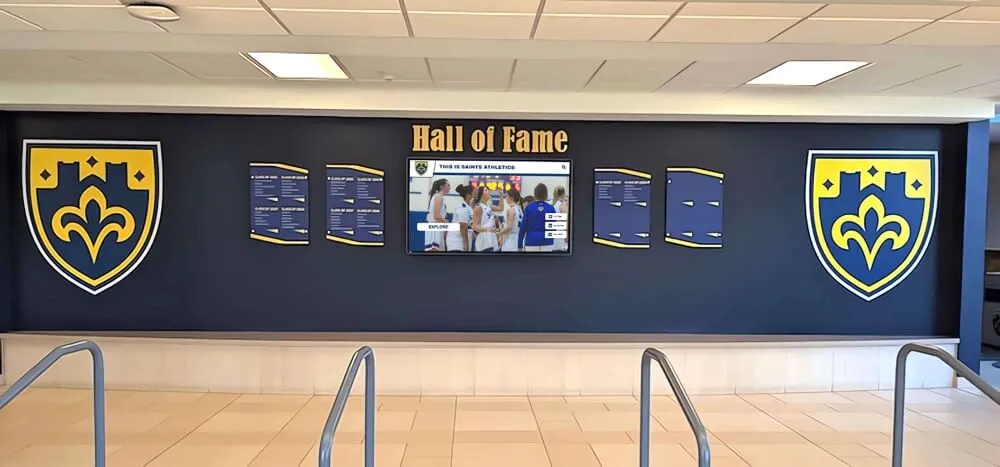
Physical and digital recognition elements depend on the same underlying verified data to remain consistent with each other
Display Integration: Connecting Verification to Permanent Recognition
Verified profiles are the input; a searchable, permanent recognition display is the output. The connection between them is a content management system that accepts structured, verified data and surfaces it through consistent display templates.
Cloud CMS and Remote Management
A cloud-based CMS lets athletic directors and archives staff publish verified profiles from anywhere, without sending files to a vendor or waiting for a scheduled display update cycle. Rocket Alumni Solutions provides a cloud CMS with role-based access, so the staff member who runs the fact-check workflow can directly publish approved profiles without relying on a separate technical team.
ADA Compliance and Accessibility
Verified text data is also accessible data. Screen readers and assistive technologies depend on accurate, properly structured text fields to communicate inductee information to visitors with visual impairments. WCAG 2.1 AA compliance—which Rocket Alumni Solutions supports—requires that the underlying data be both accurate and properly formatted.
Scheduled Publishing
Induction ceremonies often happen at specific dates: a homecoming weekend, an annual alumni gathering, or a spring banquet. A platform that supports scheduled publishing lets the committee complete the verification workflow weeks in advance and set the profiles to go live at the moment of the ceremony, without requiring a staff member to be at a computer at midnight.
Basketball banquet planning resources show how scheduled digital content releases can be synchronized with ceremony timelines to create a cohesive event experience.
Unlimited Inductee Capacity
Some recognition platforms cap the number of profiles they will host. A fact-check checklist is only as valuable as the platform that can accommodate the verified data it produces. A program with three hundred inductees today may have five hundred in a decade—choosing a platform with unlimited inductee capacity ensures that verification effort today is not wasted on a system that will require migration tomorrow.
Measurement: What Accuracy Looks Like Over Time
| Metric | How to Measure | Target |
|---|---|---|
| Error rate at launch | Count errors found in post-launch inductee review | Zero unresolved errors before profiles go live |
| Correction volume | Count profile corrections requested by inductees per year | Decline year-over-year as process matures |
| Search return accuracy | Spot-check: search known inductee names and verify all results appear | 100% return rate for verified name variants |
| Annual review completion | Percentage of active profiles reviewed on annual cycle | 100% reviewed before the next induction ceremony |
| Inductee confirmation rate | Percentage of inductees who sign off on their profile before publishing | 100% for new inductees; 80%+ for historical backfill |
Programs that track these metrics year-over-year find that the verification workflow pays for itself within two induction cycles by eliminating the staff time and reputational cost of post-launch corrections.
Pep rally and school spirit recognition programs that integrate accurate hall-of-fame content into school events consistently report higher engagement from students who trust that the recognition data they are shown reflects the real institutional record.
Conclusion
A hall of fame biography fact-check checklist is the difference between a recognition archive that communities trust and one that creates quiet skepticism every time someone finds their grandfather’s name misspelled on a permanent display. The five-step workflow—verify names, confirm dates, check team affiliations, validate honors, and review media—addresses every field an inductee biography contains and produces a signed verification record that protects the institution and honors the inductee.
Accurate data entered through a rigorous verification process is also the data that powers every searchable, filterable, and automatically displayed feature on a modern digital recognition platform. The effort invested in verification at the source flows directly into every future search result, every decade filter, and every auto-populated display module the platform generates.
See Verified Profiles on a Live Digital Display
Rocket Alumni Solutions combines a cloud-based CMS, unlimited inductee capacity, ADA-compliant display templates, and scheduled publishing into one purpose-built recognition platform—so every biography you verify through this checklist is immediately display-ready.
Live Example: Rocket Alumni Solutions Touchscreen Display
Interact with a live example (16:9 scaled 1920x1080 display). All content is automatically responsive to all screen sizes and orientations.































