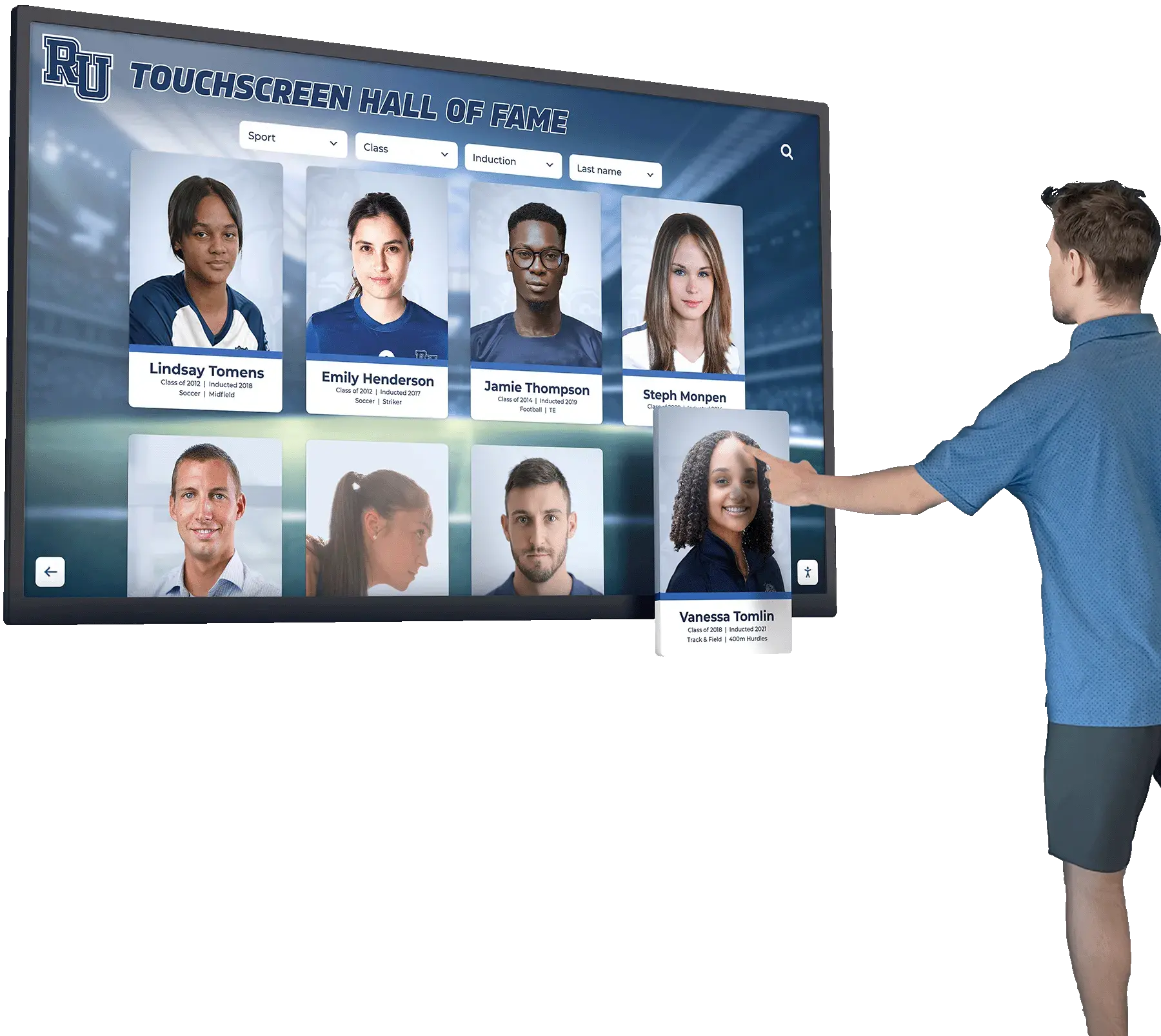




Every school athletic program accumulates decades of achievement — conference titles, individual records, coach milestones, and standout athletes whose names deserve to live on long after graduation. The challenge has always been space: a trophy case can hold only so many plaques, and a plaque can hold only so many names. A digital sports hall of fame solves the space problem entirely, replacing fixed walls with unlimited searchable databases that grow with every induction class and remain accessible to alumni worldwide, prospective families touring campus, and current student-athletes looking for inspiration.
This guide walks athletic directors, alumni coordinators, and advancement teams through every layer of building a searchable online hall of fame — from the profile fields that make each inductee discoverable to the touchscreen and website publishing strategies that put those profiles in front of the right audiences. You will find a ready-to-copy profile-field checklist, a content architecture overview, a phased execution timeline, and display integration recommendations grounded in what schools actually implement.
When a parent or recruit searches for your school’s sports legacy, a digital hall of fame gives them a direct answer. When a 1987 All-State pitcher visits campus, they can find their own profile in seconds rather than scanning rows of engraved panels. Searchability is what separates a digital archive from a glorified slideshow — and it begins with how you structure each inductee’s record.

Searchable touchscreen displays let visitors find any inductee instantly across decades of athletic history
Program Snapshot
| Element | Details |
|---|---|
| Audience | Athletic directors, alumni coordinators, advancement teams, booster clubs |
| Outcomes | Unlimited inductee capacity, full-text search, multi-device access, alumni engagement |
| Timing | Initial launch 60–90 days; ongoing annual induction cycles |
| Featured honorees | Individual athletes, championship teams, coaches, athletic trainers, support staff |
| Publishing channels | School website, lobby touchscreen, mobile-responsive portal |
| ADA compliance | WCAG 2.1 AA contrast, reach ranges, screen-reader-compatible markup |
Why Searchability Is the Defining Feature
Traditional plaques and trophy cases require visitors to physically scan every entry. A digital sports hall of fame with full-text search lets anyone find a 1994 state champion wrestler, a three-sport letter-winner from the 1970s, or every inductee who competed in volleyball — in under five seconds.
Search changes how alumni engage. It changes how recruits perceive your program’s legacy. And it determines whether your investment in digital recognition delivers ongoing value or simply mirrors a static display in an electronic frame.
Purpose-built platforms described in this complete guide to an online hall of fame website demonstrate that schools with searchable databases report significantly higher visitor dwell time compared to passive display rotations. The profile fields you define at setup are the foundation of every search, filter, and discovery moment your audience will experience.
The Complete Inductee Profile Field Checklist
This checklist covers the fields that make each inductee profile rich enough to reward exploration and structured enough to power reliable search. Copy it directly into your content planning document.
Core Identity Fields
- Full legal name (indexed for search)
- Preferred display name or nickname
- Graduation year (enables class-year filtering)
- Sport(s) played (multi-select for three-sport athletes)
- Position(s)
- Jersey number(s)
- Years active at the school
Achievement Fields
- Career statistics by sport (points, yards, batting average, times, etc.)
- Team championships won (with year and level: district, regional, state)
- Individual awards (All-Conference, All-State, MVP, Scholar-Athlete)
- School records held (with record value and date set)
- College athletic career (school, sport, years played)
- Professional or post-collegiate career highlights
Biographical Fields
- Short bio paragraph (150–300 words)
- Hometown and home state
- Coach(es) who influenced their career
- Notable teammates or rival competitors
- Quote from the inductee (gathered at ceremony or via email)
Media Fields
- Primary headshot or action photograph (300 DPI minimum)
- Gallery of supporting photographs (team photos, game moments)
- Video embed URL (highlight reel, ceremony speech, interview)
- Social media handles (optional; for alumni networking)
- QR unlock link for extended digital content
Administrative Fields
- Induction year and class
- Nominator name (internal use)
- Profile status: draft / approved / published
- Last updated date
Platforms like Rocket Alumni Solutions provide template-based profile creation that maps directly to these fields, ensuring consistency across all inductee records without requiring design expertise from staff.
Content Architecture: Mapping Profile Fields to Display Modules
A well-structured digital sports hall of fame separates presentation from data. The same inductee record feeds a lobby touchscreen, a school website portal, and a mobile-responsive page — because the underlying content architecture is field-based rather than design-based.

Field-based profile architecture ensures every inductee card displays consistently across touchscreen and web channels
Auto-Ranking Achievement Boards
Career statistics and championship fields feed dynamic leaderboards that update automatically when records change. Visitors browsing the touchscreen see the school’s all-time rushing leaders, consecutive winning seasons, or fastest 400m times sorted and ranked without any manual design work per update.
Inductee Portrait Gallery
Headshot and gallery fields populate a visually browsable portrait grid. Visitors swipe through classes, filter by sport, or tap a face to open the full profile. The portrait grid is also the default landing view on the lobby touchscreen — recognizable, engaging, and familiar.
Video Reel Module
Embedded video URLs in the profile feed a scheduled content loop on the touchscreen display’s ambient mode. When no visitor is interacting, the screen cycles through highlight reels and ceremony speeches — passively celebrating the hall of fame for every person who passes the display.
Sponsor and Donor Recognition Ribbon
Administrative fields designating sponsorship tiers feed a persistent ribbon at the bottom of each screen layout, giving booster clubs and community partners persistent visibility in exchange for program support.
Social and QR Share Layer
Social media handles and QR unlock links generate shareable cards that inductees can post to Instagram or Facebook from their profile page. This extends hall of fame visibility far beyond the school building into alumni networks, without requiring any additional staff effort after initial setup.
For more context on how these components compose into full installations, the sports hall of fame design guide at halloffamewall.com covers layout zones and visitor flow in depth.
Making Profiles Searchable: Database Design Principles
A digital sports hall of fame functions as a purpose-built database, not a folder of PDF documents. The structure you choose at setup determines what visitors can find and how quickly.
Full-text search indexes every word in every profile field, so searching “Smith” returns all athletes with that last name, coaches whose biography mentions a player named Smith, and teams that played in Smith Memorial Stadium.
Faceted filtering allows visitors to narrow results by sport, graduation decade, award type, or championship level without typing anything. Faceted filtering is essential for touchscreen kiosks where typing is slower than tapping a filter chip.
Related content links within profiles surface teammates, rival opponents, and coaches connected to the same inductee — encouraging exploration well beyond the initial search result.
URL-stable profile pages ensure every inductee’s record has a permanent, shareable web address. When a 1995 track star shares her profile link on social media, the page loads correctly regardless of whether the hall of fame has added 500 new inductees since then.
The online hall of fame website guide from halloffamewall.com outlines how URL structure and metadata combine to make school hall of fame profiles discoverable through Google searches, extending reach beyond visitors who already know to look.
Media Integration: Photos, Videos, and Beyond
Profile completeness correlates directly with visitor engagement time. Profiles with a headshot, one action photo, and a biographical paragraph hold visitors approximately twice as long as text-only entries. Profiles with an embedded video hold visitors longer still.
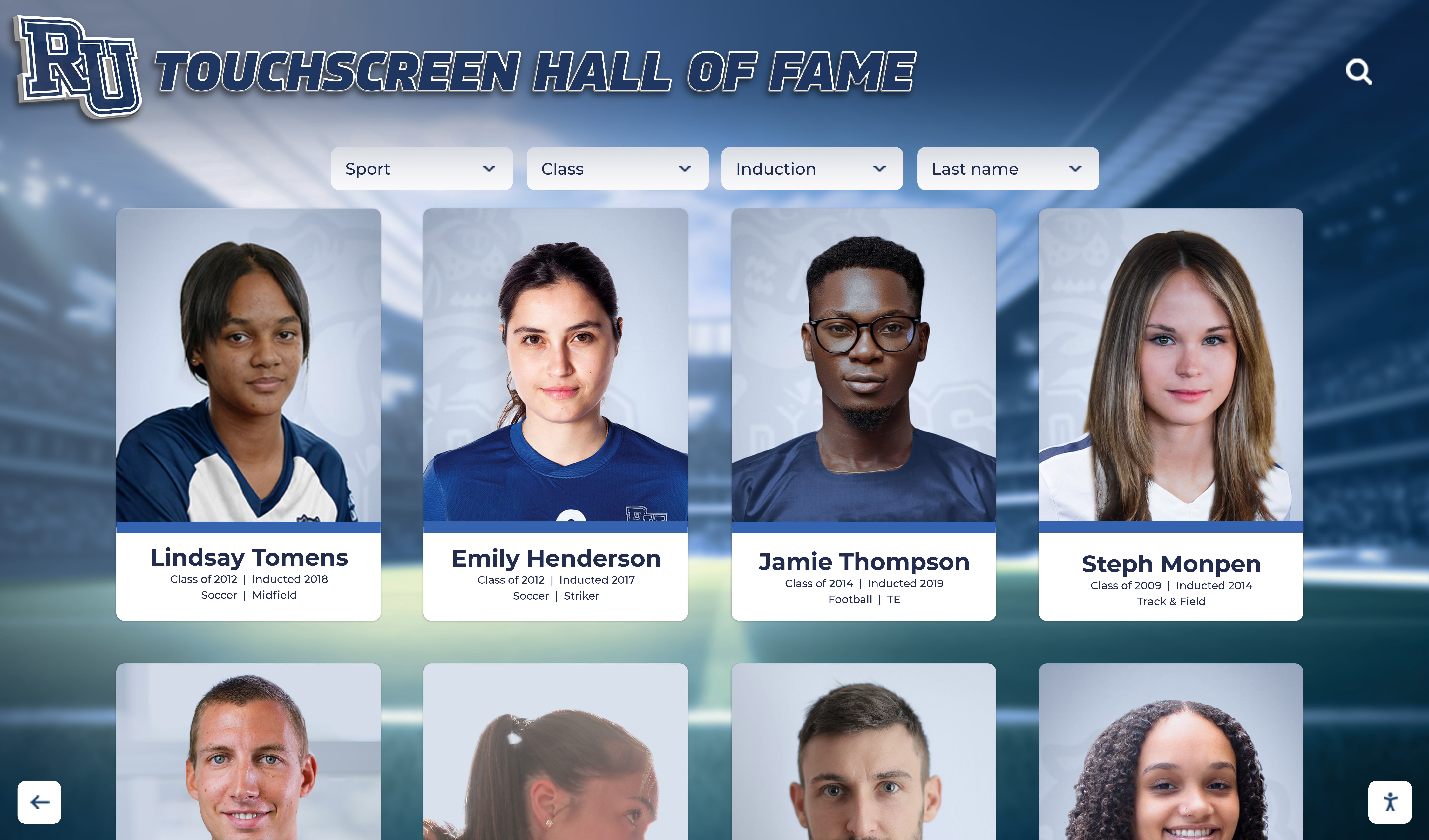
Portrait galleries with high-resolution imagery create immersive browsing experiences that outperform text-only archive pages
Photography standards for induction-quality digital profiles:
- Headshot: minimum 300 DPI, square crop preferred for consistent grid display
- Action photographs: landscape orientation, minimum 1200px wide
- Historical photographs: scan at 600 DPI to preserve detail from older prints
- Team photos: label with year and sport in the filename for CMS organization
Video integration best practices:
- Upload highlight reels to a school-controlled YouTube or Vimeo channel, then embed the URL in the profile field
- Ceremony speeches recorded on a smartphone at 1080p are sufficient for most displays
- Keep inductee interview clips under three minutes for touchscreen audiences
- Captions or subtitles are required for WCAG 2.1 AA compliance and benefit all viewers
Social media and QR codes:
- Link to an inductee’s LinkedIn profile to power alumni networking features
- Generate QR codes pointing to the web profile so printed programs and physical plaques can bridge to richer digital content
Schools managing multi-sport recognition programs — including recognition for athletic trainers and sports medicine staff — will find additional framing in how schools recognize sports medicine legends, which covers profile structures for support staff alongside athletes.
Publishing Options: Website vs. Touchscreen vs. Both
Most schools benefit from publishing inductee profiles through at least two channels. Each serves a different audience and interaction context.
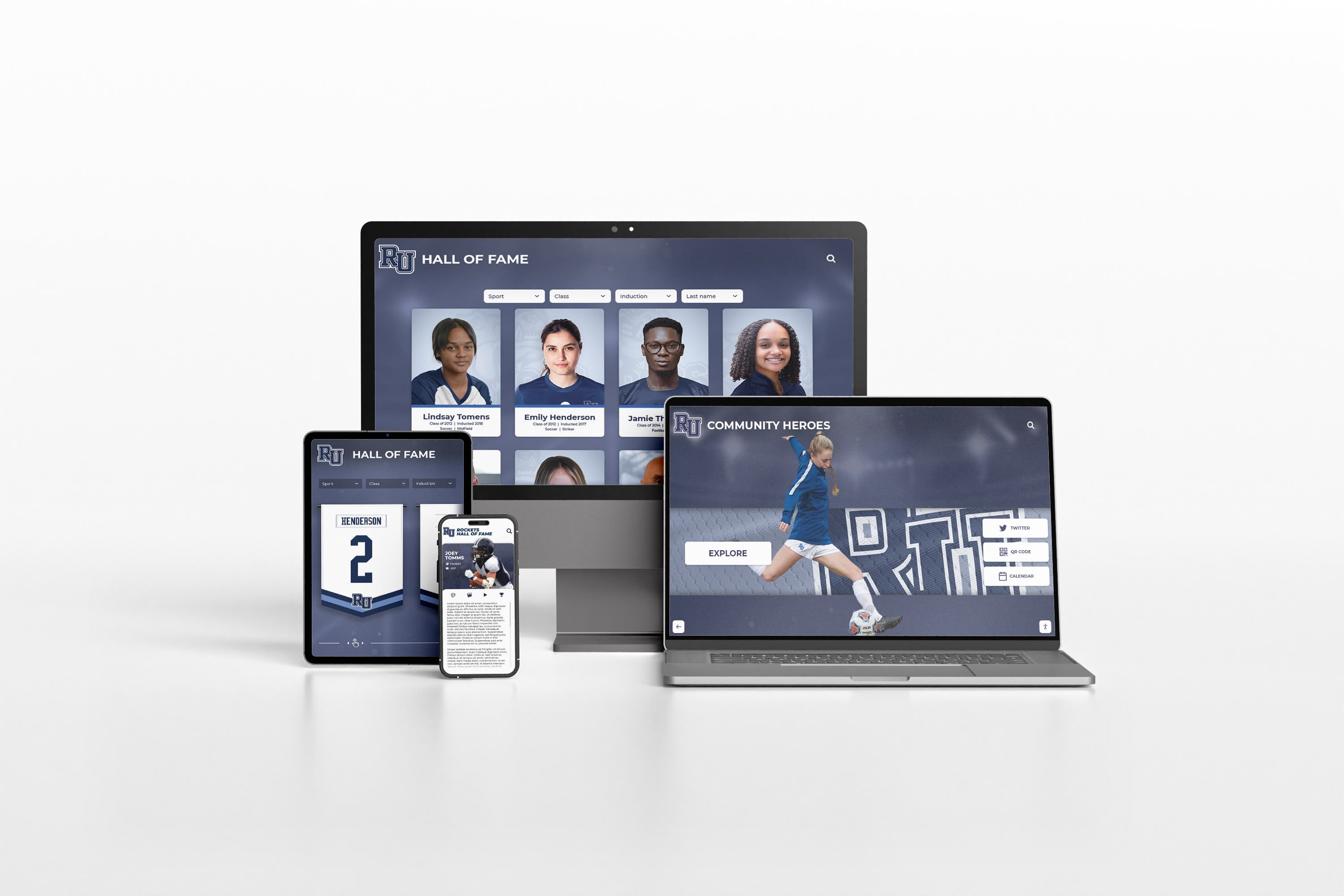
A mobile-responsive website extends hall of fame access to alumni worldwide, not just visitors in your building
School website portal (web-first audience: alumni, recruits, media, donors):
- Mobile-responsive design ensures profiles load cleanly on every device
- SEO-optimized pages make individual inductees discoverable through Google
- Social sharing buttons let honorees amplify their recognition to personal networks
- Web portals serve alumni who live across the country and can never visit the lobby
Lobby touchscreen kiosk (on-campus audience: students, visitors, prospective families):
- 46"–65" interactive displays in high-traffic corridors, athletic facilities, or lobbies
- Touch-optimized portrait grid with large tap targets and simplified navigation
- Ambient loop mode showcases inductees passively between active sessions
- ADA compliance requires mounting height within 15"–48" reach range and WCAG 2.1 AA color contrast
Integrated approach (the most effective model):
- One content management system feeds both channels simultaneously
- Adding a new inductee publishes to the website and the touchscreen from a single form submission
- Scheduled publishing coordinates releases with induction ceremonies without requiring staff to be at a computer at midnight
- Cloud-based remote management allows coaches and alumni coordinators to update profiles from anywhere
For a comprehensive comparison of delivery options, the online hall of fame resource at digitalrecordboard.com examines the trade-offs between self-hosted and fully managed publishing platforms in the context of ongoing school staff capacity.
Execution Timeline: Plan → Build → Launch → Refresh
Phase 1 — Plan (Weeks 1–3)
- Audit existing honors: championship banners, printed programs, yearbook All-State lists, coach records
- Define inductee categories: individual athletes, championship teams, coaches, staff, special honorees
- Establish nomination and vetting criteria for future induction classes
- Assign content ownership: who gathers bios, who scans photos, who reviews accuracy
- Select platform (purpose-built recognition platform vs. general signage adaptation)
Phase 2 — Build (Weeks 4–8)
- Configure profile template using the field checklist above
- Enter founding inductee class (recommend starting with 20–50 profiles for launch momentum)
- Digitize historical photographs at 300–600 DPI with consistent naming conventions
- Draft biographical paragraphs; send to inductees or families for review
- Configure search indexes, sport filters, and class-year facets
- Test touchscreen navigation and web responsiveness across devices
Phase 3 — Launch (Week 9–10)
- Coordinate publication date with an induction ceremony or recognition event
- Share web portal links with inductees for social amplification
- Brief athletic department staff on adding new profiles through the CMS
- Announce the launch in school communications, alumni newsletters, and athletic department social channels
Phase 4 — Refresh (Ongoing Annual Cycle)
- Open nomination window 3–4 months before induction ceremony
- Collect media assets from nominees as part of the nomination process
- Schedule publication of new class to coincide with ceremony date
- Update records when athletes surpass existing marks
- Expand historical archive by backfilling additional years each cycle
Guidance on building sustained athletic program visibility — including how digital recognition intersects with social media strategy — is covered in sports team social media ideas for building program presence.
Display Integration: ADA, Remote Management, and Layout Zones
A digital sports hall of fame display should function as a permanent architectural element of the school’s athletic environment, not a screen that gets unplugged between events.
Layout zones for a standard 55" portrait-orientation touchscreen:
- Top zone: school logo, mascot, “Hall of Fame” wordmark
- Main zone: inductee portrait grid (3×4 cards), search bar, sport filter chips
- Detail panel: slides open on tap, showing full profile with statistics, bio, and photo gallery
- Ambient ticker: recent inductions, upcoming ceremony announcements
- Footer ribbon: sponsor or donor recognition, persistent across all views
ADA and accessibility requirements:
- Interactive elements mounted at 15"–48" floor-to-center height
- Minimum 4.5:1 color contrast ratio for all text over backgrounds (WCAG 2.1 AA)
- All images carry descriptive alt text for screen-reader compatibility
- Non-touch backup navigation for visitors with motor limitations
Remote CMS management:
- Cloud-based platforms allow content updates without physical access to the display hardware
- Scheduled publishing queues induction class releases to go live at ceremony start time
- Automatic backups protect archived profile data from hardware failure
- Role-based permissions allow coaches to submit draft profiles for administrator review before publication
For inspiration on how leading athletic programs structure their recognition environments, the Texas sports hall of fame overview at digitalwarming.net highlights design approaches that translate well to high school and college athletic facilities.
Measurement: Engagement KPIs for Your Digital Hall of Fame
Recognition investments deserve accountability. These metrics help administrators demonstrate program value to stakeholders and guide content development priorities.
| Metric | Target Benchmark | Data Source |
|---|---|---|
| Daily touchscreen interactions | 15–40 sessions per school day | Display analytics |
| Average session duration | 3–7 minutes | Display analytics |
| Web portal monthly visitors | 200–800 per month (grows with inductee count) | Website analytics |
| Profile search queries | Track top 20 searches monthly | CMS search log |
| Social shares from inductee profiles | 50–200 per induction class release | Social platform analytics |
| New inductee profiles published annually | 10–30 per year | CMS record count |
| Broken or low-media profiles | Target < 5% of total library | CMS audit report |
Review these metrics quarterly and use them to identify which sports or eras have thin profile coverage — indicating where historical research efforts should be focused next.
Frequently Asked Questions
How many inductee profiles should a school launch with?
Most platforms recommend launching with a minimum of 20–30 profiles. This populates the portrait grid visually and gives visitors enough to explore. Starting with recent induction classes (last 5–10 years) is practical because media assets and contact information are easier to gather. Historical expansion into earlier decades can follow in subsequent annual cycles. A complete guide to structuring the initial launch is available in this online hall of fame website overview from touchhalloffame.us.
What makes a digital sports hall of fame different from a digital trophy case?
A trophy case typically displays team championships and hardware photos — objects rather than people. A hall of fame is person-centered: each inductee has their own named profile, biographical narrative, and searchable record. The two can coexist in the same platform, but they serve different purposes. Digital trophy cases are passive displays; digital halls of fame are interactive databases.
Can a school publish a digital hall of fame if they don’t have a touchscreen display yet?
Yes. A web-based portal requires no physical hardware and can launch with just a school subdomain and a CMS subscription. Many schools begin online only, then add a touchscreen installation once the content library is substantial enough to justify the display investment. The hall of fame online overview from touchwall.us covers web-first deployment strategies in detail.
How much staff time does ongoing maintenance require?
With a purpose-built platform and a structured nomination process, adding one new inductee profile takes approximately 45–90 minutes of staff time assuming the nominee submits their own biography draft and photos. A 20-person induction class represents roughly 15–30 hours of annual maintenance effort, spread across the nomination review window before the ceremony.
Does a digital hall of fame help with athlete recruitment?
Program heritage is a meaningful recruiting signal. Prospective student-athletes and their families searching your school’s athletic history encounter individual profiles, championship records, and alumni success stories — content that supports recruiting conversations and reinforces the value of committing to your program. Schools that make their legacy searchable online extend that benefit to recruits doing research before they ever step on campus.
Getting Started: From Profile Checklist to Published Display
A digital sports hall of fame is not a one-time project. It is an ongoing recognition infrastructure that grows more valuable each year as inductee counts rise, historical archives deepen, and alumni networks expand. The schools that build the most effective halls of fame start with well-structured profile fields, implement genuine search functionality, publish across both web and physical display channels, and commit to annual induction cycles that keep the platform current.
The profile-field checklist in this guide is designed to be your first deliverable. Share it with your athletic department, alumni coordinator, and advancement team. Assign owners for each field category. Then audit what you already have — yearbooks, programs, coaches’ records, athletic department files — before deciding what gaps to fill.
Rocket Alumni Solutions builds purpose-built digital sports hall of fame platforms for schools, complete with searchable inductee databases, cloud-based content management, touchscreen and web publishing, and professional content development support for historical archives.
Request Your Free Custom Demo to see how your school’s athletic legacy can become a searchable, engaging, always-current recognition experience that honors every inductee from every era — on the lobby wall and online.
The goal is a hall of fame your inductees are proud to share, your students are inspired by daily, and your alumni find whenever they search for their own chapter in your school’s story.































