




A visitor who misspells a name or remembers only a nickname should still find the inductee they are looking for. Most school digital halls of fame are configured with exact-match keyword search, which means a single transposed letter or an informal first name returns zero results — and the visitor walks away without finding the honoree. Typo-tolerant search solves this by building flexible matching directly into the search index, so that “Micheal” finds “Michael,” “Coach Kowalski” surfaces “James Kowalski,” and a maiden name entered by a classmate still returns the correct profile. This guide explains how to plan, configure, and maintain typo-tolerant search for a school digital hall of fame using structured data fields, search aliases, and platform settings that scale as the archive grows.
Program Snapshot: Typo-Tolerant Search for a Digital Hall of Fame
Map the scope of your search improvement project before touching any platform settings. The table below identifies the key dimensions and planning baseline for schools at any stage of a recognition archive.
| Planning Element | Details |
|---|---|
| Primary Audiences | Alumni, students, parents, visiting families, reunion groups, archivists |
| Core Problem | Exact-match search fails on misspellings, nicknames, maiden names, and outdated team or program names |
| Search Tolerance Modes | Fuzzy matching, phonetic matching, alias fields, synonym lists, partial-word matching |
| Most Common Failure Cases | Transposed letters, name abbreviations, married-vs.-maiden names, legacy sport names (e.g., “Varsity A” vs. “Track”), hyphenated surnames |
| Data Requirements | Nickname field, maiden name field, alternate spelling field, historic team name synonym list |
| Display Contexts | Touchscreen kiosk, school website, alumni web portal, mobile web |
| ADA Considerations | Search input fields minimum 44×44 px touch target; results must display with sufficient contrast (WCAG 2.1 AA); keyboard navigation for web contexts |
| Maintenance Cadence | Review zero-result search logs quarterly; update alias fields when inductees report their profiles are not surfacing |
A typo-tolerant search configuration requires both platform settings and clean structured data. Neither alone is sufficient — fuzzy matching on poorly structured records produces noisy results, and perfect data without fuzzy matching still fails on a single keystroke error.
What Makes Search “Typo-Tolerant”?
Typo-tolerant search uses one or more of the following techniques to expand what counts as a match:
Fuzzy matching allows a search term to differ from a stored value by a small number of character edits — insertions, deletions, substitutions, or transpositions. A search for “Johansen” returns “Johannsen” because the two strings differ by only one edit. Most modern search engines express this as an “edit distance” or “Levenshtein distance” threshold, typically set to 1 or 2 for name search.
Phonetic matching groups names that sound alike regardless of spelling. “Caitlin,” “Katelyn,” and “Katelynn” all share the same phonetic representation under common algorithms and will match the same query. This is particularly useful for names with multiple accepted spellings that a visitor may remember by sound rather than by spelling.
Alias and alternate-name fields store known variations of an inductee’s name as separate indexed values attached to the same profile. A nickname stored in an alias field is treated as an equal match to the official name. This approach gives administrators direct control over which alternate names surface for each inductee without relying entirely on algorithmic matching.
Synonym lists serve the same function at the category or team level. A synonym list maps “JV Soccer” to “Junior Varsity Soccer,” “Track” to “Track and Field,” and a retired program name like “Varsity A” to its current equivalent. Visitors who remember the name of a program from decades ago can still find inductees from that era.

Visitors select inductees by name — a single typo or remembered nickname should not block that discovery, which is why typo-tolerant search configuration matters even in small archives
Content Architecture: Mapping Search Tolerance to Data Fields
Typo-tolerant search depends on having the right data fields in each inductee profile. The following architecture maps each failure mode to its required data field and search technique.
Inductee Profile Fields Required for Full Search Coverage
| Failure Mode | Root Cause | Required Data Field | Search Technique |
|---|---|---|---|
| Misspelled first name | Visitor memory or keyboard error | Fuzzy match on first name field | Edit-distance threshold 1–2 |
| Misspelled last name | Same | Fuzzy match on last name field | Edit-distance threshold 1–2 |
| Nickname used instead of legal name | Inductee known by a common short form | Nickname / preferred name field | Exact match on alias field |
| Maiden name used by classmates | Married inductee listed under married name | Maiden name / former name field | Exact and fuzzy match on alias field |
| Hyphenated surname partially remembered | Visitor recalls only one part | Partial-word match on full name | Substring or prefix match |
| Historic team name | Program renamed since inductee competed | Team name synonym list | Synonym expansion at query time |
| Alternate honorific or title | Inductee known as “Coach” or “Doc” | Role alias field | Exact match on alias field |
| Phonetic variant | Different spelling, same sound | Phonetic index | Soundex or Metaphone match |
The alias field is the most reliable mechanism for nicknames and former names because it requires no algorithmic approximation — an administrator enters the known variant and it matches exactly. Fuzzy matching handles unforeseen typos that no alias could anticipate.
Controlled Vocabulary and Synonym Lists for Category Fields
Search tolerance extends beyond individual names to the category fields visitors use to narrow results. Historic program names are a common source of zero-result searches on archived profiles. Build and maintain synonym lists for each of the following:
| Category Field | Example Synonyms to Map |
|---|---|
| Sport or program | “Track” → “Track and Field”; “Swim” → “Swimming & Diving”; “B-Ball” → “Basketball” |
| Award tier | “HOF” → “Hall of Fame”; “WOH” → “Wall of Honor”; “DA” → “Distinguished Alumni” |
| Graduation era | “Class of ‘88” → “Class of 1988”; “‘98 grad” → “Class of 1998” |
| Role | “Coach” → “Head Coach”; “Asst.” → “Assistant Coach”; “AD” → “Athletic Director” |
Scanning historical records and yearbooks at high resolution before importing them into an archive ensures that digitized names match the spelling actually used in the source documents — which is the starting point for an accurate alias field.
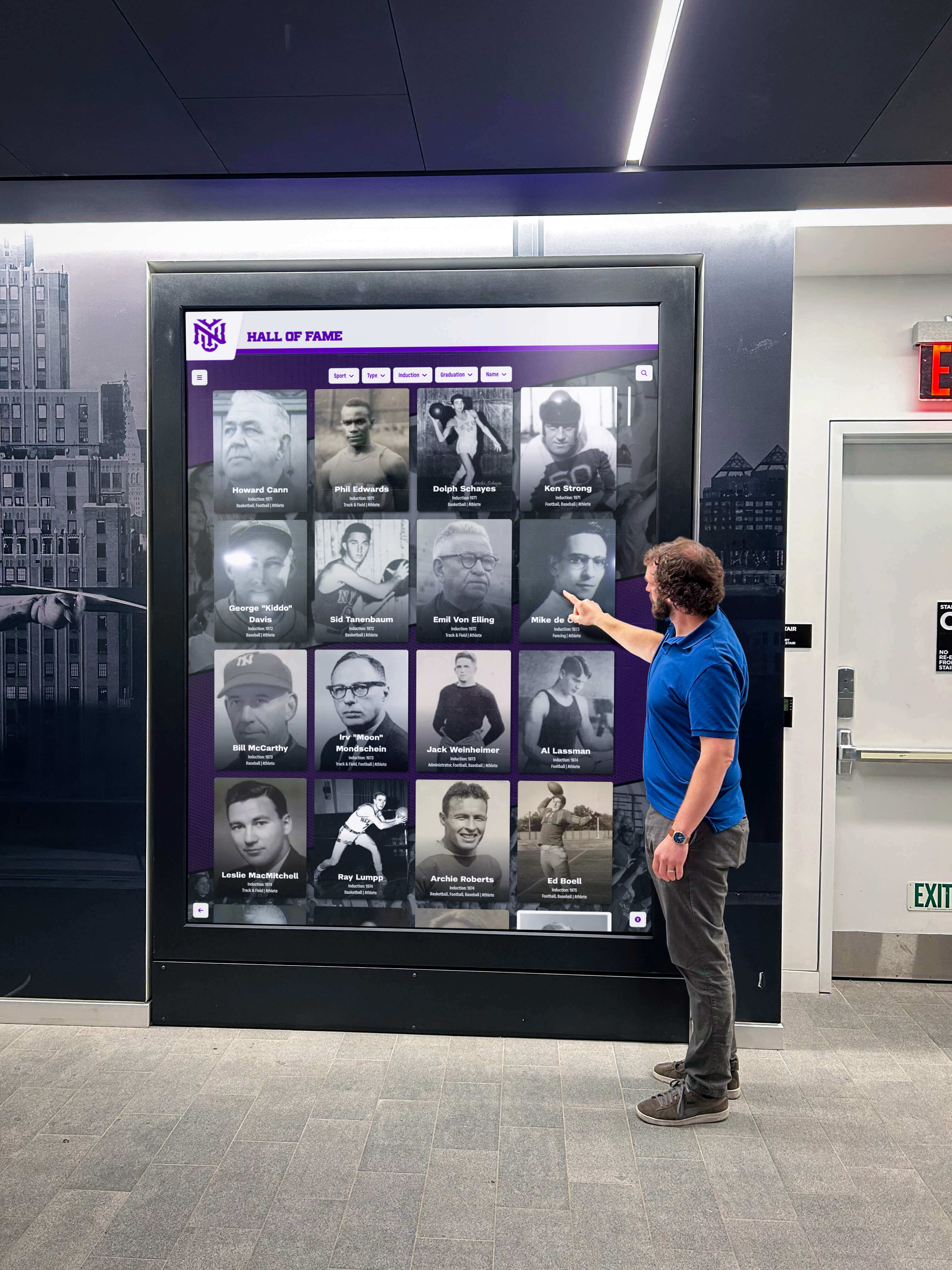
Visitors at a physical display often enter names from memory and have no way to look up the correct spelling — typo tolerance closes the gap between what they type and what is stored
Seven Configuration Steps for Typo-Tolerant Search
Follow this sequence to implement search tolerance in a school digital hall of fame. Steps 1–3 address data quality; Steps 4–7 address platform settings.
Step 1: Audit your existing inductee data for name consistency. Before adjusting any search settings, review your inductee records for the most common inconsistency: names entered in more than one form. Look for profiles where a nickname appears in the official name field (“Coach Williams” instead of “Robert Williams”), where maiden names were used for some alumni but married names for others, and where hyphenated surnames are split or joined inconsistently. Resolve these in the underlying records before configuring search.
Step 2: Add alias fields to your inductee profile schema. If your platform does not already include a nickname or alternate name field, add one before importing or updating any records. Purpose-built digital hall of fame platforms like Rocket Alumni Solutions include these fields as standard. Generic CMS platforms or website builders may require custom field additions. Confirm that any alias field is included in the search index — a field that is stored but not indexed will not improve search results.
Step 3: Populate alias fields for inductees with known name variants. Work through your inductee list and enter known variants for any inductee who meets one or more of the following criteria: uses a nickname publicly, changed their name since graduating, has a hyphenated surname, or was known by a title or role (Coach, Doc, Sister). This population step requires someone familiar with your school’s history — not just a data entry operator. Your athletic director, archivist, or a long-tenured administrator is the right person to review the list and flag entries needing aliases.
Step 4: Enable fuzzy matching in your platform’s search settings. Locate the search configuration section of your platform’s admin panel. Enable fuzzy or approximate matching for name fields and set the edit distance to 1 for short names (under five characters) and 2 for longer names. An edit distance of 2 is the practical limit for name search — higher values begin returning unrelated names and confuse rather than help visitors. If your platform uses a configurable search engine (such as Elasticsearch or Algolia), these settings are typically available under the index configuration or query settings.
Step 5: Build and configure sport and program synonym lists. Document every program name that has appeared in your inductee records over the history of the archive, including retired names, abbreviations, and informal terms used by alumni. Map each variant to the current canonical name. Enter these synonym pairs in your platform’s synonym configuration. Test the synonym list by searching for retired program names and confirming that current inductees from those programs surface correctly.
Step 6: Test the search experience with representative failure cases. Before declaring the configuration complete, run a structured test using real examples from your archive. The following test cases should all return the expected inductee profile:
| Test Input | Expected Profile | Technique Tested |
|---|---|---|
| Inductee’s common nickname | Correct inductee | Alias match |
| Inductee’s maiden name | Correct inductee | Former name alias |
| Inductee’s last name with one transposed letter | Correct inductee | Fuzzy match |
| Retired sport name | Inductees from that era | Synonym expansion |
| Partial hyphenated surname | Correct inductee | Substring match |
| Phonetic variant of first name | Correct inductee | Phonetic or fuzzy match |
Document which test cases pass and which do not. Failures indicate either a missing alias entry or a platform setting that needs adjustment.
Step 7: Establish a zero-result review cycle. Configure your platform to log search queries that return zero results. Review this log quarterly alongside your inductee data audit. Zero-result queries are the most direct evidence of search gaps — each one represents a visitor who was looking for a specific person and could not find them. Categorize each zero-result query: Was it a misspelling that fuzzy matching should have caught? A nickname that needs an alias? A historic program name missing from the synonym list? Route each finding to the appropriate fix.

Every visitor who types a name into a hall of fame search is expressing genuine intent to find a specific person — zero-result searches represent recognition that failed at the final step
Handling the Four Most Common Name Matching Challenges
1. Misspellings and Transposed Letters
Fuzzy matching with an edit distance of 1 or 2 handles the majority of keyboard errors. The most common patterns — “ei” vs. “ie” in names like “Reilly/Riley,” double vs. single consonants as in “Carroll/Carol,” and transposed letters as in “Brian/Brain” — all fall within a single edit distance. Configure the fuzzy threshold on the name fields that visitors are most likely to type (first name, last name, full name) but apply it conservatively on shorter fields like year or category to avoid false positives.
School memorabilia display planning is useful context here because physical recognition displays face the inverse problem — names are fixed at the time of production and cannot be corrected cheaply — which reinforces why digital search tolerance is a meaningful advantage of a digital hall of fame over static installations.
2. Nicknames and Informal Names
Nicknames require explicit alias entries because algorithmic matching cannot reliably infer that “Skip” refers to a person officially named “William.” Build the alias field population step into your inductee intake process: when a new honoree’s profile is created, the intake form should ask for any nickname or preferred name the inductee uses publicly. For existing profiles, use induction ceremony programs, school newspaper archives, and yearbooks to identify common informal names.
Common categories of nicknames in school athletics:
- Shortened first names: “Mike” for “Michael,” “Liz” for “Elizabeth,” “Tony” for “Anthony”
- Sport-specific titles: “Coach,” “Skip,” “Cap” (for captain)
- Hypocoristics: “Bobby” for “Robert,” “Becky” for “Rebecca,” “Jimmy” for “James”
- Team nicknames: less common in individual profiles but sometimes used for coaches (“Coach K” in yearbook captions)
3. Maiden Names and Name Changes
A married inductee listed under her married name may be searched by classmates who knew her only by her maiden name. This is one of the most reliable sources of zero-result searches in archives that span more than fifteen years. The solution is a dedicated former name or maiden name field that is indexed separately from the official name.
Recognition program visual consistency is relevant here because the same naming consistency that improves search also ensures that the inductee’s display card, printed certificate, and digital profile all reference the same canonical name — preventing confusion about whether two records refer to the same person.
When populating this field, use the name displayed in the inductee’s graduation year yearbook as the reference. If a profile shows a different name than the yearbook, the maiden name is the likely historical form and should be stored in the alias field.
4. Historic Team and Program Terminology
Schools that have operated athletic and activity programs for several decades often have renamed, merged, or discontinued programs. Alumni searching for inductees from those eras use the names they remember, not the current program names. Common examples:
| Original Terminology | Current Equivalent |
|---|---|
| “Varsity A” | Individual sport by name (e.g., “Track and Field”) |
| “PeeWee Football” | Modified football program |
| “Junior Varsity” abbreviated as “JV” | Stored as full “Junior Varsity” |
| Previous school mascot name | Current mascot name |
| “Girls’ Athletic Association” (GAA) | Individual sport categories |
Map every historic term in your synonym list to the current canonical category name. This work requires a review of induction programs and yearbooks from each decade in the archive. Gift and recognition display ideas for athletic teams provides relevant context on how team-level recognition is typically structured, which informs what category names alumni are most likely to remember.

An inductee grid that is easy to browse visually is still limited by exact-match search — typo tolerance ensures that visitors who remember a name imperfectly still arrive at the right profile
Execution Timeline: Plan → Build → Launch → Refresh
Phase 1: Plan (Weeks 1–3)
Identify every name variant category present in your archive by reviewing a representative sample of inductee records. Determine which search techniques your platform supports natively and which require custom configuration. Consult with your athletic director, archivist, or alumni relations staff to identify inductees most likely to be searched under alternate names — these are typically the most prominent alumni from each decade, and their search usability should be verified first.
Assess your platform’s search configuration capabilities. Rocket Alumni Solutions and other purpose-built recognition platforms support alias fields and configurable fuzzy matching as standard features. Generic website CMSs and digital signage platforms typically require third-party search plugins or custom development to achieve equivalent results. If your current platform does not support the techniques described in this guide, evaluate purpose-built alternatives before investing in a workaround.
Phase 2: Build (Weeks 4–10)
Add alias and former name fields to your inductee profile schema. Populate these fields for all existing inductees, prioritizing the most prominent honorees and any inductees who have generated zero-result search reports from visitors or staff. Configure fuzzy matching settings at the platform level, referencing the edit distance thresholds in Step 4. Build and test the sport and program synonym list.
Backfill the alias fields for the full archive using the systematic approach described in Step 3. Assign this work to a staff member or archivist with institutional knowledge of the program’s history — accuracy is more important than speed. Modern showcase and display ideas for school achievements covers how to structure a full recognition archive that balances completeness with discoverability, which reinforces the case for investing in the backfill work rather than applying search improvements only to new profiles.
Phase 3: Launch (Weeks 11–12)
Enable zero-result query logging before soft-launching the improved search experience. Introduce the updated search at a higher-traffic event — an alumni reunion, an athletics banquet, or a home playoff game — where visitors are likely to search by name and where staff can observe any remaining failure cases firsthand. Brief the event host or a student ambassador to demonstrate the search box so visitors know it exists and are encouraged to use it.
Communicate the improvement through alumni and athletic department channels. Alumni who previously tried and failed to find a specific inductee are a motivated audience for a message that says the search now handles the names they actually remember.
Phase 4: Refresh (Ongoing)
Review the zero-result query log quarterly. Add alias entries for any names that appeared in the log and were not matched. Update the synonym list when new program names are added or old ones are retired. Confirm that new inductee profiles created after each ceremony include alias fields populated for any known nickname or former name. Alias field population should be part of the standard inductee intake workflow, not an afterthought.
Display Integration: Search UX Across Touchscreen and Web
Touchscreen Kiosk Search Design
On a touchscreen kiosk, the search input field should be visible on the default screen without requiring the visitor to navigate to a separate search mode. Place the search box at or near the top of the inductee browsing interface with a placeholder prompt — “Search by name, sport, or class year” — that communicates the scope of the search to a first-time visitor.
Design the on-screen keyboard to be finger-friendly: minimum 44×44 pixel key targets, adequate spacing between adjacent keys to reduce adjacent-key errors, and a clear delete key for correction. Each of these physical keyboard errors (adjacent key, fat-finger tap) produces a transposed or substituted character that fuzzy matching is specifically designed to catch.
Show a visible result count as the visitor types — “Showing 3 results for ‘Johansen’” — so visitors understand immediately whether their input is matching records. A result count of zero should trigger a “Try a different spelling or check nicknames” prompt rather than a bare empty state.
Web Platform Search Design
On the school website, the hall of fame search field should support standard browser autocomplete interactions so that visitors who have typed the name before can reuse prior entries. URL-encode the search query so filtered search results are bookmarkable and shareable. A visitor who finds the profile they were looking for should be able to share that URL with a family member who is also looking.
Provide a visible “No results” state that suggests alternate approaches: check a different spelling, use a nickname, or browse by sport and class year. The zero-state message is one of the most important UX elements in a typo-tolerant search system because it tells the visitor what to do next rather than simply confirming that the current input failed.

A search system that works on a touchscreen kiosk should function equivalently on web and mobile — consistent search tolerance across all display contexts means no visitor is left without a path to find the person they are looking for
Measurement: Evaluating Search Tolerance Effectiveness
Track these metrics after configuring typo-tolerant search to confirm the configuration is working and identify where gaps remain:
| Metric | What It Tells You |
|---|---|
| Zero-result rate | Percentage of searches returning no results; below 5% is a reasonable target for a well-configured system |
| Corrected searches | Searches followed immediately by a rephrased query; indicates the first attempt failed and the visitor tried again |
| Alias match rate | How often results are returned via an alias field rather than the official name; high rates confirm alias field investment is paying off |
| Zero-result query content | The specific terms that returned no results; each one is a concrete signal of a missing alias, an unconfigured synonym, or an inductee not yet in the archive |
| Search-to-profile rate | How often a search session ends with a profile view; below 60% suggests significant search friction remains |
| Return visit rate | Visitors who searched once and returned to search again; suggests the experience was successful enough to bring them back |
Review these metrics alongside the zero-result query log at each quarterly data audit cycle. A sustained zero-result rate above 10% indicates either a systematic data field gap (alias fields not populated) or a platform setting that has not been applied correctly.
Frequently Asked Questions
Does typo-tolerant search require a specialized platform, or can it be added to any CMS?
Many generic CMS platforms can be extended with third-party search plugins that support fuzzy matching, but the alias and maiden name fields that are essential for name variant matching typically require custom development on non-purpose-built platforms. Purpose-built digital hall of fame platforms include these fields as standard and expose search configuration through an administrative interface that does not require developer involvement. For schools without dedicated technical staff, a purpose-built platform is usually the more reliable path to a fully configured typo-tolerant search experience.
How many alias entries should a typical inductee profile have?
Most inductees need zero to two alias entries. Athletes known by a common nickname (“Johnny” for John) need one. Married women with a maiden name different from their listed name need one. Inductees with both a common nickname and a maiden name may need two. Fewer than 20% of inductees in a typical school archive will require any alias entries at all, but identifying that 20% accurately is essential — they represent the profiles most likely to generate zero-result searches from classmates and family members.
What edit distance threshold should be used for name search?
Edit distance 1 catches most single-character errors — transposed letters, adjacent key errors, one missing or extra letter. Edit distance 2 catches more aggressive misspellings but begins returning loosely related names that can confuse visitors browsing results. For most school hall of fame archives, edit distance 1 for first and last name fields and edit distance 2 for full-name queries (which are typically longer and more tolerant of a higher threshold) is a practical starting configuration. Adjust based on what the zero-result query log reveals.
How should maiden name alias fields be handled for privacy?
Maiden names stored in a search alias field are used only for search indexing — they do not need to appear on the public-facing profile card or bio page. The inductee’s current official name remains the displayed name; the maiden name enables the search match without publicizing the prior name on the profile itself. Confirm this behavior in your platform’s alias field configuration before deploying, and document it in your inductee intake process so staff know the alias field is for search use only.
Can typo-tolerant search coexist with faceted filter search?
Yes, and the two approaches work best together. A visitor who does not know the exact name spelling can use sport and class year filters to narrow the result set to a manageable list, then use keyword search within those filtered results to find the specific person. Conversely, a visitor who enters a name directly benefits from typo tolerance to get past the first failed search attempt. Both capabilities draw on the same underlying data fields — the alias and synonym configurations that power typo-tolerant search also improve the relevance of filter-based browsing.
What happens when a fuzzy match returns multiple possible results?
The search interface should display all fuzzy matches ranked by confidence — closest edit distance first — and show enough profile detail (photo, sport, class year) for the visitor to identify the correct inductee at a glance. A disambiguation result list showing two or three profiles with their portrait images and key details takes less than two seconds for a visitor to scan. Do not collapse multiple fuzzy matches into a single “did you mean?” prompt; show the candidates and let the visitor choose.
Ready to configure typo-tolerant search so every visitor can find every inductee? Request your free custom demo to see how Rocket Alumni Solutions supports alias fields, fuzzy matching, synonym lists, and the ongoing search configuration that keeps a growing recognition archive fully discoverable — even when visitors remember only a nickname or an imperfect spelling.
A digital hall of fame is only as useful as its search. When a classmate types a maiden name from forty years ago, when an alumnus misspells a surname they remember phonetically, or when a student searches for a coach by their team nickname — the search system either finds the right profile or it does not. Typo-tolerant search built on alias fields, fuzzy matching, and maintained synonym lists closes the gap between the name a visitor remembers and the name stored in the archive. Plan the data fields before configuring the settings, populate alias entries for inductees with known variants, and review zero-result logs quarterly. The result is a hall of fame that reliably surfaces the right person regardless of how imperfectly the visitor remembers the name.































