



A digital hall of fame breadcrumb navigation checklist is a structured set of taxonomy, URL, markup, and testing decisions that guide administrators in building visible trail links—Home > Sport > Era > Team > Inductee—so that a returning alumnus, first-time visitor, or search engine crawler can move through a recognition archive at any depth without losing their place or arriving at a dead end.
This checklist is designed for school athletic directors, administrators, IT staff, booster leaders, and archive stewards who manage a digital hall of fame website and need a repeatable framework for planning, implementing, and auditing breadcrumb navigation across every sport category, decade bracket, and individual profile the archive contains.
When an athletic director or archive steward builds a recognition website, attention naturally falls on profile content—photos, statistics, career summaries, and induction citations. Navigation architecture receives far less attention until a family member reports they cannot find a 1978 inductee without using the search bar, or a visitor who arrived on a football page has no visible path back to the archive’s starting point. The five-phase checklist below addresses every navigation decision between an empty taxonomy structure and a working breadcrumb trail that serves visitors, search engines, and ADA-compliance audits simultaneously.

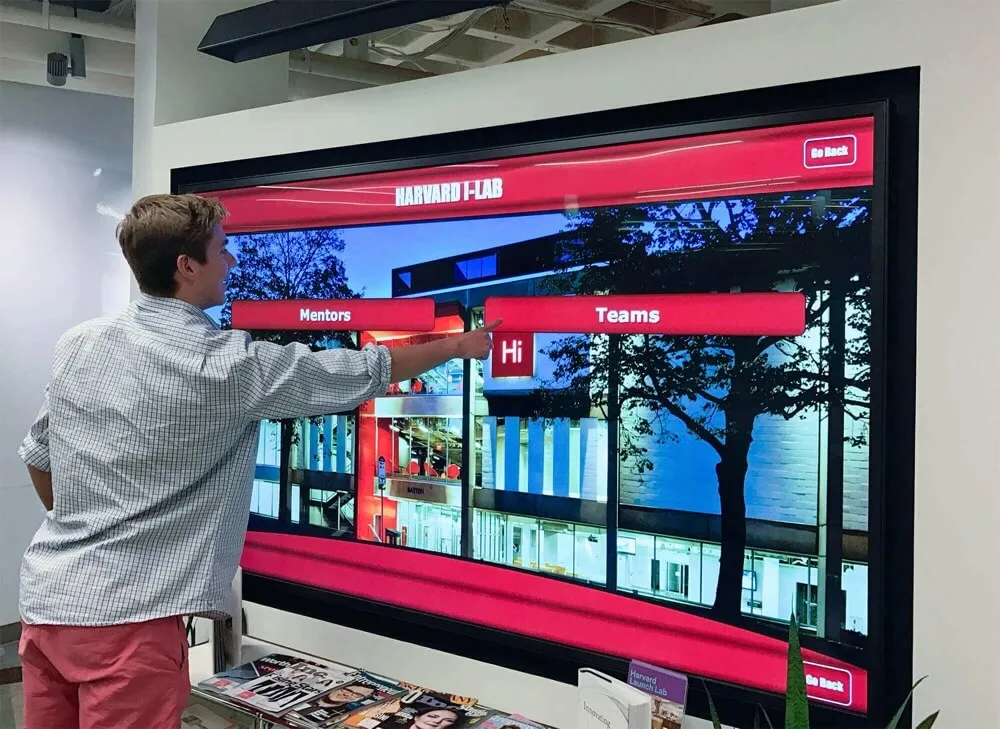
Touchscreen kiosk menus and website breadcrumb trails serve the same purpose—helping visitors move between sports, eras, teams, and individual profiles without losing their orientation in the archive
Navigation Snapshot
| Dimension | Details |
|---|---|
| Primary audience | Athletic directors, school administrators, IT staff, archives volunteers, booster leaders, facilities coordinators |
| Navigation layers | Site root → Sport category → Era or decade → Team or class → Individual inductee profile |
| Common failure modes | Dead-end category pages, inconsistent slug depth, missing BreadcrumbList schema, breadcrumbs that truncate on mobile |
| Recommended cadence | Full audit at launch; incremental review whenever a new sport category or era bracket is added to the archive |
| Tools required | Spreadsheet for taxonomy mapping, CMS theme or template access, HTML validator, Google Search Console |
| Core outcome | Visitors can navigate from any inductee profile back to sport, era, and home without using the browser Back button—and search engines crawl the full category-to-profile path |
Why Breadcrumb Navigation Is an Archive Integrity Problem
Breadcrumbs are horizontal navigation links, typically placed below the site header, that display the path from the homepage to the current page. In a recognition archive, that path might look like:
Home > Football > 1980–1989 > Offense > James Morales
Each segment is a clickable link to the corresponding category or index page. Visitors use breadcrumbs to orient themselves within a deep archive, correct a wrong turn, or deliberately navigate up one level to browse related profiles. Search engines use breadcrumbs to understand site hierarchy and to display category labels in search result snippets rather than raw URL strings.
For most websites, a missing breadcrumb is a minor ergonomic inconvenience. For a school hall of fame website with 400 inductees across 20 sports and six decades, a missing breadcrumb trail means a visitor who lands directly on a football inductee’s profile from a search result has no visible path to other football inductees from the same era, to other sports, or back to the archive’s root. The recognition program loses the browsing engagement that converts a single profile view into an extended archive visit.
Athletic directors who manage records across multiple sports, decades, and induction classes know that recognition archives depend on navigation visitors can follow without assistance—breadcrumb trails are the self-service layer that makes that possible.
Three scenarios make breadcrumb navigation planning essential for school recognition archives:
Deep taxonomy archives. A hall of fame covering 40 years of inductions across 15 sports contains hundreds of potential navigation paths. Without breadcrumbs, a visitor who lands on a swimming inductee profile has no visible connection to the swimming category page, the 1990s decade index, or the era of that inductee’s career.
Touchscreen and kiosk integration. Physical display systems often link to web profile URLs via QR codes. A visitor who scans a kiosk QR code and lands on an inductee profile page needs the ability to navigate to related profiles directly from that page. Breadcrumbs provide that navigation context on every web profile that a kiosk QR accesses.
Search engine category display. Google’s search results show breadcrumb-style paths in the URL section of each result—using BreadcrumbList schema data rather than the raw URL when schema is present. A football inductee profile displaying “halloffame-online.com > Football > 1990s > Morales, James” in search results is more informative and more clickable than a raw slug path.
Phase 1 — Taxonomy Mapping: Define the Navigation Hierarchy Before Building
Breadcrumb trails reflect the archive’s taxonomy. If the taxonomy is undefined or inconsistent, no breadcrumb implementation corrects it. The first phase is a planning exercise, not a technical one.
1a. List every top-level category the archive uses
Work through the full inductee catalog and list every primary grouping dimension: sports, activity types (band, debate, cheerleading), award classifications (Coach of the Year, Distinguished Alumni), and any other primary category the program uses to organize inductees.
A hall of fame that also recognizes school-wide activities such as competitive cheerleading or end-of-season honorees from multiple programs must decide at this phase whether those categories appear at the same breadcrumb level as sports or under a separate branch of the taxonomy.
1b. Decide which secondary dimensions the archive uses
Common secondary dimensions for school recognition archives include:
- Era or decade: 1970–1979, 1980–1989—useful for archives spanning more than 20 years
- Induction class year: The specific year of induction—useful for newer archives or programs that induct annually
- Team or squad: Individual team within a sport (Varsity Football, JV Soccer)—useful when the program recognizes at the team level as well as the individual level
- Award type: All-State, Team Captain, Record Holder—useful when inductees are categorized by achievement rather than chronology
The order of these dimensions in the breadcrumb path matters. Choose the order that matches how most visitors think about the archive. For most school athletic halls of fame, the natural order is Sport → Era → Inductee. For all-activity programs, it may be Category → Year → Inductee.
1c. Identify every combination that needs a category landing page
Each breadcrumb segment must link to a real page. If breadcrumbs include Football > 1990s, there must be a page at the corresponding URL listing all football inductees from the 1990s. Map every breadcrumb segment to the index page it must link to before any implementation work begins.
1d. Document the taxonomy in a shared spreadsheet
The taxonomy map is the reference document for every decision in the phases that follow. Document at minimum:
- Category name and type (sport, era, award, team)
- Expected number of inductees within that category
- Whether a landing page exists or must be created
- The URL slug to be used for that category
Phase 2 — URL and Slug Architecture: Build Paths That Mirror the Breadcrumb
URL structure and breadcrumb trail must align. If breadcrumbs show Football > 1990s > Morales, James, the profile URL should reflect that hierarchy so each breadcrumb segment corresponds to a real URL at the correct path depth.
2a. Choose a URL depth appropriate to the taxonomy
A three-level archive (Sport → Inductee) uses URLs like /football/james-morales/. A four-level archive (Sport → Era → Inductee) uses /football/1990s/james-morales/. Both are valid, but the depth must be decided before any content is published—changing URL depth later requires a redirect map for every profile and category page in the archive.
2b. Standardize slug format across all categories
Choose one slug format and apply it consistently:
- Sport slugs: all lowercase, hyphenated (
track-and-field,cross-country,swimming-diving) - Era slugs: decade notation or year range (
1980s,1980-1989,class-of-2019) - Team slugs: include sport prefix when team is a sub-category (
football-varsity,soccer-jv) - Profile slugs:
[first-name]-[last-name]or[last-name]-[first-name]-[sport]
The slug format applied to the first ten inductees becomes the de facto standard for every inductee that follows. Inconsistency at this stage—some profiles using james-morales, others using morales-james-football—creates breadcrumb display problems and URL audit failures at every subsequent phase.
2c. Confirm every category slug has a corresponding index page
Before implementing breadcrumbs, verify that every slug used in any breadcrumb segment resolves to a real index page. A breadcrumb linking to /football/1990s/ when that page does not exist produces a dead link that degrades both the visitor experience and the site’s crawl integrity.
Managing multi-sport archival content across seasons and classification brackets requires the same URL discipline as a hall of fame archive—every category page must exist before it can be linked from a breadcrumb trail.
Phase 3 — Breadcrumb Implementation: Add the Visible Trail
With the taxonomy mapped and URL structure confirmed, the implementation phase adds the visible breadcrumb element to the site’s page templates.
3a. Generate breadcrumbs from the template, not from individual pages
Breadcrumbs should be generated automatically from each page’s position in the taxonomy, not added manually to each profile. In a CMS or static site generator:
- Use the page’s parent-child relationship to generate breadcrumb segments automatically
- Build breadcrumbs from the URL path using a template function that converts
/football/1990s/james-morales/into a three-link trail - Never hardcode breadcrumb HTML into individual inductee profiles—template-driven breadcrumbs update automatically when the taxonomy changes
3b. Position breadcrumbs below the header and above the page title
The standard position for breadcrumb navigation is between the global header (logo, main navigation) and the page’s H1 title. Avoid placing breadcrumbs in the footer, sidebar, or inside the main content block—these positions reduce usability and fail common accessibility expectations.
3c. Apply ADA-compliant markup to the breadcrumb element
Use a <nav> element with aria-label="Breadcrumb" to wrap the breadcrumb trail. Mark the current page (the inductee profile or current category) with aria-current="page". This allows screen readers to announce the breadcrumb as a navigation landmark and to distinguish the current page from clickable parent segments.
<nav aria-label="Breadcrumb">
  <ol>
    <li><a href="/">Home</a></li>
    <li><a href="/football/">Football</a></li>
    <li><a href="/football/1990s/">1990s</a></li>
    <li aria-current="page">James Morales</li>
  </ol>
</nav>
Use an ordered list (<ol>) rather than an unordered list (<ul>) because breadcrumbs represent a sequence from general to specific—ordered-list semantics communicate that sequence to assistive technologies.
3d. Verify breadcrumb truncation behavior on mobile
Breadcrumb trails that display correctly on a desktop screen often truncate or collapse incorrectly on a 375px mobile viewport. Test breadcrumb rendering at 375px, 414px, and 768px widths and confirm:
- The full trail is visible (scrollable if needed) or truncated gracefully, with the immediate parent always visible
- The current page label does not overflow its container
- Touch targets for breadcrumb links meet the 44×44 px minimum (WCAG 2.1 Success Criterion 2.5.5)
Interactive campus storytelling programs that adapt archive navigation for mobile visitors consistently find that breadcrumb truncation on small screens is the most common navigation complaint from alumni browsing on phones during reunions and athletic events.
3e. Add separators without interfering with screen readers
Add breadcrumb separators (chevrons, slashes) via CSS ::before or ::after pseudo-elements rather than as text characters inserted in the HTML. This prevents screen readers from announcing the separator symbol as part of the breadcrumb text. When a visible text character is used as a separator, wrap it in <span aria-hidden="true"> to suppress screen reader announcement.

A visitor who selects a profile on the kiosk and scans its QR code to visit the web profile needs a breadcrumb trail to navigate back to the sport category or era without using the browser Back button
Phase 4 — Schema Markup: Signal the Breadcrumb Structure to Search Engines
Schema markup communicates the breadcrumb hierarchy directly to search engines in a machine-readable format, enabling the display of breadcrumb-style paths in search result snippets rather than raw URL strings.
4a. Implement BreadcrumbList schema on every profile and category page
Add BreadcrumbList structured data in JSON-LD format to the <head> of every inductee profile page and every category index page. The schema must exactly mirror the visible breadcrumb trail.
{
  "@context": "https://schema.org",
  "@type": "BreadcrumbList",
  "itemListElement": [
    {
      "@type": "ListItem",
      "position": 1,
      "name": "Home",
      "item": "https://yourdomain.com/"
    },
    {
      "@type": "ListItem",
      "position": 2,
      "name": "Football",
      "item": "https://yourdomain.com/football/"
    },
    {
      "@type": "ListItem",
      "position": 3,
      "name": "1990s",
      "item": "https://yourdomain.com/football/1990s/"
    },
    {
      "@type": "ListItem",
      "position": 4,
      "name": "James Morales",
      "item": "https://yourdomain.com/football/1990s/james-morales/"
    }
  ]
}
Generate this schema from a page template rather than writing it manually for each profile. Every schema ListItem must include a valid, live item URL—a schema breadcrumb referencing a URL that does not exist will generate a validation error in Google Search Console.
4b. Validate schema in Google’s Rich Results Test
After implementing BreadcrumbList schema on one category page and one profile page, test both URLs in Google’s Rich Results Test. Confirm that the tool detects the BreadcrumbList and returns no validation errors. Common errors include:
- Mismatched
itemURLs that do not match the live page URL - Missing
positionvalues that break the ordinal sequence - Schema on pages where the corresponding visible breadcrumb trail is absent
4c. Monitor schema in Google Search Console after indexing
After the site is indexed, open Google Search Console → Enhancements → Breadcrumbs. This report shows how many pages have valid breadcrumb schema, how many have errors, and which specific pages are failing. Monitor this report monthly and resolve errors before they accumulate into a large invalid-page backlog.
Phase 5 — Testing and Audit: Walk Every Path a Visitor Might Take
Implementation testing for breadcrumb navigation covers three distinct layers: functional link testing, accessibility testing, and search engine crawl testing.
5a. Test every breadcrumb segment as a live link
For a representative sample of inductee profiles—at minimum one profile per sport category and one per era bracket—click every breadcrumb segment and confirm:
- The link resolves to the correct category or index page
- The category page contains the inductee profile the test navigated from
- The category page itself has a breadcrumb trail one level up from the current trail
5b. Test keyboard and screen reader navigation
Navigate the breadcrumb trail using keyboard only (Tab to focus breadcrumb links, Enter to follow). Confirm that:
- Each breadcrumb link receives a visible focus indicator in keyboard navigation order
- The
aria-label="Breadcrumb"announces correctly in a screen reader (NVDA on Windows, VoiceOver on macOS or iOS) - The
aria-current="page"on the current item announces as “current” in a screen reader
5c. Audit breadcrumb consistency across all category pages
After launch, run a crawl tool across all category index pages and verify that every page has a breadcrumb trail and that no category page is a dead end. A sport category page without a breadcrumb linking back to the main archive root is the most common omission and the most disorienting for visitors who arrive on the category page directly from a search result.
Donor and recognition program administrators who manage multi-tier archive programs know that every navigation dead end represents a potential loss of the browsing engagement that sustains alumni involvement—breadcrumb trails eliminate those dead ends systematically.

A testing walk that clicks every breadcrumb segment on one profile per sport category catches dead-end category pages before visitors encounter them
Digital Hall of Fame Breadcrumb Navigation Checklist (Copy-Paste)
Copy this checklist to a shared document and assign ownership before building or auditing breadcrumb navigation on any recognition website.
DIGITAL HALL OF FAME BREADCRUMB NAVIGATION CHECKLIST

PHASE 1 — TAXONOMY MAPPING
[ ] All top-level categories listed (sports, activities, award types)
[ ] Secondary dimensions identified (era, induction year, team, award type)
[ ] Breadcrumb depth decided: 3-level or 4-level (see Depth Reference Table below)
[ ] Every breadcrumb segment mapped to an existing or planned index page
[ ] Taxonomy documented in shared spreadsheet before implementation begins
[ ] Category landing page list reviewed with CMS administrator

PHASE 2 — URL AND SLUG ARCHITECTURE
[ ] URL depth decided and documented before first profile is published
[ ] Slug format standardized for sports, eras, teams, and profile names
[ ] All sport category slugs confirmed live at designated URL paths
[ ] All era or decade slugs confirmed live at designated URL paths
[ ] All breadcrumb segments correspond to live index pages (no dead links)
[ ] URL structure and slug format documented for IT and CMS administrators

PHASE 3 — BREADCRUMB IMPLEMENTATION
[ ] Breadcrumb generated from page hierarchy by template (not hardcoded per profile)
[ ] Breadcrumb positioned below global header, above H1 title
[ ] <nav aria-label="Breadcrumb"> wrapper applied
[ ] Ordered list <ol> used (not <ul>)
[ ] Current page marked with aria-current="page"
[ ] Breadcrumb separator added via CSS pseudo-element or aria-hidden="true"
[ ] Breadcrumb tested at 375px, 414px, and 768px viewport widths
[ ] Touch targets for all breadcrumb links meet 44x44px minimum
[ ] Breadcrumb links pass visible focus indicator test (keyboard navigation)
[ ] Breadcrumbs suppressed on homepage and root-level pages

PHASE 4 — SCHEMA MARKUP
[ ] BreadcrumbList schema generated by template for all profile pages
[ ] BreadcrumbList schema generated by template for all category index pages
[ ] All schema ListItem "item" URLs match live page URLs exactly
[ ] "position" values form a sequential, unbroken integer sequence
[ ] Schema validated in Google's Rich Results Test (at least one category + one profile)
[ ] No validation errors returned in Rich Results Test
[ ] Schema monitored in Google Search Console → Enhancements → Breadcrumbs

PHASE 5 — TESTING AND AUDIT
[ ] All breadcrumb segments tested as live links on one profile per sport category
[ ] All category pages confirmed to have upward breadcrumb trail (no dead ends)
[ ] Keyboard-only navigation tested on all breadcrumb links
[ ] Screen reader breadcrumb announcement tested (NVDA or VoiceOver)
[ ] Crawl tool run across all category pages to confirm breadcrumb presence
[ ] Google Search Console Breadcrumbs report monitored at launch and monthly
[ ] Any validation errors resolved within one reporting cycle (28 days)
[ ] Spot-check audit scheduled for each new sport category or era bracket added
Breadcrumb Depth Reference Table
Use this table to decide the appropriate breadcrumb depth for your archive during the taxonomy mapping phase, before any implementation begins.
| Archive Size | Induction History | Recommended Depth | Example Trail |
|---|---|---|---|
| Under 100 inductees | Under 15 years | 2-level: Sport → Inductee | Home > Football > James Morales |
| 100–300 inductees | 15–25 years | 3-level: Sport → Era → Inductee | Home > Football > 2000s > James Morales |
| 300–600 inductees | 25–40 years | 3-level: Sport → Era → Inductee | Home > Track and Field > 1990s > Maria Chen |
| 600+ inductees | 40+ years | 4-level: Sport → Era → Team/Class → Inductee | Home > Football > 1980s > Varsity > James Morales |
| All-activity program | Any | 3-level: Category → Year → Inductee | Home > Performing Arts > Class of 2018 > Jordan Rivera |
| Award-type program | Any | 3-level: Award → Year → Recipient | Home > Coach of the Year > 2022 > Patricia Walsh |
Schools managing multi-facility athletic programs and campus environments that span multiple buildings or sports complexes may need a facility or campus level above the sport level. Confirm whether the recognition program is facility-specific or school-wide before finalizing breadcrumb depth.
Display Integration: Connecting Web Breadcrumbs to Touchscreen Navigation
A breadcrumb trail on a recognition website and the menu structure of a touchscreen kiosk serve the same navigational purpose: they let visitors orient themselves within a deep archive and move between categories without losing their place. The web breadcrumb architecture built in this checklist should directly inform the kiosk navigation design in four specific ways.
Category labels must match across channels. If the website breadcrumb trail displays “Track and Field” as a sport category, the kiosk main menu must display “Track and Field”—not “Track” or “Track & Field.” Visitors who use both the kiosk and the website to research an inductee will expect consistent category names. Inconsistency erodes confidence in the archive’s completeness.
Era brackets must align across channels. A website that organizes inductees by decade (1980–1989) and a kiosk that organizes the same inductees by five-year periods (1980–1984, 1985–1989) create a navigation mismatch that confuses visitors who move between both. Align era bracketing during the taxonomy mapping phase before either channel is built.
Category index pages should be linkable from kiosk QR codes. The URL structure developed in Phase 2 generates stable, linkable URLs not only for individual profiles but for every category and era index page. A QR code on a kiosk’s “Football – 1990s” section header can link to the corresponding web category page, allowing visitors to continue browsing on their phones after leaving the kiosk.
Physical programs that document school milestones across disciplines—from athletics to capturing memorable school moments for ongoing reference—benefit from a breadcrumb framework that accommodates multiple content types within a consistent navigation structure, not only athletic inductees.

Consistent breadcrumb navigation allows visitors to browse the archive from a desktop at home, a tablet at a booster meeting, or a phone after scanning a kiosk QR code—the navigation path looks and works the same on every device
Frequently Asked Questions
Do breadcrumbs improve search engine rankings for individual inductee profiles?
Breadcrumb navigation does not directly boost rankings for individual profile pages. It improves two factors that influence rankings indirectly: internal link equity distribution (breadcrumb links from category pages to profiles pass page authority throughout the archive) and click-through rate (breadcrumb-style display in search result snippets tends to attract more relevant clicks than raw URL paths). A football profile showing “halloffame-online.com > Football > 1990s” in search results communicates context that a plain URL slug cannot.
What if the CMS does not support automatic breadcrumb generation?
Most CMS platforms support breadcrumb generation through a plugin, a theme setting, or a custom template function. If automatic generation is unavailable, breadcrumbs can be implemented manually using a consistent HTML pattern maintained as part of the profile creation workflow—though manual breadcrumbs carry a higher risk of inconsistency and are harder to audit at scale. When evaluating CMS platforms for a new hall of fame website, confirm breadcrumb generation capability before selecting a platform.
Should breadcrumbs display on the homepage?
No. Breadcrumbs are only meaningful when a visitor is more than one level deep in the site hierarchy. The homepage is the root of every breadcrumb trail—it does not need a trail pointing back to itself. Implement breadcrumbs on all category index pages and all inductee profile pages, and suppress them on the homepage and any pages only one level below the root.
How should the archive handle an inductee who appears in more than one sport?
If the archive allows an inductee to be recognized in more than one sport—a three-sport athlete inducted into football, basketball, and track—each profile page should have a breadcrumb trail appropriate to the category context in which it appears. A single inductee may have three profile URLs, each with a different breadcrumb path reflecting the sport. If a single canonical profile lists multiple sports, display the breadcrumb trail for the primary sport and include a note in the profile content indicating secondary sports.
What is the correct breadcrumb format for a team induction rather than an individual inductee?
Team inductions follow the same depth logic as individual inductees but replace the personal name with the team name and year: Home > Football > 1982–83 Season > State Championship Team. Each segment in this trail must link to a real index page—the “1982–83 Season” segment links to a page listing all inductees from that period, and the team page must exist as a standalone profile the breadcrumb links to.
Does BreadcrumbList schema need to be updated when new inductees are added?
Individual breadcrumb schema on a specific profile page does not change when new inductees are added—it reflects only the path to that specific profile. Category index pages may need their schema updated if a category is renamed or restructured. A templated schema generation approach propagates updates automatically when the taxonomy changes rather than requiring manual editing of individual pages.
How does breadcrumb navigation affect ADA compliance for the recognition website?
Properly implemented breadcrumbs contribute to WCAG 2.1 AA compliance by providing multiple ways to navigate to a page (Success Criterion 2.4.5) and helping visitors understand where they are within the site (Success Criterion 2.4.8). The aria-label="Breadcrumb" attribute on the <nav> wrapper and aria-current="page" on the current item are the minimum markup requirements for accessible breadcrumb implementation. Touch target sizing at 44×44 px minimum applies to all breadcrumb links on mobile viewports.
Measurement: Confirming Breadcrumb Navigation Is Working
Track these indicators in the 30–60 days following implementation to confirm that breadcrumbs are functioning correctly across the archive.
| Metric | Where to Find It | Target |
|---|---|---|
| Breadcrumb schema validity | Google Search Console → Enhancements → Breadcrumbs | Zero validation errors; all detected pages valid |
| Category page traffic share | Google Analytics → Pages and Screens; filter by category URL patterns | Category pages receiving traffic proportional to profile page volume |
| Profile exit rate | Google Analytics → Engagement → Pages → Exit rate on profile pages | Exit rate below 80%, indicating visitors are using breadcrumbs to browse further |
| Crawl depth to profiles | Screaming Frog → URL depth report | No profile page more than 4 clicks from the homepage |
| Dead-end category count | Crawl tool → Pages with no outbound internal links | Zero category pages with no breadcrumb or onward navigation |
| Rich snippet display rate | Google Search Console → Performance → look for breadcrumb path in snippet preview | Breadcrumb-style path visible in search result snippets for category and profile pages |
Execution Timeline: Plan → Build → Launch → Refresh
Plan (Weeks 1–3)
- Complete the Phase 1 taxonomy mapping exercise; document every category, era, and sub-category in the shared spreadsheet before any development work begins
- Confirm URL depth and slug format with the CMS administrator or development team before any content is published to the site
- Audit the existing site (if one already exists) for category pages that are missing—create a list of every index page that must exist before breadcrumbs can be implemented correctly
Build (Weeks 4–6)
- Create all category index pages identified as missing during the planning audit
- Implement the breadcrumb template in the CMS or static site generator; confirm it generates correctly on one sport category page and one inductee profile before rolling out across the full archive
- Add BreadcrumbList schema to page templates for profile and category pages; validate in Google’s Rich Results Test before proceeding
Launch (Week 7)
- Run the full Phase 5 testing sequence across a representative sample of profiles and categories—at minimum one profile per sport and one per era bracket
- Confirm ADA compliance for all breadcrumb markup (aria-label, aria-current, keyboard navigation, touch target sizing)
- Submit the updated sitemap to Google Search Console and begin monitoring the Breadcrumbs enhancement report
Refresh (Ongoing — After Every New Sport Category or Era Bracket Is Added)
- When a new sport category or era bracket is added, verify the new category index page exists, the breadcrumb template generates correctly for profiles in that category, and BreadcrumbList schema validates for new pages
- Run a spot-check crawl annually across all category pages to confirm no dead-end pages have accumulated as the archive grows
- Revisit the breadcrumb depth reference table if the archive grows past a size threshold that warrants adding a navigation level
Schools that have expanded recognition archives to include academic, performing arts, and community achievement inductees alongside athletics find that campus-wide storytelling and navigation programs require the same breadcrumb planning discipline as athletic archives—the taxonomy simply has more branches.

Whether a visitor browses the archive on a hallway kiosk or on the school's recognition website, breadcrumb navigation ensures they can move between sports, eras, and individual profiles without reaching a dead end
Connecting Breadcrumb Navigation to a Platform That Manages It Automatically
A breadcrumb navigation checklist built and maintained manually is a significant ongoing commitment for any administrative team. Every new sport category, era bracket, or award type added to the archive requires a new category landing page, a schema update, and a crawl audit to confirm no dead-end pages were introduced. When staff turnover occurs, the institutional knowledge behind the taxonomy can be lost unless it was documented in the Phase 1 spreadsheet and preserved as a handoff document.
Platforms designed specifically for school recognition and community archives that handle navigation architecture automatically reduce that maintenance burden substantially—but the taxonomy mapping and testing phases in this checklist still apply regardless of platform, because breadcrumb navigation reflects the archive’s organizational logic, not just its technical implementation.
Rocket Alumni Solutions builds cloud-based digital hall of fame platforms with structured profile organization, schema-ready URL patterns, and category-based browsing built into the display architecture from the ground up. Navigation between sports, eras, teams, and individual inductee profiles is managed through a single cloud CMS, so the breadcrumb architecture updates automatically when a new category is added or an existing category is restructured—rather than requiring a manual template change, a separate schema update, and a crawl audit on every affected page.
See How Rocket Manages Hall of Fame Navigation Automatically
Rocket Alumni Solutions builds digital hall of fame platforms with structured category navigation, ADA-compliant WCAG 2.1 AA displays, and cloud CMS management—so every sport, era, and inductee profile stays browsable without manual breadcrumb configuration. Unlimited inductee capacity and remote management are included.































