




A digital hall of fame ARIA-rowcount ARIA-rowindex audit is the process of examining every large inductee table on your school’s recognition website and touchscreen kiosk to verify that aria-rowcount and aria-rowindex are correctly applied whenever the platform renders only a portion of a large inductee collection rather than every row in the DOM simultaneously. When a roster of 400 inducted athletes is too large to render as 400 table rows without degrading page performance, the display platform typically uses virtualization—rendering only the 20–30 rows currently visible in the viewport and swapping new rows into the DOM as the visitor scrolls, while removing rows that have scrolled out of view. Without aria-rowcount and aria-rowindex, a screen reader examining the rendered table sees only the 20–30 DOM-resident rows, announces the table as having 20–30 rows, and has no indication that 370–380 additional inductees exist. A digital hall of fame ARIA-rowcount ARIA-rowindex audit verifies that the rendering platform supplies the correct total row count on the table element and the correct position index on each rendered row, so that assistive technology can communicate both “this inductee is row 47 of 400” and “the full inductee archive contains 400 entries”—giving screen-reader users the same spatial orientation within the recognition collection that a sighted visitor derives from a scrollbar position indicator.
Virtualized inductee tables are the correct architectural choice for recognition archives that grow to hundreds or thousands of entries. A school that has operated a digital hall of fame for twenty years—inducting classes each spring and fall—will accumulate hundreds of inductee records. A university athletics program covering a dozen sports across both men’s and women’s programs can reach inductee counts in the low thousands. Rendering every inductee as a DOM-resident table row is not viable at that scale; the browser’s layout engine must paint every row on each load, most of which the visitor will never scroll to.
Virtualization solves the rendering problem but introduces an accessibility gap: the DOM no longer matches the full dataset. aria-rowcount and aria-rowindex are the WAI-ARIA attributes that close this gap at the accessibility-tree level, so that assistive technology users receive complete, accurate information about the table’s size and each row’s position—even when the DOM contains only a fraction of the full inductee list at any given moment.

Large inductee collections on digital hall of fame platforms are commonly rendered through virtualized tables that display only a subset of rows at a time—aria-rowcount and aria-rowindex are the attributes that tell screen readers the table's total size and each visible row's position in the full collection
Program Snapshot: ARIA-Rowcount and ARIA-Rowindex Audit Scope
Define the full audit scope before opening any tools. The table below covers schools at every stage of digital recognition implementation.
| Planning Element | Details |
|---|---|
| Primary Audience | Athletic directors, IT administrators, school web managers, accessibility compliance leads, and recognition-program owners who maintain web-based or touchscreen inductee roster tables with more than 50–100 rows |
| What Is Being Audited | Every table or grid element on the recognition platform that renders a large inductee collection through virtualization: sport-filtered inductee rosters, all-time award recipient lists, class-year archive tables, and searchable inductee grids rendered with role="grid" or native <table> markup |
| WCAG Criteria | 4.1.2 Name, Role, Value — Level A; 1.3.1 Info and Relationships — Level A; 2.1.1 Keyboard — Level A |
| Tools Required | Chrome or Firefox with DevTools Accessibility panel, NVDA (Windows, free) or VoiceOver (macOS, built-in), the axe DevTools browser extension, Chrome’s Accessibility Tree viewer (DevTools → Elements → Accessibility tab), and a keyboard for interaction testing |
| Time Investment | 20–40 minutes for an initial audit of all virtualized table elements; 10–15 minutes for a targeted re-check after any table component, data API, or JavaScript framework update |
| Failure Consequence — aria-rowcount Missing | Screen reader announces the table as having only as many rows as are currently in the DOM; for a 400-row archive rendered 25 rows at a time, the screen reader tells the visitor “table with 25 rows” rather than “table with 400 rows”; the visitor has no indication a larger collection exists |
| Failure Consequence — aria-rowindex Missing | Screen reader announces each visible row’s position relative only to the DOM-resident rows; a visitor reading row 12 of the visible 25-row window sees “row 12 of 25” rather than “row 36 of 400”; the visitor cannot orient themselves within the full archive |
| Failure Consequence — Off-by-One aria-rowindex | aria-rowindex values are set incorrectly by one position (starting at 0 instead of 1, or misaligned with scroll offset calculations); the visitor hears row positions that do not correspond to their actual location in the sorted archive |
| Failure Consequence — aria-rowcount Stale After Filter | aria-rowcount is set once at page load and not updated when a sport or year filter reduces the visible collection; the screen reader continues to announce “400 rows” even after the filter narrows the dataset to 28 basketball inductees |
| Pass Condition | Every virtualized table element carries aria-rowcount equal to the total number of rows in the current dataset (including filtered state); every DOM-resident table row carries aria-rowindex equal to its 1-based position in the full dataset; verified in at least two screen reader and browser combinations at multiple scroll offsets |
| ADA Relevance | Public school recognition websites and kiosk displays serving alumni, parents, and community members carry digital accessibility obligations; WCAG 4.1.2 Level A requires that all UI components expose accurate name, role, and value through the accessibility API, which aria-rowcount and aria-rowindex provide for virtualized table structures where the DOM does not represent the full dataset |
When Are aria-rowcount and aria-rowindex Required?
aria-rowcount and aria-rowindex are required on any table or grid element that renders fewer rows in the DOM than exist in the underlying dataset. The test is straightforward: count the rows in the DOM, count the rows in the dataset. If they differ, aria-rowcount and aria-rowindex are required.
Virtualization is the primary scenario. A JavaScript-rendered inductee table that loads 25 rows, removes them as the visitor scrolls down, and loads the next 25 rows is a virtualized table. The DOM contains 25 rows at any moment; the dataset contains 400. aria-rowcount="400" on the <table> or role="grid" element and aria-rowindex on each <tr> or role="row" element are required.
Server-side pagination is a secondary scenario. A table that loads page 1 of 50 inductees (rows 1–50 of 400) through a server request is not technically virtualized—the page reload replaces the DOM—but the same principle applies. On page 1, aria-rowcount="400" and aria-rowindex values 1–50 are correct. On page 2, aria-rowindex values 51–100 are correct, and aria-rowcount remains 400. Without aria-rowcount and aria-rowindex in the server-rendered HTML, a screen-reader user on page 2 hears “table with 50 rows” rather than “rows 51–100 of 400.”
Lazy-loading (infinite scroll) is the third scenario. An inductee table that appends new rows to the DOM as the visitor scrolls—never removing previously loaded rows—eventually contains all rows in the DOM, but initially contains only a subset. aria-rowcount should be set to the total from the first render; aria-rowindex values on the initial rows should reflect their true 1-based positions.
aria-rowcount and aria-rowindex are NOT required when the table renders every row in the DOM simultaneously—even if the table is very long. A 400-row <table> with all 400 <tr> elements present in the DOM does not need aria-rowcount or aria-rowindex; the browser communicates row count and position correctly from the DOM structure. These attributes are only needed when the DOM and the dataset diverge.
Deciding on inductee eligibility and induction criteria for a digital display program shapes how large the inductee dataset grows over time—and directly determines when a recognition platform will cross the virtualization threshold. A school that inducts 10–15 honorees per year across multiple sport and recognition categories can expect to exceed 200 inductees in less than fifteen years, at which point virtualized table rendering becomes a performance necessity rather than an optional optimization.

Recognition archives that grow to hundreds of inductees require virtualized table rendering—and aria-rowcount and aria-rowindex are the attributes that give screen-reader users accurate row count and position information when the DOM shows only a fraction of the full collection
Content Architecture: Virtualized Table Types and aria-rowcount/aria-rowindex Decision Table
The central output of a digital hall of fame ARIA-rowcount ARIA-rowindex audit is a pass, remediate, or skip decision for every table and grid element on the recognition platform. The table below covers the table types most commonly found on school recognition platforms.
| Table Type | Rendering Method | aria-rowcount Required? | aria-rowindex Required? | Common Finding |
|---|---|---|---|---|
| All-inductee roster table (virtualized scroll) | JavaScript virtualizes rows; DOM contains 20–30 of N total rows | Yes — set to total inductee count | Yes — each row’s 1-based position in full dataset | Both attributes missing; screen reader announces only the DOM-resident row count |
| Sport-filtered inductee grid (role=“grid”) | Filter reduces dataset; virtualization continues within filtered result | Yes — updated to filtered count on each filter change | Yes — row positions within filtered dataset | aria-rowcount set once at page load; not updated after filter; announces stale total |
| Paginated inductee table (server-rendered pages) | Each page request renders 50 rows of N total | Yes — set to N (total across all pages) | Yes — set to page-start-offset through page-end-offset | aria-rowindex missing on server-rendered pages; screen reader sees “table with 50 rows” every page |
| Class-year archive table (lazy-load / infinite scroll) | DOM grows as visitor scrolls; no rows removed | Yes — set to total at first render | Yes — rows appended with correct continuing index | aria-rowindex on appended rows starts at 1 rather than continuing from last loaded index |
| Search results grid (dynamic query results) | Search returns N matching inductees; virtualization renders subset | Yes — set to N matching results | Yes — position within search result set | aria-rowcount not updated after search query; announces previous filter’s total |
| Award category recipients table (static, all rows rendered) | All rows in DOM simultaneously | No | No | Attributes unnecessarily added (not harmful, but redundant) |
| Top-10 all-time statistical leaders table | Fixed small table; all rows always rendered | No | No | No virtualization; attributes not needed |
| Comparison table (2–4 inductees side by side) | Fixed layout with one row per stat; always fully rendered | No | No | Comparison table is not a roster list; no virtualization required |
| Inductee class year navigation tree | role="tree" component, not a table | N/A — applies to table/grid roles only | N/A | Table attributes incorrectly applied to tree component; remove and use aria-setsize/aria-posinset instead |
The distinction between table/grid roles and other collection roles is critical. aria-rowcount and aria-rowindex are valid only on elements with role="table", role="grid", role="treegrid", or equivalent native HTML table elements. For lists rendered with role="listbox" or role="list", the equivalent attributes are aria-setsize (total collection size) and aria-posinset (item position). An inductee list rendered as role="listbox" options requires aria-setsize and aria-posinset, not aria-rowcount and aria-rowindex.
Auditing how a recognition platform communicates loading state and result counts through ARIA live regions is a complementary check to the aria-rowcount audit. A status message that reads “Showing 25 of 400 inductees” supplements the aria-rowcount information carried in the table element—both mechanisms together give screen-reader users the fullest picture of the collection size.
See Accessible Virtualized Inductee Tables in a Live Demo
Request a walkthrough of Rocket Alumni Solutions’ recognition platform to see how large inductee archives are rendered, how aria-rowcount and aria-rowindex are managed through scroll and filter interactions, and how screen-reader users navigate inductee collections of any size.
Common Off-by-One Failures and How to Identify Them
Off-by-one errors in aria-rowindex values are among the most common implementation failures in virtualized table accessibility. They occur because the index calculation in the JavaScript rendering engine uses a different reference frame than the WAI-ARIA specification requires.
Failure 1: aria-rowindex Starts at 0 Instead of 1
WAI-ARIA specifies that aria-rowindex is a 1-based integer—the first row in the table is row 1, not row 0. JavaScript arrays, however, are 0-indexed. A virtualization engine that passes the array index directly to the aria-rowindex attribute will set the first rendered row to aria-rowindex="0", the second to aria-rowindex="1", and so on.
<!-- FAIL: aria-rowindex starts at 0 (JavaScript array index passed directly) -->
<table role="grid" aria-rowcount="400" aria-label="Hall of Fame Inductees">
<tbody>
<tr role="row" aria-rowindex="0"><!-- should be 1 --></tr>
<tr role="row" aria-rowindex="1"><!-- should be 2 --></tr>
<tr role="row" aria-rowindex="2"><!-- should be 3 --></tr>
</tbody>
</table>
Fix: Add 1 to the array index before setting aria-rowindex: aria-rowindex={arrayIndex + 1} in React/Vue/Angular templates, or row.setAttribute('aria-rowindex', arrayIndex + 1) in vanilla JavaScript.
How to identify during audit: Inspect the first visible <tr> or role="row" element in DevTools Elements panel. If aria-rowindex="0" appears on the first row of the table regardless of scroll position, the implementation is 0-based.
Failure 2: aria-rowindex Resets to 1 for Each Scroll Window
A virtualization engine that resets the row index to 1 for each freshly rendered window sets aria-rowindex values 1 through 25 for the first window, then resets to 1 through 25 again for the second window. The screen reader announces rows 1–25, then announces rows 1–25 again after the visitor scrolls—giving the impression of a circular table rather than a linear archive of 400 entries.
<!-- After scrolling to second window — FAIL: index reset to 1 instead of 26 -->
<tr role="row" aria-rowindex="1"><!-- should be 26 --></tr>
<tr role="row" aria-rowindex="2"><!-- should be 27 --></tr>
Fix: Track the scroll offset in the virtualization engine and set aria-rowindex as (windowStartIndex + windowRowIndex + 1) where windowStartIndex is the dataset index of the first rendered row in the current window and windowRowIndex is the 0-based position within the current window.
How to identify during audit: Scroll the inductee table to approximately the midpoint of the archive. Inspect a visible <tr> or role="row" element and note its aria-rowindex value. If the value is between 1 and 25 rather than near the midpoint of the full dataset count, the implementation is resetting the index within each scroll window.
Failure 3: aria-rowcount Includes Header Rows in the Data Count
aria-rowcount should count only the data rows that represent inductees—it should not inflate the data row count by including header rows. A table with 1 header row and 400 inductee data rows has aria-rowcount="400", not aria-rowcount="401". Including the header row in the data count causes the screen reader to announce “401 rows” when only 400 inductees are in the archive.
WAI-ARIA note: aria-rowindex on the header row (role="rowheader" or <th> row) should be set to 1 when the header row is present. Data row indices then begin at 2. Many implementations omit aria-rowindex from the header row entirely and begin data rows at aria-rowindex="1". Either approach is valid—the key is consistency: if the header row has no aria-rowindex, data rows must begin at 1; if the header row has aria-rowindex="1", data rows must begin at 2.
How to identify during audit: Count the <tr> elements in the <thead> or header section. Confirm that aria-rowcount on the <table> element equals only the count of data rows in the dataset, not the sum of header rows and data rows.
Failure 4: aria-rowcount Not Updated After Filter Change
Applying a sport or year filter reduces the inductee collection from 400 total entries to, for example, 28 basketball inductees. If aria-rowcount is set once at page load and not updated when the filter is applied, the screen reader continues to announce the table as having 400 rows even when only 28 basketball inductees match the filter.
// FAIL: aria-rowcount set once at initialization, never updated
tableElement.setAttribute('aria-rowcount', totalInducteeCount); // set to 400 at load

// PASS: update aria-rowcount whenever the dataset changes
function applyFilter(sport) {
  const filteredCount = inductees.filter(i => i.sport === sport).length;
  tableElement.setAttribute('aria-rowcount', filteredCount); // update to 28
  renderVirtualizedRows(filteredInductees);
}
How to identify during audit: Load the inductee table in its default state and note the aria-rowcount value on the table element in DevTools. Apply a sport filter that visibly reduces the inductee list. Re-inspect the aria-rowcount value. If the value has not changed, the implementation is not updating aria-rowcount on filter.
Failure 5: aria-rowindex Gap After Row Removal
Some recognition platforms allow visitors to remove inductees from a comparison selection or to hide rows from a filtered view without reloading the page. When a row is removed from the DOM, the aria-rowindex values of the remaining rows must be updated to close the gap. If the removed row was row 15 of 400, rows 16 through 400 must each have their aria-rowindex decremented by 1—or aria-rowcount reduced by 1 if the row is permanently removed from the dataset. Failure to update produces a sequence with a gap: rows announcing positions 1–14, then 16–25 with no row 15, which confuses screen-reader users navigating by row position.
Planning a community showcase or recognition exhibit involves the same kind of careful sequencing: the order in which honorees appear, and their positions relative to each other, carries meaning for visitors. The same principle applies in the digital context—aria-rowindex values are the screen reader’s equivalent of sequencing cues, and gaps or duplicates disrupt that meaning.
Execution Timeline: Plan → Build → Launch → Refresh
Step 1 — Identify All Table and Grid Elements
Open the recognition platform in Chrome or Firefox. Use DevTools Element search (Ctrl+F in Elements) to find all instances of <table>, role="grid", and role="treegrid". For each table or grid, record: the element tag and role, whether the element is virtualized (test by scrolling—if the row count in the DOM stays constant while new rows appear and old rows disappear, it is virtualized), the current aria-rowcount value (if any), and the aria-rowindex values on the first three and last three visible <tr> or role="row" elements.
Record whether the table has associated filter or search controls. Filtered tables require aria-rowcount updates when filtering events occur.
Step 2 — Verify aria-rowcount on Each Table Element
For each virtualized table or grid, inspect the table element in DevTools Accessibility panel. Confirm that aria-rowcount is present and that its value equals the total number of rows in the current dataset (not the number of DOM-resident rows). Confirm the value updates after applying a filter.
- If
aria-rowcountis absent: record as Remediate — Missingaria-rowcount - If
aria-rowcountequals the DOM row count (e.g., 25) rather than the dataset row count (e.g., 400): record as Remediate — Incorrectaria-rowcountvalue
Step 3 — Verify aria-rowindex on Visible Rows at Multiple Scroll Positions
Scroll the inductee table to the top. Inspect the first visible row and record its aria-rowindex value. It should be 1 (or 2 if a header row has aria-rowindex="1"). Inspect the last visible row and confirm its aria-rowindex value equals the number of visible rows (or header offset plus number of data rows visible).
Scroll to the midpoint of the table (approximately 50% of scroll depth). Inspect the first visible row and record its aria-rowindex value. For a 400-row dataset rendered 25 rows at a time, a 50% scroll should produce aria-rowindex values in the range of approximately 190–210 on the first visible row. If the value is in the range of 1–25 (reset within window), record as Remediate — aria-rowindex reset within scroll window.
Scroll to the bottom. Inspect the last visible row. Its aria-rowindex should equal the total dataset row count.
Step 4 — Check for Off-by-One at the Top of the Table
Inspect the aria-rowindex of the first data row (not the header row). If aria-rowindex="0", record as Remediate — 0-based indexing error. If aria-rowindex="1" and no header row exists, or aria-rowindex="2" and a header row carries aria-rowindex="1", record as Pass.
Step 5 — Test aria-rowcount Update on Filter Change
Apply a sport filter (for example, filter the inductee table to Basketball only). After the filter is applied and the table updates, inspect the aria-rowcount value on the table element. Confirm it reflects the filtered dataset size, not the unfiltered total. If aria-rowcount still shows the unfiltered total, record as Remediate — aria-rowcount not updated on filter.
Reset the filter. Confirm aria-rowcount returns to the unfiltered total.
Step 6 — Screen Reader Navigation Test
Enable NVDA (Windows) in Browse mode. Tab to the inductee table. Press Enter or F7 to enter NVDA’s table navigation mode. Press Ctrl+Alt+Down Arrow to navigate down through rows. Listen for the row announcements. NVDA should announce each row’s aria-rowindex value as part of its cell position announcement—for example: “Row 36, column 1 of 5: Jordan Ramirez.” After scrolling the table visually and pressing Down Arrow in NVDA’s table navigation mode, confirm that the announced row number continues incrementing correctly (37, 38, 39) rather than resetting.
Enable VoiceOver on macOS. Navigate to the table using VO+Tab. Use VO+Shift+Down Arrow to move down through rows. Confirm VoiceOver announces each row’s position using the aria-rowindex value and the total using aria-rowcount.
Step 7 — Run axe DevTools Structural Verification
With the inductee table loaded in its default state, run the axe DevTools browser extension. Review results for violations in the categories: ARIA Required Attributes (flags tables and grids missing aria-rowcount when aria-rowindex is present), and ARIA Valid Attribute Value (flags non-integer or out-of-range aria-rowindex values). Document violations alongside manual findings.
Run axe again after applying a filter to confirm aria-rowcount is updated and no new violations appear in the filtered state.
Scheduling recognition display maintenance alongside physical facility upkeep keeps the digital and physical recognition environments aligned. Running an aria-rowcount and aria-rowindex audit on the same calendar as gym floor refinishing or lobby refresh cycles ensures the digital archive is verified before each period of heightened visitor traffic.
Step 8 — Document and Assign Remediation
For each table or grid that fails the audit, document: the table element’s selector or aria-label, the page URL, the specific failure (missing aria-rowcount, incorrect aria-rowcount value, 0-based aria-rowindex, window-reset aria-rowindex, stale aria-rowcount after filter), the WCAG criterion violated, and the recommended fix. Pass documented findings to the platform vendor or IT team responsible for the table rendering component.
Common fixes:
- Add
aria-rowcount={totalDatasetRowCount}to the<table>orrole="grid"element - Change
aria-rowindexcalculation fromarrayIndextoarrayIndex + 1throughout the rendering engine - Add a filter-event listener that calls
table.setAttribute('aria-rowcount', filteredCount)after each filter is applied - Add scroll-position tracking so
aria-rowindexis calculated asscrollOffset + windowRowIndex + 1rather than resetting to 1 per window

Kiosk-mounted inductee displays in school hallways render the same virtualized table components as the web directory—an aria-rowcount and aria-rowindex audit on the web platform covers kiosk accessibility when both environments share a codebase
Display Integration: Virtualized Tables Across Web Directory and Kiosk Interfaces
A digital hall of fame platform that serves both a web directory and a physical kiosk typically shares a single rendering codebase for table components. An aria-rowcount and aria-rowindex implementation corrected on the web directory propagates to the kiosk automatically when both environments use the same JavaScript component library.
Schools should confirm with their platform vendor whether the kiosk interface uses a separate table rendering component or the same shared library. If the kiosk delivers a simplified “kiosk mode” table with a different component, the audit must be run independently for the kiosk interface. Simplified kiosk tables are sometimes built without accessibility attributes that the full web component includes—the reduction in features may inadvertently remove the aria-rowcount and aria-rowindex declarations from the component layer.
Evaluating recognition display vendors and understanding the market involves assessing not only the visual quality of the inductee tables but also whether the platform’s table rendering is built for long-term accessibility compliance. A platform whose virtualized table component correctly implements aria-rowcount and aria-rowindex—and whose vendor updates those attributes correctly when the rendering engine is upgraded—provides a lower total accessibility maintenance burden than a platform that leaves these attributes as a post-purchase customization task.
Rocket Alumni Solutions’ cloud CMS updates inductee records through a content management layer that is separate from the table rendering component. When IT staff add a new inductee class through the CMS, the total inductee count increases—and the platform’s rendering engine automatically updates aria-rowcount to reflect the new total. Athletic directors and recognition-program managers who add inductees through the CMS do not need to manually update accessibility attributes; the platform handles aria-rowcount recalculation as part of its data-update lifecycle.
Annual recognition events that bring alumni back to campus often serve as the occasion to announce new inductees—meaning the inductee dataset may grow by a cohort immediately before or after a period of high visitor traffic. A platform that automatically updates aria-rowcount on dataset changes handles these event-driven inductee additions without introducing a window of accessibility non-compliance between the CMS update and the next scheduled audit.
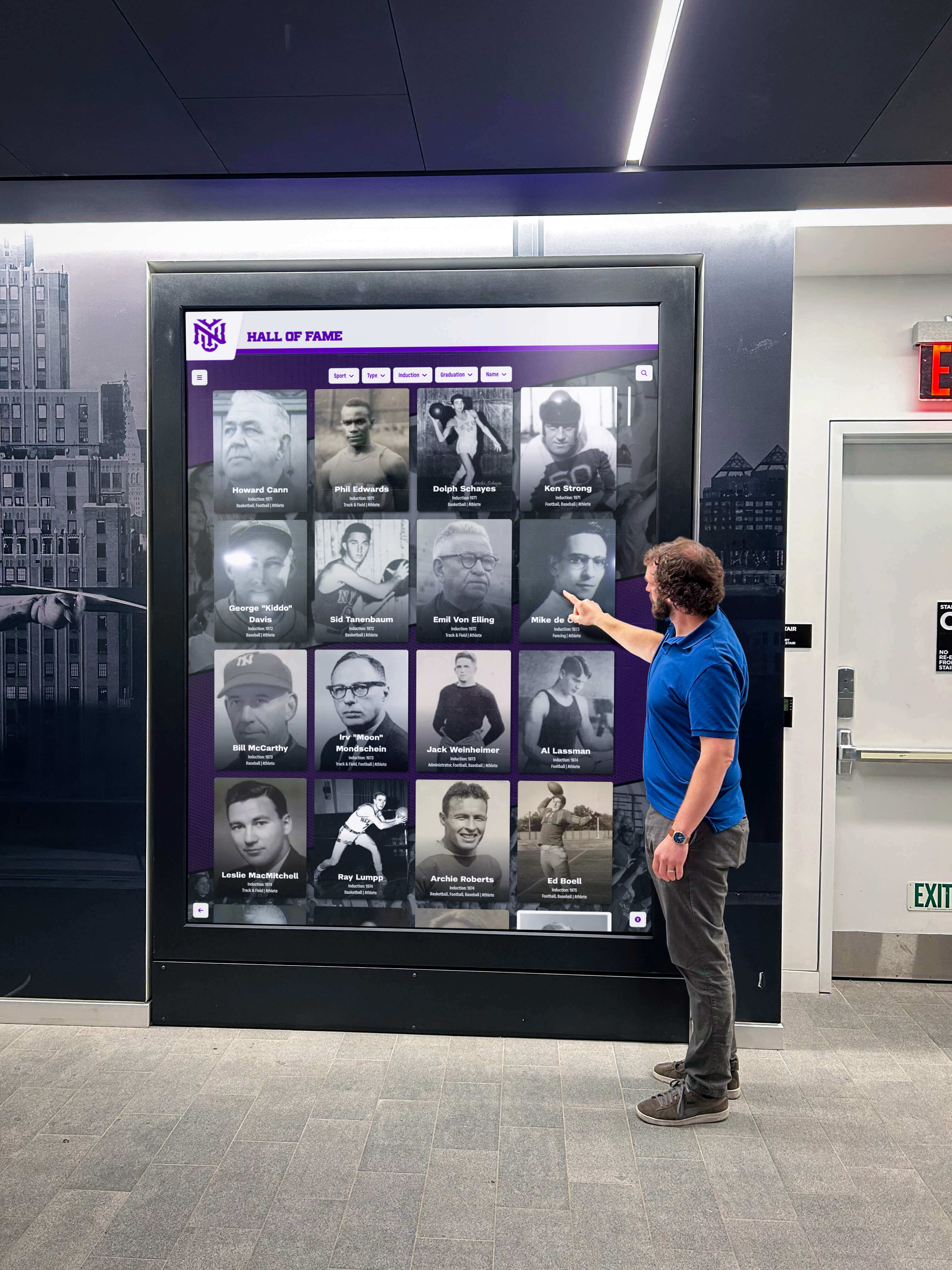
Community members who use screen readers to explore a school's inductee archive depend on aria-rowcount and aria-rowindex to understand how large the recognition collection is and where each visible row falls within it—without these attributes, the virtualized table communicates only a fraction of the collection's true scope
Reusable Audit Checklist: Digital Hall of Fame ARIA-Rowcount and ARIA-Rowindex Audit
Copy this checklist into your accessibility tracking system. Mark each item as Pass, Remediate, or N/A.
Inventory
- All table and grid elements on the platform identified and classified as fully rendered (all rows in DOM) or virtualized (only a subset of rows in DOM at any time)
- Virtualized tables flagged as requiring
aria-rowcountandaria-rowindexreview - Filter and search controls associated with each virtualized table identified
Per Virtualized Table — aria-rowcount
-
aria-rowcountpresent on the<table>orrole="grid"element -
aria-rowcountvalue equals the total data row count in the current dataset (not the DOM-resident row count) -
aria-rowcountupdates to the filtered count when a filter is applied -
aria-rowcountreturns to the unfiltered total when the filter is cleared -
aria-rowcountupdates when a search query changes the result set size
Per Virtualized Table — aria-rowindex
-
aria-rowindexpresent on every<tr>orrole="row"element in the virtualized table - First data row carries
aria-rowindex="1"(oraria-rowindex="2"if header row hasaria-rowindex="1") -
aria-rowindexis 1-based: no row carriesaria-rowindex="0" -
aria-rowindexat midpoint scroll reflects a value near half the totalaria-rowcount, not a reset to low values -
aria-rowindexon the last visible row at bottom of scroll equalsaria-rowcountvalue (or close to it, accounting for the final partial window) -
aria-rowindexvalues are contiguous: no gaps between consecutive visible rows
Screen Reader Verification
- NVDA + Chrome: row position announced using
aria-rowindexvalue during table navigation; row numbers increment correctly through scroll; total communicated byaria-rowcountmatches expected dataset size - VoiceOver + Safari: row position and total announced correctly; VO table navigation keys move through rows with correct position announcement
- axe DevTools: no ARIA Required Attributes violations (missing
aria-rowcountwhenaria-rowindexpresent); no ARIA Valid Attribute Value violations (non-integer or zero-valuearia-rowindex)
Regression Checks
- After any JavaScript framework or virtualization library upgrade: re-verify
aria-rowindexcalculation and confirm 1-based offset is preserved - After any inductee dataset update (new class inducted): re-verify
aria-rowcountreflects updated total - After any filter or search component change: re-verify
aria-rowcountupdates correctly on filter and reset - After any pagination or infinite-scroll component change: re-verify
aria-rowindexcontinuity across page loads or scroll events
Virtualized Table Test Matrix
Verify each scenario for each virtualized table element on the recognition platform before each recognition season.
| Scenario | Test Action | aria-rowcount Expected | aria-rowindex Expected | Screen Reader Announces | Pass? |
|---|---|---|---|---|---|
| Default load — top of table | Load inductee table; inspect first row | Equals total inductee count | First data row = 1 | “Row 1 of [total], [inductee name]” | Confirm |
| Scroll midpoint | Scroll table to 50% depth; inspect first visible row | Unchanged from load | Near [total ÷ 2] | “Row [near half total], [inductee name]” | Confirm |
| Scroll bottom | Scroll to bottom; inspect last visible row | Unchanged from load | Equals total (or total minus header offset) | “Row [total], [inductee name]” | Confirm |
| Sport filter applied | Apply Basketball filter; inspect aria-rowcount | Equals basketball inductee count | First visible row = 1 within filtered set | “Row 1 of [filtered count], [inductee name]” | Confirm |
| Filter cleared | Clear Basketball filter; inspect aria-rowcount | Returns to unfiltered total | First visible row = 1 in unfiltered list | “Row 1 of [total], [inductee name]” | Confirm |
| Search query applied | Search a name; inspect aria-rowcount | Equals count of matches | 1-based within search result set | “Row 1 of [match count], [name]” | Confirm |
| Header row present | Inspect <thead> tr aria-rowindex | N/A for aria-rowcount | Header row = 1; first data row = 2 | Header row announced before data rows | Confirm |
| Off-by-one check — first row | Inspect first data row’s aria-rowindex | N/A | Must be 1, not 0 | No “row 0” announcement | Confirm |
| NVDA table navigation | NVDA + Ctrl+Alt+Down through 10 rows | N/A | NVDA reads sequential row numbers | Row 1, row 2 … row 10 announced in sequence | Confirm |
| axe scan — default state | Run axe with table at default load | No “aria-rowcount missing” violations | No “aria-rowindex out of range” violations | N/A | Confirm |
| axe scan — filtered state | Run axe after applying filter | No violations with updated aria-rowcount | No violations | N/A | Confirm |
Measurement: Indicators of aria-rowcount and aria-rowindex Compliance Quality
| Signal | Target | How to Measure |
|---|---|---|
| Virtualized tables with aria-rowcount present | 100% of virtualized tables | Count virtualized table/grid elements; count those with aria-rowcount; calculate ratio |
| aria-rowcount accuracy — default state | 100% match to dataset total | Compare aria-rowcount value to actual inductee count returned by the data API; flag mismatches |
| aria-rowcount accuracy — filtered state | 100% match to filtered dataset count | Apply each available filter; compare aria-rowcount to filtered record count; flag stale values |
| aria-rowindex 1-based compliance | Zero rows with aria-rowindex="0" | Inspect first DOM-resident row of each virtualized table; flag 0-value instances |
| aria-rowindex window-reset rate | Zero tables with window-reset indexing | Verify mid-scroll aria-rowindex values reflect dataset position, not window position |
| axe violations — ARIA Required Attributes | Zero serious violations | Run axe in default and filtered states; record violation count per table |
| Screen-reader row announcement accuracy | 100% correct row position announced | Manual NVDA and VoiceOver test; record mismatches between announced row number and aria-rowindex value |
Auditing the visual accuracy of touchscreen recognition displays for parallax and calibration errors is a hardware-level precision check that pairs naturally with the software-level precision that aria-rowcount and aria-rowindex provide. Both audits ensure that a visitor’s interaction with the inductee display—whether through touch or assistive technology—delivers accurate, correctly positioned information.
Frequently Asked Questions
What is the difference between aria-rowcount and aria-rowspan?
aria-rowcount is a table-level attribute that communicates the total number of rows in the dataset when the DOM does not contain all rows. aria-rowspan is a cell-level attribute that indicates how many rows a single cell occupies in a multi-row spanning layout—similar to the HTML rowspan attribute. The two attributes serve completely different purposes. aria-rowcount is needed for virtualization; aria-rowspan is needed for cells that span multiple rows in a complex table layout. They may coexist in the same table.
Does aria-rowcount include the header row?
The WAI-ARIA specification states that aria-rowcount should be set to the count of all rows in the table, including header rows. Most practical implementations set aria-rowcount to the data row count only and handle the header row through aria-rowindex="1" on the header row, with data rows beginning at aria-rowindex="2"—or by omitting aria-rowindex from the header entirely and starting data rows at 1. Either convention is acceptable provided the indexing is consistent throughout.
What if the inductee dataset size is unknown at render time?
Set aria-rowcount="-1" to explicitly indicate that the total row count is unknown. Screen readers that encounter aria-rowcount="-1" omit the “of N rows” portion of the row position announcement rather than announcing an incorrect total. Update aria-rowcount to the actual total as soon as the count becomes available from the data API. Using aria-rowcount="-1" is always preferable to using an incorrect value.
Should we audit non-virtualized tables on the same platform?
Only if they are expected to grow beyond 50–100 rows. A table with 10 rows and all 10 rows in the DOM does not need aria-rowcount or aria-rowindex—the browser derives the count correctly from the DOM structure. However, if the table is expected to grow (an honor roll table that adds recipients each semester), schedule a threshold review: when the table approaches 50–100 rows, evaluate whether virtualization will be introduced and plan the aria-rowcount and aria-rowindex implementation in advance.
Can aria-rowcount and aria-rowindex be applied to role=“listbox” or role=“list”?
No. aria-rowcount and aria-rowindex are valid only on elements with table-family roles: role="table", role="grid", role="treegrid", and their row and cell descendants. For virtualized lists rendered with role="listbox" or role="list", use aria-setsize (total collection size) and aria-posinset (item position) on each role="option" or role="listitem" element instead.
How do we handle aria-rowindex when rows are reordered by sort?
When a visitor sorts the inductee table by a column—for example, sorting by graduation year rather than alphabetically—the aria-rowindex values should reflect the row’s position in the newly sorted dataset. Row 1 in the sorted view is aria-rowindex="1" regardless of which inductee occupies that position. The aria-rowcount value remains unchanged by sort (the dataset size does not change when sort order changes). aria-rowindex values must be recalculated after each sort event to reflect positions in the new sort order.
Does this audit need to run after every inductee addition?
No. Adding inductee records through the CMS changes the dataset size—which should automatically update aria-rowcount in the rendering engine—but does not change how aria-rowindex values are calculated. The calculation logic is part of the component layer, not the content layer. Run the full audit after any change to the table rendering component, virtualization library, or filter implementation. Content additions that change aria-rowcount should be verified by confirming the updated count appears correctly in DevTools after the CMS publish event—a two-minute spot check rather than a full audit.
Connecting aria-rowcount and aria-rowindex to the Recognition Program Experience
A school’s inductee archive is a record of institutional history—every athlete, scholar, artist, and community contributor who has earned recognition over decades of program history. For a screen-reader user navigating that archive, knowing that the table contains 400 entries—and that the current row is entry 183 of those 400—is the difference between understanding the archive as a living, comprehensive historical record and experiencing it as a short, incomplete list of names.
aria-rowcount communicates scope: this is a large collection, and the visitor is exploring something significant. aria-rowindex communicates position: the visitor is here, at this specific place in the archive. Together, they give screen-reader users the spatial context that sighted visitors derive naturally from scrollbar indicators, progress percentages, and the visual density of a long table.
Building a community showcase that represents the full depth of an organization’s history depends on presenting that history as a complete, navigable collection—not a curated excerpt. The same principle applies at the technical level: aria-rowcount and aria-rowindex ensure that the platform’s virtualization technique does not accidentally present the full archive as an excerpt to screen-reader users who would otherwise receive only the DOM-resident subset.

A digital hall of fame aria-rowcount and aria-rowindex audit applies across every device where virtualized inductee tables appear—desktop web, tablet, mobile, and kiosk—because the same table rendering component and its accessibility attributes serve all form factors
The aria-rowcount and aria-rowindex audit is a 20–40 minute investment that eliminates a common class of accessibility failures from recognition platforms that serve large inductee archives. It requires no specialized accessibility tools beyond free browser extensions, built-in screen readers, and DevTools. It produces a documented checklist that can be retained for district-level accessibility compliance records, shared with platform vendors during contract reviews, and updated after each virtualization library or rendering engine update.
Rocket Alumni Solutions’ digital hall of fame platform manages inductee archives that span multiple decades and hundreds of entries. The platform’s table rendering engine applies aria-rowcount to the table element automatically from the dataset API response, sets aria-rowindex on each rendered row using 1-based offset calculations relative to the scroll position in the full dataset, and updates both attributes when filters or search queries change the visible collection. Schools that need to document WCAG 2.1 AA compliance for district or state accessibility reviews can request the platform’s table accessibility implementation documentation and AT test results as part of the demo process.

University and school hall of fame platforms serve large inductee archives across every device in the visitor's hands—correct aria-rowcount and aria-rowindex implementation ensures screen-reader users receive accurate row count and position information on desktop, tablet, mobile, and kiosk form factors alike
Request a Demo of an Accessible Inductee Archive
See how Rocket Alumni Solutions renders large inductee collections with correct aria-rowcount and aria-rowindex attributes—so every screen-reader user exploring your school’s recognition archive receives accurate row count, position, and navigation information, on any device, for any archive size.































